
Workflow Orchestration
Workflow orchestration connects user input, models, knowledge bases, and external services into reusable AI workflows (AI Flow). Define steps and execution order on the admin canvas, test them, and make the workflow available in the user app or through an API in your own application.
The default node library contains Start, End, Generate Answer, Conditional Branch, Web Search, and Knowledge Retrieval. Image Generation, Mail Send, and HTTP Request are also implemented, but require component initialization and their external dependencies. See Current capabilities.
This guide explains nodes, edges, and variables, then walks through a complete release-checklist example, user-app access, API integration, and individual node configuration. The screenshots use the Chinese interface; sample names and data are retained so you can match them to the examples.
| Your task | Start here |
|---|---|
| Understand nodes, edges, variables, and runs | Six basic concepts |
| Build and test a complete workflow | Release Checklist Assistant |
| Let users run a workflow from chat | Use it in the Web app |
| Embed a workflow in a business page | Two integration options |
| Add models, retrieval, HTTP, and other nodes | Current capabilities and the node guides below |
Six basic concepts
The admin canvas uses Vue Flow. The backend compiles its nodes and edges into a LangGraph4j StateGraph and sends execution updates to the debugger over SSE.
| Concept | In the interface | In the implementation |
|---|---|---|
| Workflow definition | Name, nodes, and edges | Saved execution configuration identified by uuid |
| Node | A Start, Branch, Answer, or End card | One operation with inputs and nodeConfig, identified by its own UUID |
| Edge | A line between nodes | Determines the next step; connecting nodes does not configure their variables |
| User input | The Start node's input table | Public parameter contract: name, title, type, and required status |
| Referenced input | Inputs in a downstream node's properties | A field from an executed node, with an alias local to the consuming node |
| Runtime | One submission in Run and Debug | A distinct runtime UUID, node inputs and outputs, and execution status |
For example, an input can be named question with the display title “Changes in this release.” An End node can reference a branch's output, alias it to question, and use {question} in its template. The display title, source field name, and local alias are separate values.
{
  "inputConfig": {
    "user_inputs": [],
    "ref_inputs": [
      {
        "name": "question",
        "node_uuid": "替换为条件分支节点UUID",
        "node_param_name": "output"
      }
    ]
  },
  "nodeConfig": {
    "result": "本次变更:{question}"
  }
}
This reads output from node_uuid, assigns it to the End node's question, and replaces {question} in the template. Use single braces and an exact match to the local alias.
Save, public visibility, and enabled status
Save updates the definition. Public controls visibility in other users' application lists. Enabled controls whether it can run; new workflows are enabled by default. There is no separate published-version snapshot. Saving changes to a public workflow affects subsequent runs. Create a separate test workflow for experiments.
Example: Beichen Release Checklist Assistant
A developer enters a change description, environment, and release version. The workflow returns a production checklist when environment is prod, and a standard verification checklist for other values.
This example uses real nodes and backend execution without calling a model, sending mail, or deploying software. Beichen, the named owners, and checklist items are tutorial data; replace them with your team's release rules.
The completed canvas contains four nodes and three edges. Each run reaches only one End node, so its execution details should contain three executed nodes.
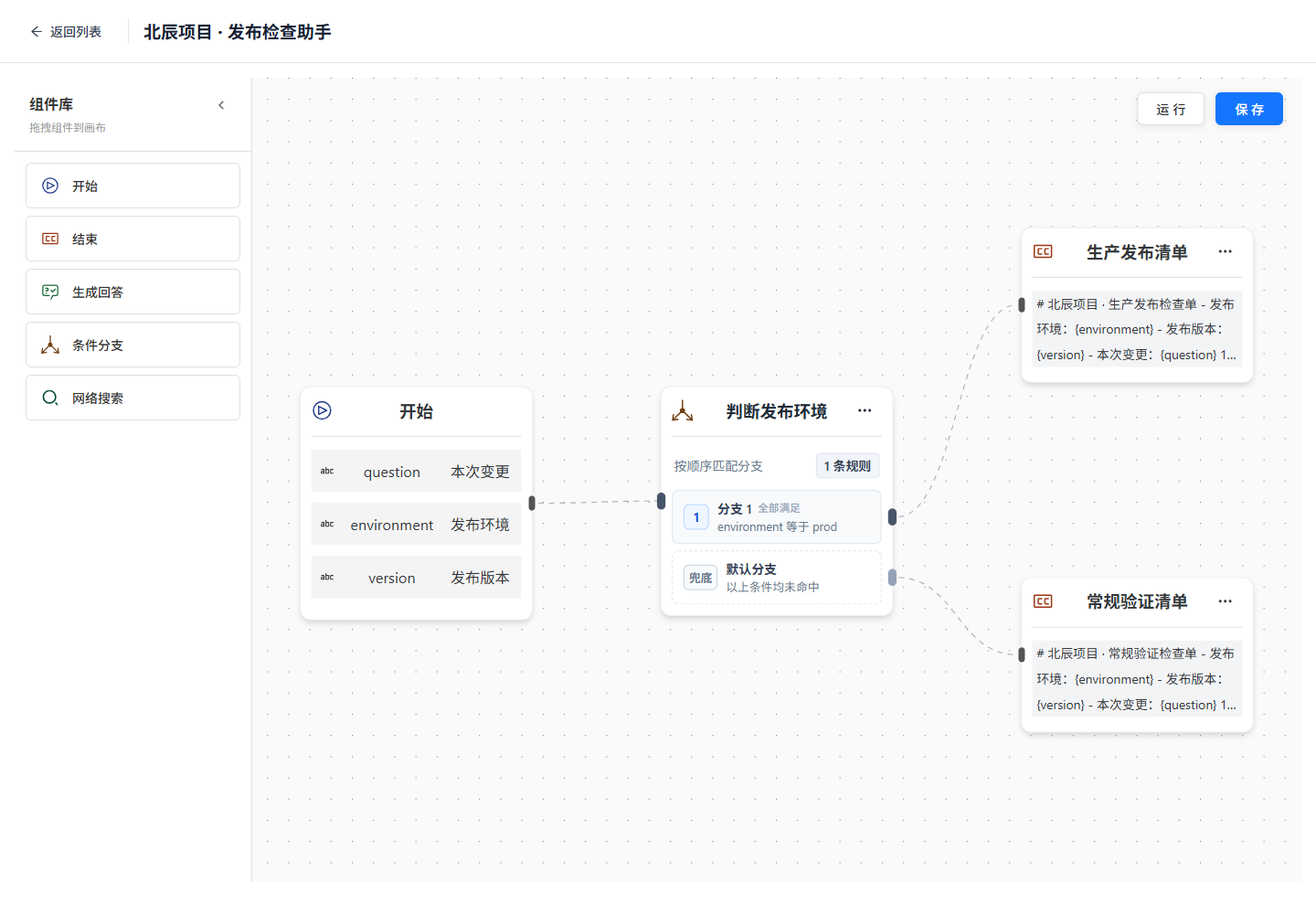
The component library is on the left, execution paths are in the center, and Save and Run are at the upper right. Branch 1 and the default branch connect to different End nodes.
1. Create the workflow
Start the services using Local Installation. In the illustrated environment, documentation uses 5173, the user app 5174, admin 5666, and the backend 6039. Use your own startup logs to determine the actual ports.
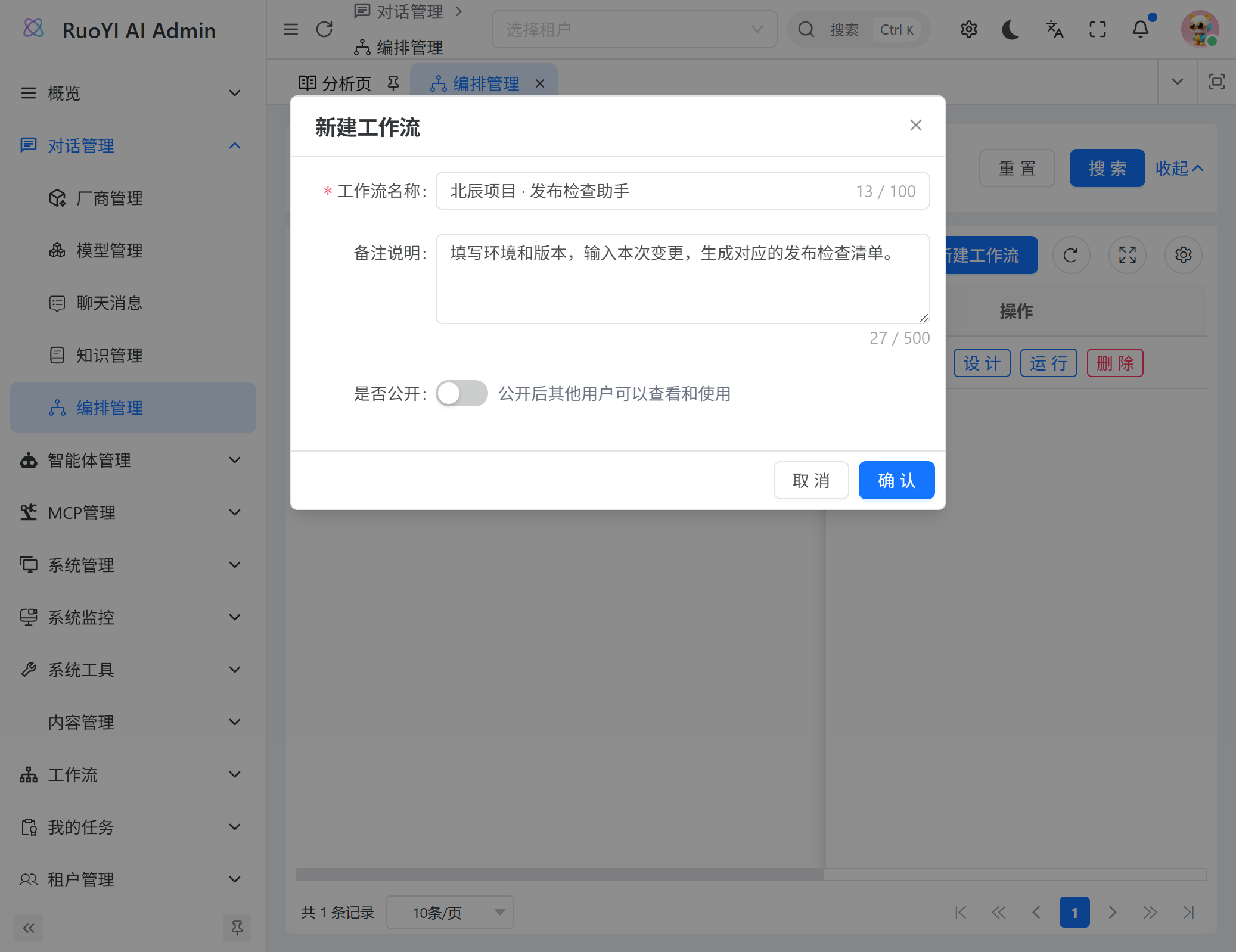
- Log in to the admin app and open Chat Management → Orchestration Management. The separate Workflow / My Tasks menu belongs to business approvals.
- Click New Workflow and name it
北辰项目 · 发布检查助手(Beichen Release Checklist Assistant). - Describe the required inputs and result. Leave public visibility off initially.
- Open the designer and keep the automatically created Start node.
2. Define the Start inputs
Select Start, leave the opening message empty, and add these three inputs:
| Name | Display title | Type | Required | Test value |
|---|---|---|---|---|
question | 本次变更 (Changes) | Text | Yes | 优化知识检索超时处理 |
environment | 发布环境 (Environment) | Text | Yes | prod |
version | 发布版本 (Version) | Text | Yes | v1.8.0 |
Keep question as the first text field. The current chat integration puts each message into the first text input. Other fields retain values entered before opening the conversation.
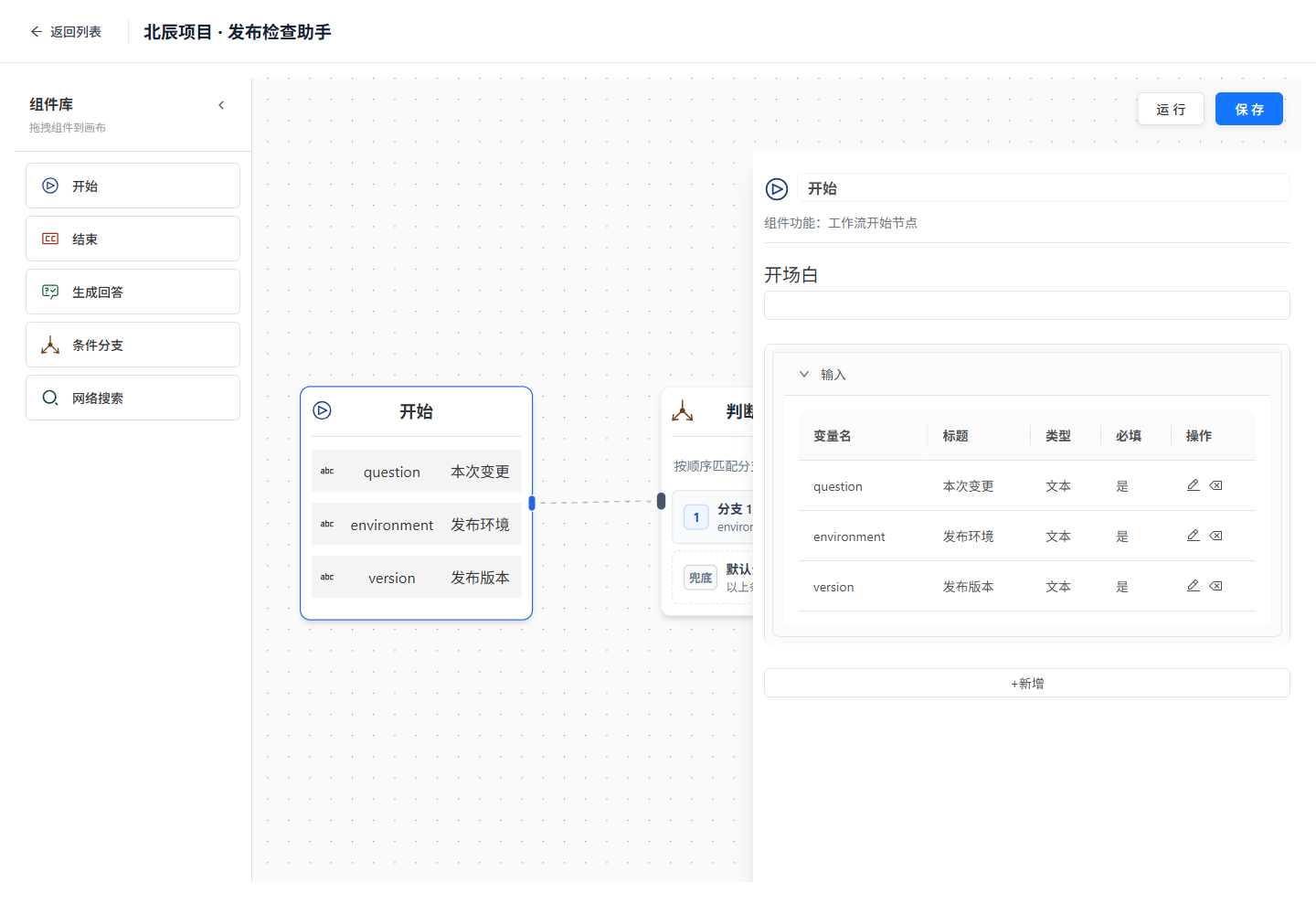
Names are API keys; titles generate the admin and user forms. The opening message is not an input placeholder: if filled in, it replaces the Start node's normal output.
Default output and downstream references
Start provides a default output. The current implementation converts that default output to input when passing it onward, so references to Start's output across several steps may not resolve. This example passes the change description through Start → Branch, then lets End reference the Branch node's output. Environment and version still reference Start's named fields.
3. Configure the branch and edges
Drag in a Conditional Branch, named 判断发布环境 (Check Environment), and two End nodes, named 生产发布清单 (Production Checklist) and 常规验证清单 (Standard Checklist).
- Connect Start's right handle to the branch's left handle.
- Add a condition with source Start, field environment, operator equals, and comparison value
prod. - Set the condition's target to Production Checklist and keep the multi-condition operator at all /
and. - Set the default target to Standard Checklist.
- Connect Branch 1 to Production Checklist and the default handle to Standard Checklist.
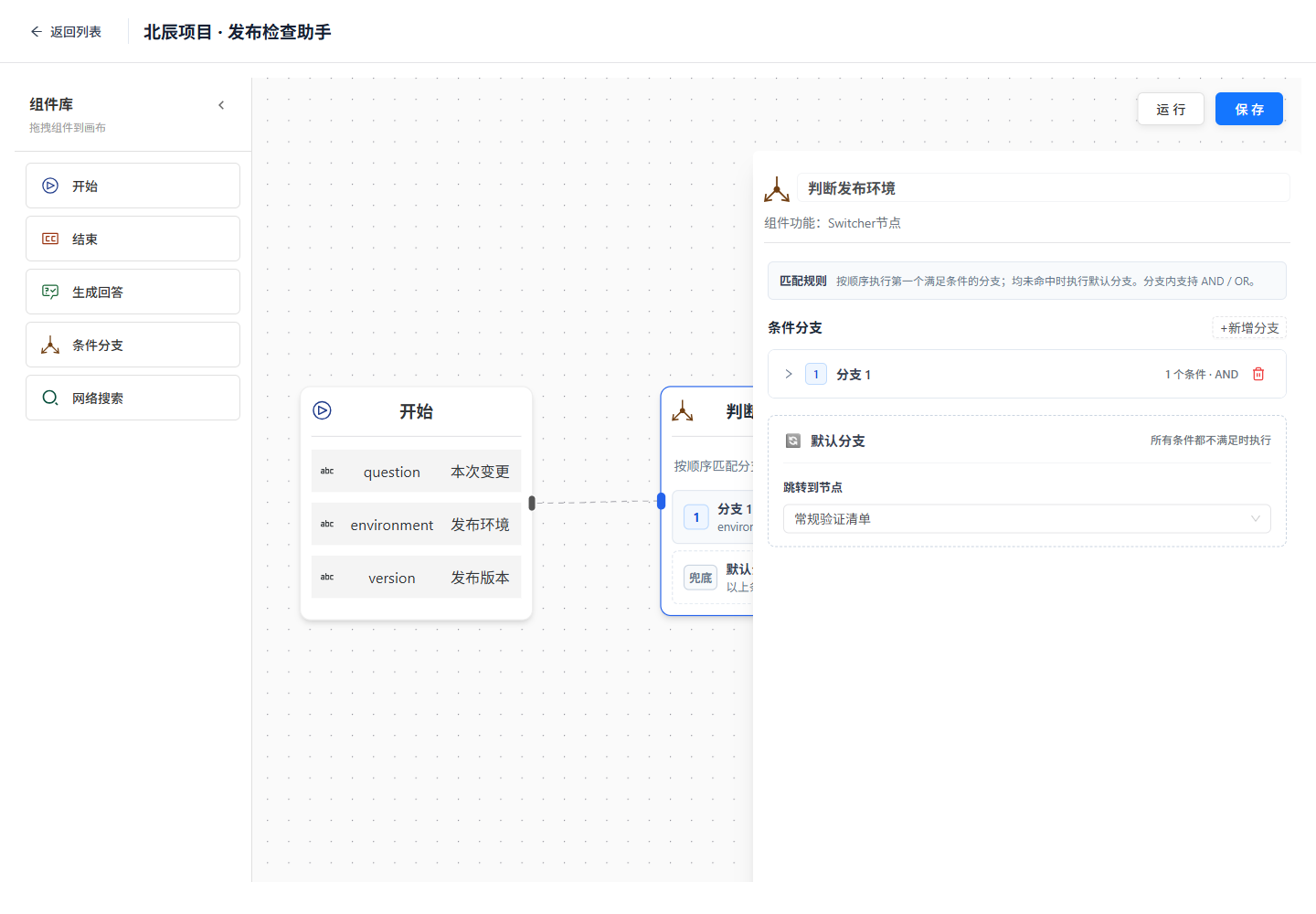
Targets in the rules must match the canvas edges. Matching is exact: PROD, test, and other values use the default path. This example only generates a checklist.
4. Configure both End nodes
Select Production Checklist and add three referenced inputs. Choose the source first, then rename the local variable on the left:
| Local alias | Source node | Source field | Template reference |
|---|---|---|---|
question | Check Environment | output | {question} |
environment | Start | environment | {environment} |
version | Start | version | {version} |
Paste this final-result template:
# 北辰项目 · 生产发布检查单

- 发布环境:{environment}
- 发布版本:{version}
- 本次变更:{question}

1. 发布前确认数据库备份与回滚版本。
2. 联系发布负责人林小满,确认维护窗口。
3. 检查后端 6039 端口与健康检查结果。
4. 发布后验证登录、对话和知识检索。
5. 记录验证结果,再通知业务方。

> 此流程只生成检查单,审批与部署由现有发布制度执行。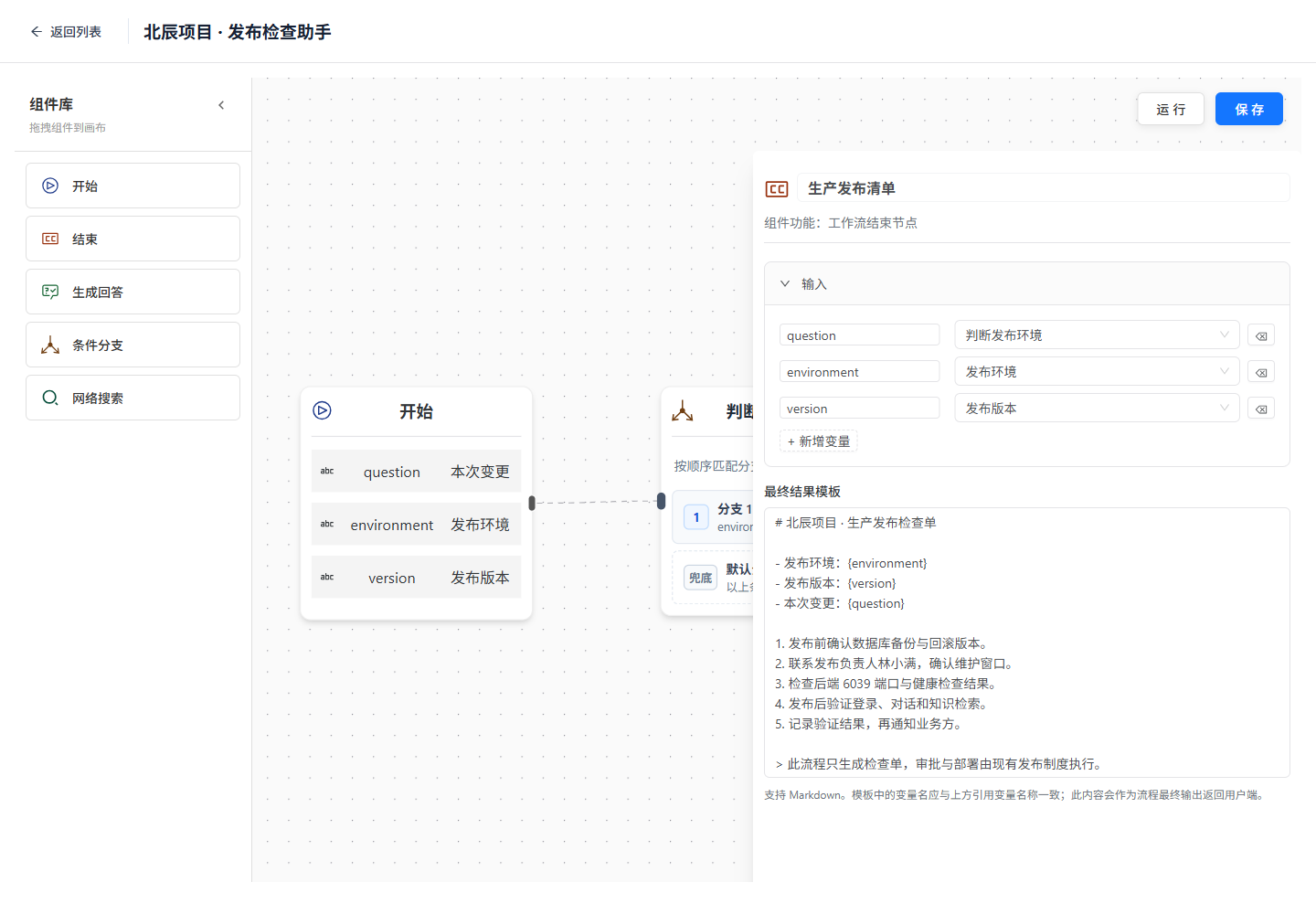
The upper section selects values; the lower section formats the result. Update the admin designer code if your version lacks the variable selector or multiline template field.
Configure the same three inputs on Standard Checklist, with this template:
# 北辰项目 · 常规验证检查单

- 发布环境:{environment}
- 发布版本:{version}
- 本次变更:{question}

1. 确认这是非生产环境;生产发布请将环境填写为 prod。
2. 检查后端 6039 端口与健康检查结果。
3. 回归本次变更,并保存测试记录。
4. 验证通过后,再准备生产发布检查单。

> 示例项目资料用于教程演练,此流程不会执行部署。
5. Run and inspect the result
Click Save → Run, or Save and Run if prompted. The run page generates three fields from the Start definition.
Enter 优化知识检索超时处理, prod, and v1.8.0, then submit. Expand execution details and inspect the End node:
- Start receives the three actual values.
- The branch reports
matched_case=1and atarget_nodepointing to Production Checklist. - Execution follows Start → Check Environment → Production Checklist.
- The End node's
outputcontains the complete checklist with all three placeholders replaced.
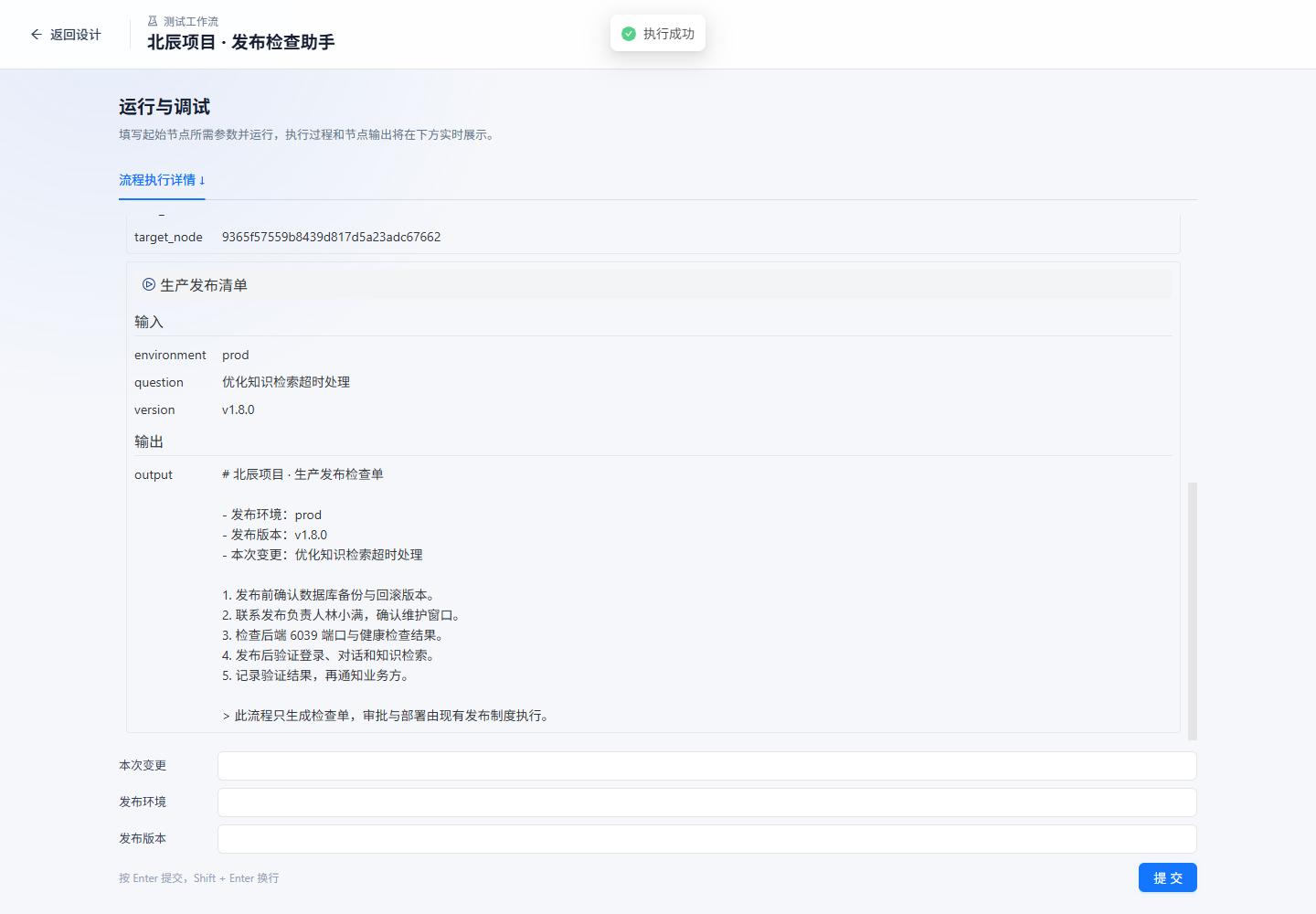
A success status means graph execution ended. Inspect the business output too; a generic completion message is not the End node's checklist.
Run again with environment=test. The current run page clears its form after completion, so reenter the other values.
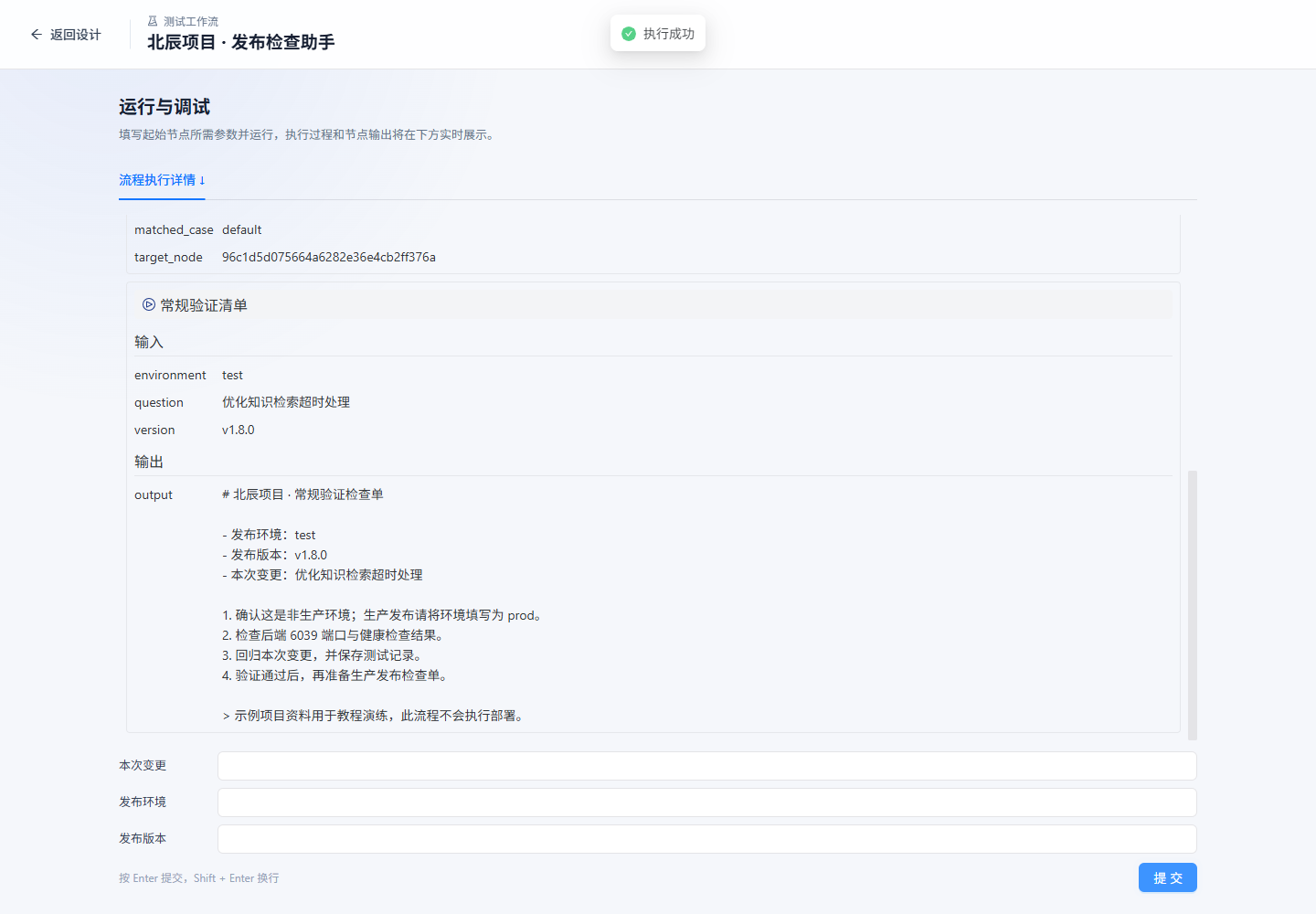
| Test | Expected result |
|---|---|
environment=prod | Production Checklist, matched_case=1 |
environment=test | Standard Checklist, matched_case=default |
environment=PROD | Default branch, confirming case-sensitive exact matching |
| Change description or version | Updated final content, without values from the previous run |
Omit required version in an API request | An [ERROR] event; do not treat it as success |
Create the same example in code
Download the workflow creation script. It uses existing APIs to create a new private workflow and resolves component IDs by name. It never overwrites an existing workflow; each invocation creates another record.
In the admin project, place the downloaded file next to the calling file:
import { requestClient } from '#/api/request'
import { createReleaseWorkflow } from './create-release-workflow.mjs'

const workflow = await createReleaseWorkflow((method, path, body) =>
  method === 'GET'
    ? requestClient.get(path)
    : requestClient.post(path, body),
)
console.log(workflow.uuid) // 打开 /aiflow/edit/<uuid> 检查并运行
This is a developer helper. The current designer has no JSON import button. Nodes created by the script remain editable on the canvas.
Use the workflow in the Web app
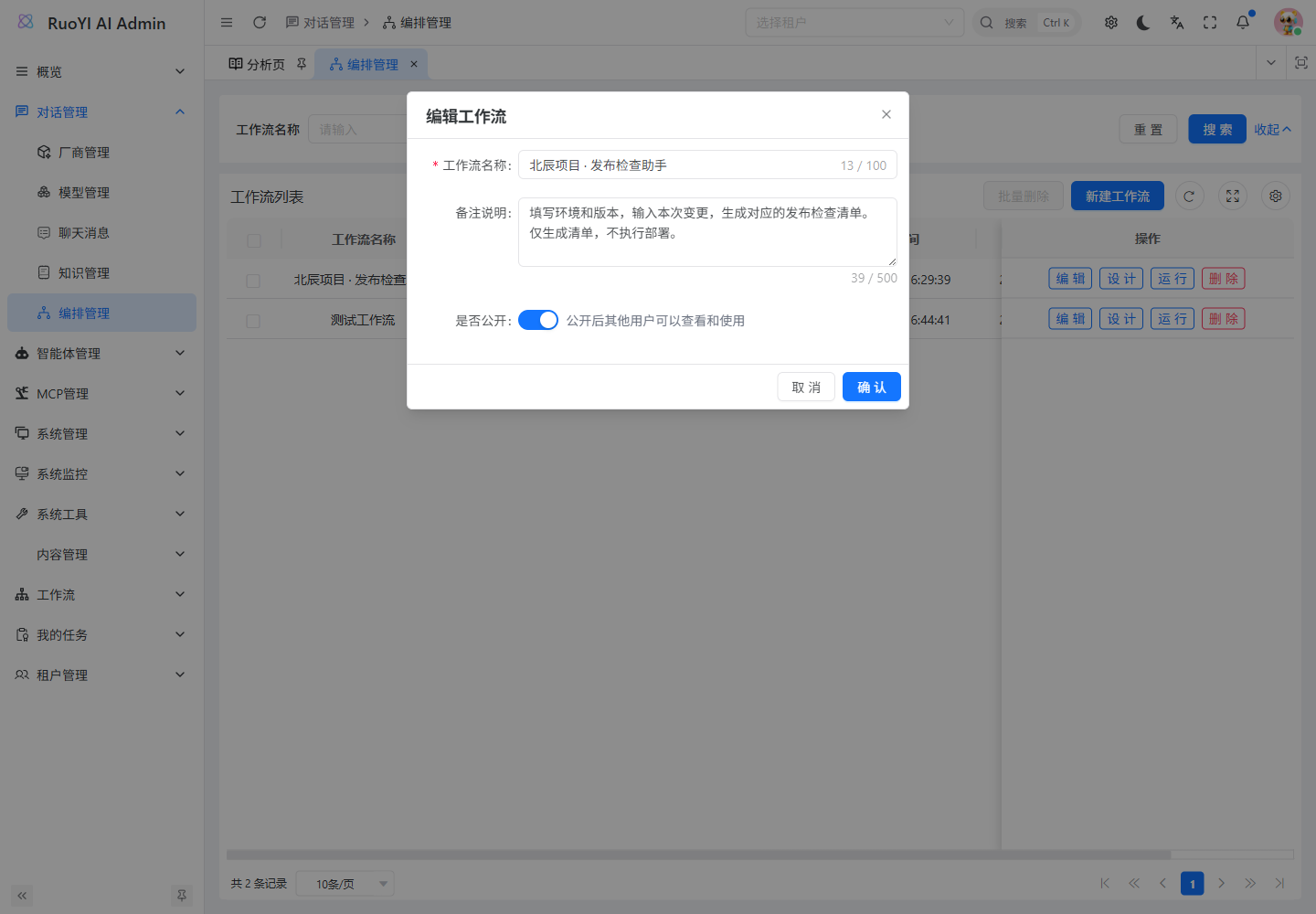
1. Make the verified workflow public
Return to the admin orchestration list, edit the workflow's basic information, enable Public, and save. Public lists include only workflows that are public, enabled, and not deleted. Users still need to log in.
2. Open it from the app market
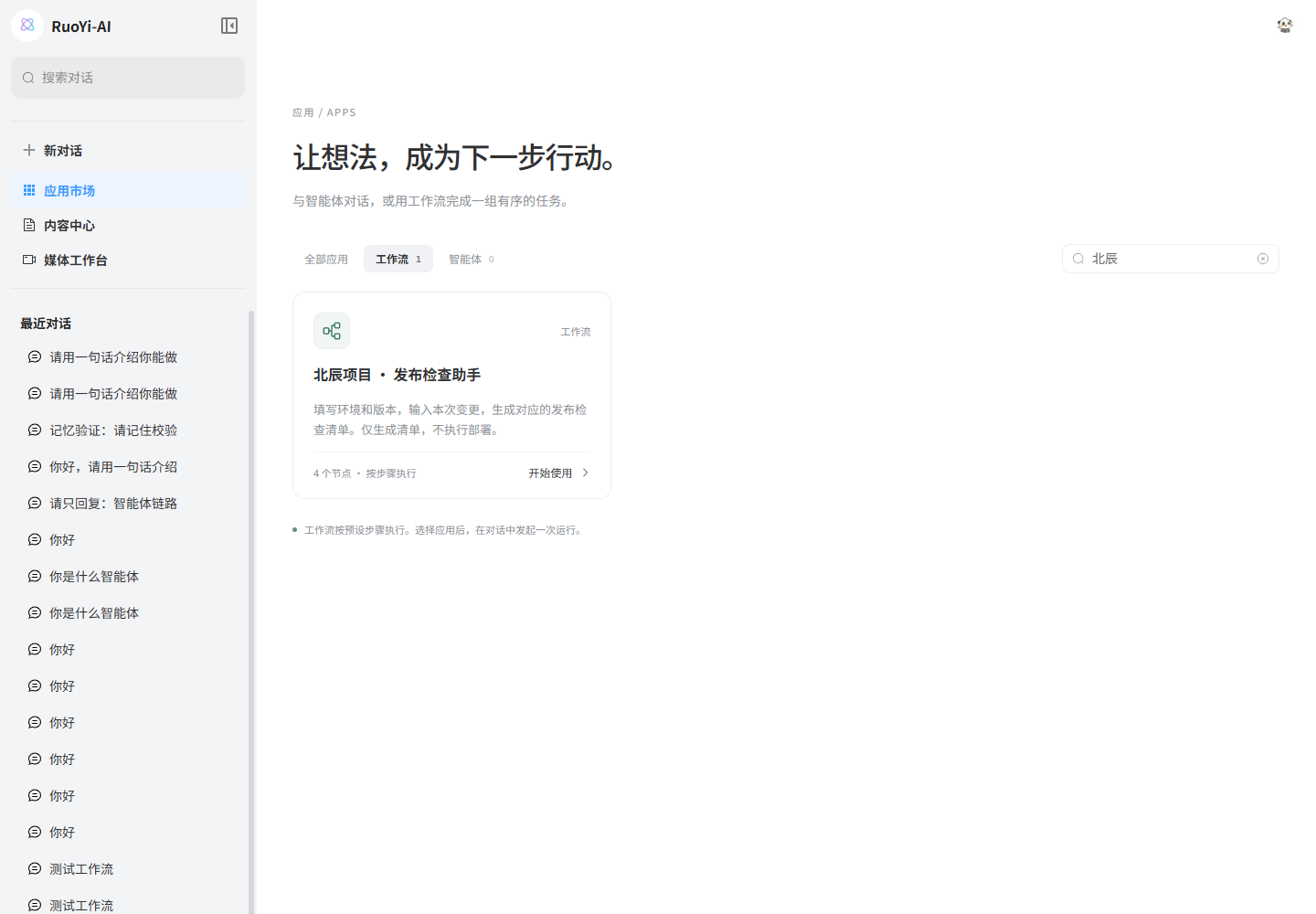
Log in to the Web user app, open App Market → Workflows, and search for 北辰. Click Start Using on the matching card.
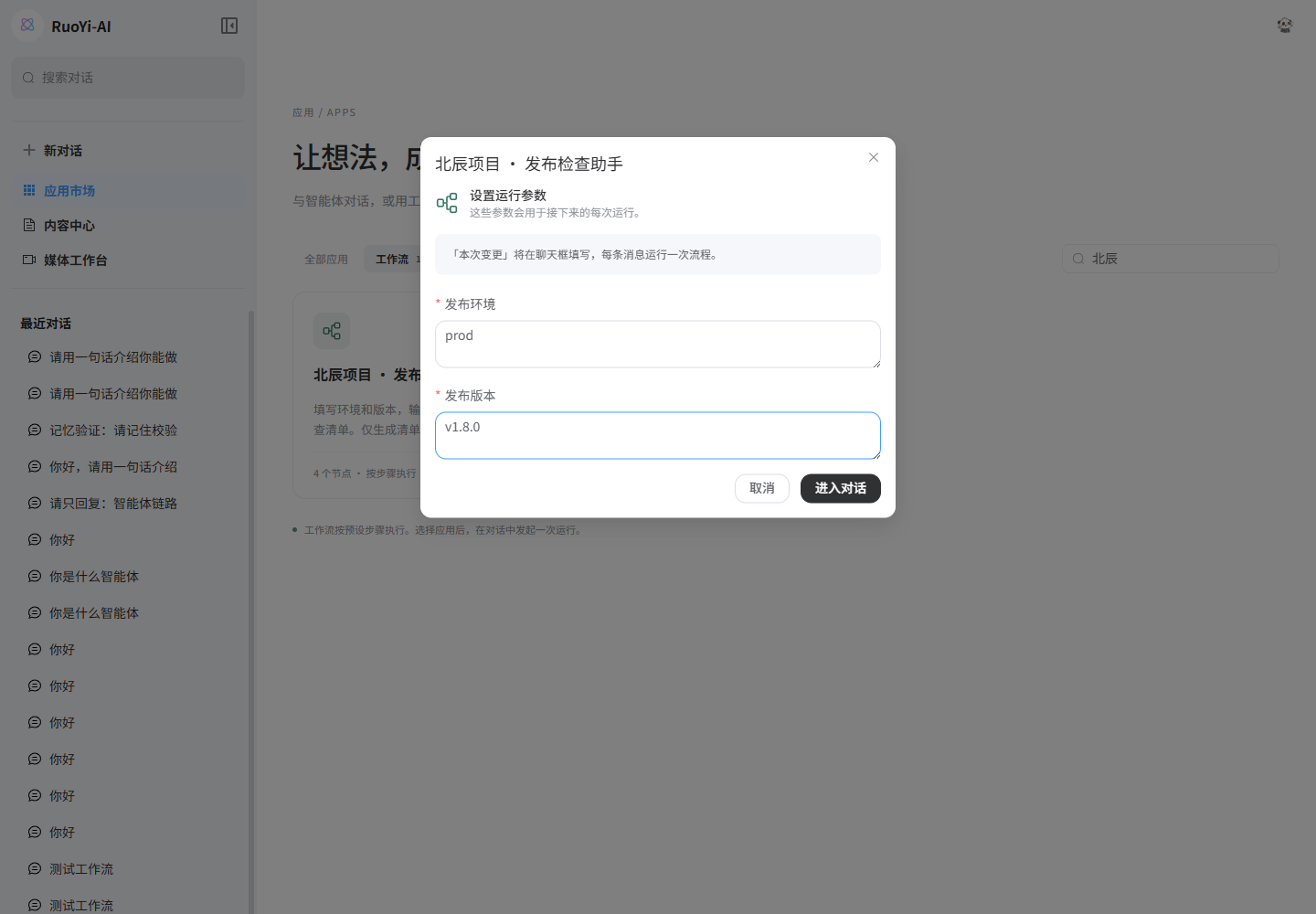
A workflow with one text input opens chat directly. This example has several fields, so an initial form appears. Enter environment prod and version v1.8.0, then open the conversation. The chat box will supply the change description.
3. Send a message
Confirm that the selected workflow name appears near the input. Send 优化知识检索超时处理. Each message starts one complete workflow run.
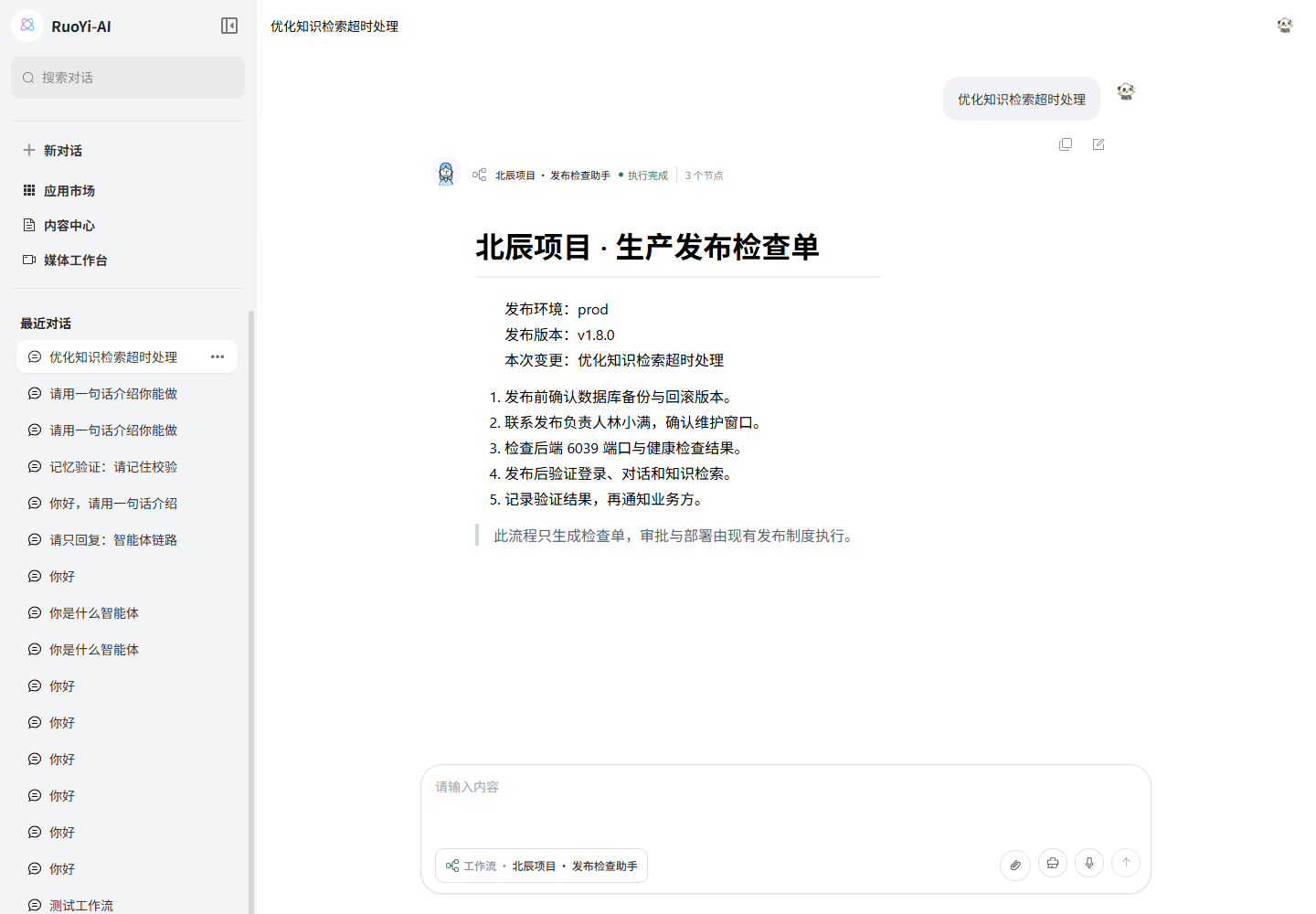
After completion, the answer area displays the End node's result and the status line shows the number of executed nodes. Intermediate text may appear first and is replaced by the final checklist.
- Later messages replace the first text input; environment and version retain their initial values. Reopen the workflow from the app market to change those parameters.
- Selecting an agent or switching to a model leaves workflow mode. A workflow's Answer node controls its model; the chat model selector does not override it.
- The app market supports text, number, and boolean inputs. Other types, including files, direct users to the admin runner.
- Stop ends reception in the browser; it does not guarantee cancellation of backend operations.
- Some backend workflow-message persistence remains unimplemented. Do not rely on a refresh restoring the complete run. For auditing or recovery, store the runtime UUID, inputs, and final result in your business layer.
Developer integration: two options
Use the existing chat page: POST /chat/send
The Web app already implements this path: src/api/chat/index.ts fetches workflows, src/pages/app-market reads Start inputs and selects the workflow, and src/pages/chat/layouts/chatWithId/index.vue submits requests and consumes SSE.
{
  "model": "",
  "content": "优化知识检索超时处理",
  "sessionId": "替换为当前会话ID",
  "enableWorkFlow": true,
  "workFlowRunner": {
    "uuid": "替换为流程UUID",
    "inputs": [
      { "name": "question", "content": { "title": "本次变更", "type": 1, "value": "优化知识检索超时处理" } },
      { "name": "environment", "content": { "title": "发布环境", "type": 1, "value": "prod" } },
      { "name": "version", "content": { "title": "发布版本", "type": 1, "value": "v1.8.0" } }
    ]
  }
}
Keep the exact casing of enableWorkFlow, workFlowRunner, and its nested uuid. content is the chat message; workflow parameters come from workFlowRunner.inputs. Supplying content alone does not populate every input. Omit agentId in workflow mode.
Embed an independent form: POST /workflow/run
A separate form, utility page, or backend integration can run a workflow without first creating a chat session:
{
  "uuid": "替换为流程UUID",
  "inputs": [
    { "name": "question", "content": { "title": "本次变更", "type": 1, "value": "优化知识检索超时处理" } },
    { "name": "environment", "content": { "title": "发布环境", "type": 1, "value": "prod" } },
    { "name": "version", "content": { "title": "发布版本", "type": 1, "value": "v1.8.0" } }
  ]
}
Use Start's input names. content.type is numeric: 1 text, 2 number, 4 file, and 5 boolean. Number and boolean values must keep their JSON types. Supply title too, because the server reads it. sessionId is optional; if provided, it must reference a valid session.
This endpoint uses POST plus SSE. Native EventSource, which sends GET, is insufficient. Include the authenticated Authorization: Bearer … header and the project's ClientID. Keep model keys on the server.
Download the dependency-free SSE client, copy it into your frontend, and call:
import { runWorkflow } from './workflow-client.mjs'

const controller = new AbortController()
// 为自建页面设置适合业务的超时,避免异常连接无限等待。
const timeout = setTimeout(() => controller.abort(), 60_000)
try {
  const result = await runWorkflow({
    baseUrl: '/api', // 管理端代理;自建应用改为自己的同源代理地址
    token: userToken, // 从当前登录状态读取
    clientId: appClientId, // 与登录时的客户端配置一致
    uuid: workflowUuid,
    inputs: [
      { name: 'question', content: { title: '本次变更', type: 1, value: '优化知识检索超时处理' } },
      { name: 'environment', content: { title: '发布环境', type: 1, value: 'prod' } },
      { name: 'version', content: { title: '发布版本', type: 1, value: 'v1.8.0' } },
    ],
    signal: controller.signal,
    onEvent({ event, data }) {
      if (event === '[START]') console.log('runtime UUID:', data.uuid)
      if (event.startsWith('[NODE_RUN_')) console.log('开始执行节点:', event)
    },
  })
  console.log(result.output.value) // 已替换变量的最终检查单
} finally {
  clearTimeout(timeout)
}
// 页面销毁或停止接收时:controller.abort()
// 调用方用 try/catch 展示错误;不要在中断后自动重试有副作用的流程。
The client handles network chunking, UTF-8 boundaries, multiline data, HTTP and business errors, and disconnections before completion. One reader.read() result is not necessarily one complete SSE event.
| SSE event | Data | Handling |
|---|---|---|
[START] | Runtime JSON including its UUID | Initialize run state and retain the UUID |
[NODE_RUN_<nodeUUID>] | Node runtime | Mark the node as started |
[NODE_INPUT_<nodeUUID>] | One {name, content} input | Add it to debug details |
[NODE_OUTPUT_<nodeUUID>] | One {name, content} output | Update output by field name |
[NODE_CHUNK_<nodeUUID>] | Incremental text or a node message, not always JSON | Accumulate per node; -_wrap_- means newline |
[DONE] | Final output, such as { "output": { "type": 1, "value": "Checklist…" } } | Display output.value as the final result without appending it again |
[ERROR] | Readable error text | Mark failure and stop waiting |
Keep progress text separate from structured output
NODE_CHUNK may contain only progress messages such as “Starting retrieval” or “Workflow ended.” Keep these in a separate chunks collection rather than appending them to the output.output object. The user app must also read [DONE] even when no model chunks arrive. The admin and Web implementations accompanying this tutorial include both display fixes.
Common APIs and access rules
| API | Purpose |
|---|---|
POST /workflow/add, POST /workflow/update | Create or save nodes and edges |
GET /workflow/{uuid} | Admin detail, with ownership checks |
POST /workflow/base-info/update | Update name, remarks, and public visibility |
POST /workflow/set-public/{uuid}?isPublic=true | Change public visibility |
GET /workflow/public/search?currentPage=1&pageSize=12&keyword=北辰 | Public, enabled workflows for users |
GET /workflow/public/{uuid} | Public detail with nodes, edges, and input definitions |
POST /workflow/run | Run directly over SSE |
GET /workflow/runtime/page?wfUuid=…¤tPage=1&pageSize=10 | Runtime history |
GET /workflow/runtime/nodes/{runtimeUuid} | Node records for a run |
Ordinary JSON APIs generally return R<T> as {code,msg,data}. Public pagination uses data.records and data.total. Admin requestClient unwraps the response, whereas Web hook-fetch .json() returns the original body. Respect the wrapper used by your client. Pagination requires pageSize >= 10.
In the local environment documented by the Chinese guide, some historical input and output fields return empty objects. The screenshots and acceptance checks therefore use live SSE evidence. Verify persistence and DTO conversion before implementing replay; status=3 alone does not prove complete history.
Current capabilities
Nodes initialized by the baseline SQL
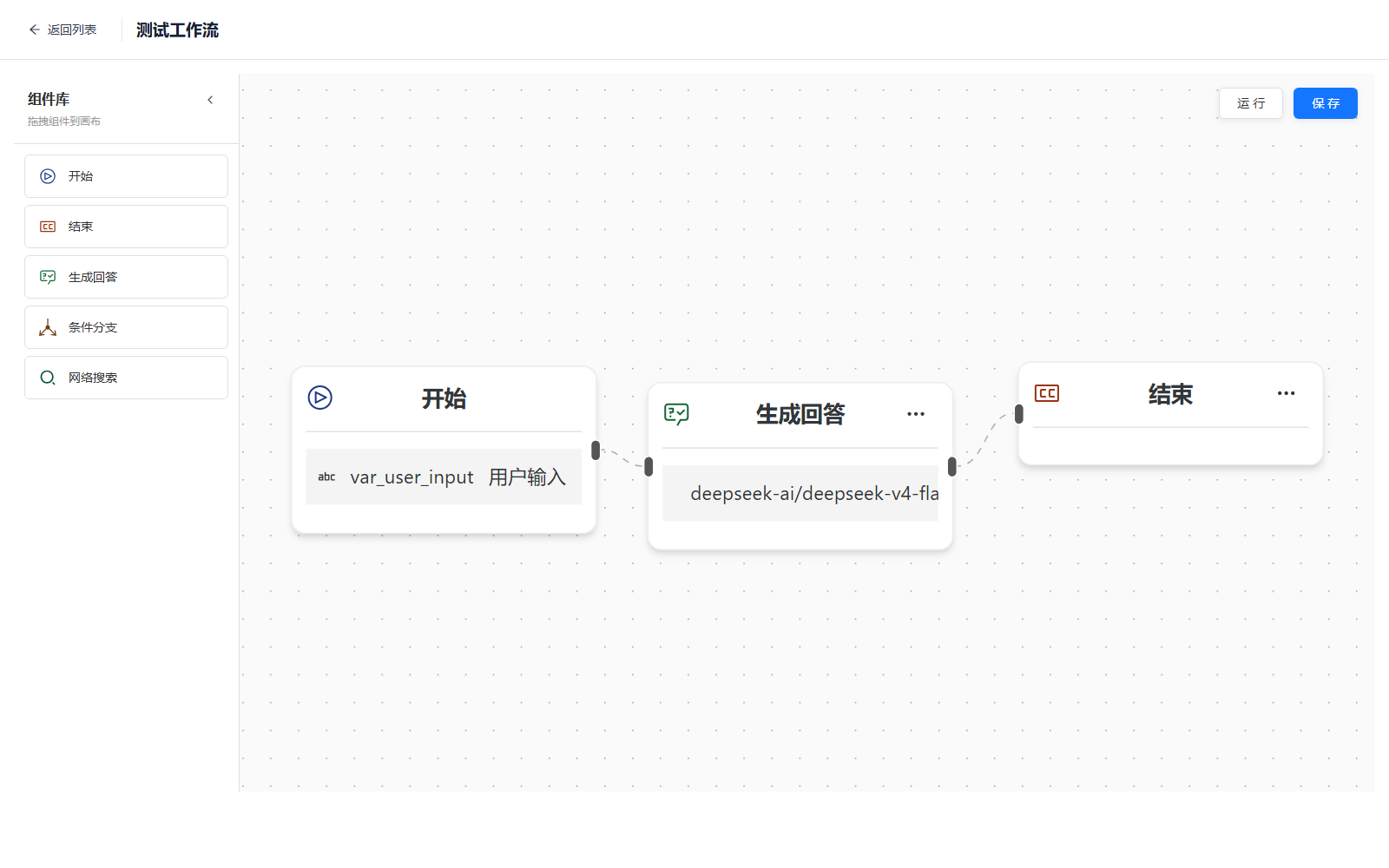
Importing the current docs/script/sql/ruoyi-ai.sql enables these six components:
| Designer label | Component name | Execution class | Prerequisite |
|---|---|---|---|
| Start | Start | StartNode | None |
| End | End | EndNode | None |
| Generate Answer | Answer | LLMAnswerNode | A working chat model |
| Conditional Branch | Switcher | SwitcherNode | Conditions and target nodes |
| Web Search | Google | GoogleSearchNode | A Zhipu Web Search API key |
| Knowledge Retrieval | KnowledgeRetrieval | KnowledgeRetrievalNode | Parsed knowledge base, embedding model, vector store |
The internal search name remains Google, but execution uses Zhipu Web Search.
Implemented nodes missing from the baseline SQL
These nodes have backend classes, frontend cards, and property panels, but lack baseline t_workflow_component records. They do not appear in the library until initialized.
| Designer label | Required component name | Execution class | Dependency |
|---|---|---|---|
| Tongyi Wanxiang | Tongyiwanx | ImageNode | Bailian / Wanxiang key and image model |
| Mail Send | MailSend | MailSendNode | SMTP host, port, mailbox, authorization code |
| HTTP Request | HttpRequest | HttpRequestNode | A reachable HTTP service |
Back up the database, then run this in ruoyi-ai:
mysql --host=127.0.0.1 --port=3306 --user=root --password ruoyi-ai
mysql> SOURCE D:/Project/github/ruoyi-doc/docs/public/files/enable-workflow-components.sql;
Or download the component initialization SQL. It is repeatable: existing disabled components are enabled, and missing components are inserted.
Refresh the designer and confirm all four rows have is_enable=1. Verify each node in a test environment before adding it to a production workflow.
Incomplete definitions to leave disabled
Parts of Dalle3 and FaqExtractor remain in frontend code or enums, but WfNodeFactory has no execution branches for them. Inserting component records alone will fail to create runnable node instances.
Human approvals belong to a separate module
Business approvals use WarmFlow in ruoyi-workflow. The AI Flow canvas has no human-approval node or connector that pauses execution for an approver.
AI Flow:Vue Flow + LangGraph4j + SSE,处理模型、RAG 和工具链
业务审批:ruoyi-workflow + WarmFlow,处理表单、审批人和人工流转
A requirement for human confirmation after model generation needs a bridge node and callback mechanism in the current version.
Prerequisites by node type
| Workflow to verify | Required setup |
|---|---|
| Start → End | No external key |
| Start → Answer → End | A chat model already tested in model management |
| Start → Knowledge Retrieval → End | Parsed documents, embedding model, matching vector store |
| Start → Web Search → End | ZAI_API_KEY or a valid zhipu key in model management |
| Start → Tongyi Wanxiang → End | Image model with providerCode=Tongyiwanx and a Bailian key |
| Start → Mail Send → End | Dedicated test mailbox, SMTP authorization code, test recipient |
| Start → HTTP Request → End | A test API; outbound access controls for production |
See Model Management and Knowledge Base for model and vector-store setup.
Run the smallest workflow first
A Start → End workflow verifies saving, LangGraph4j execution, and SSE without a model or external request.
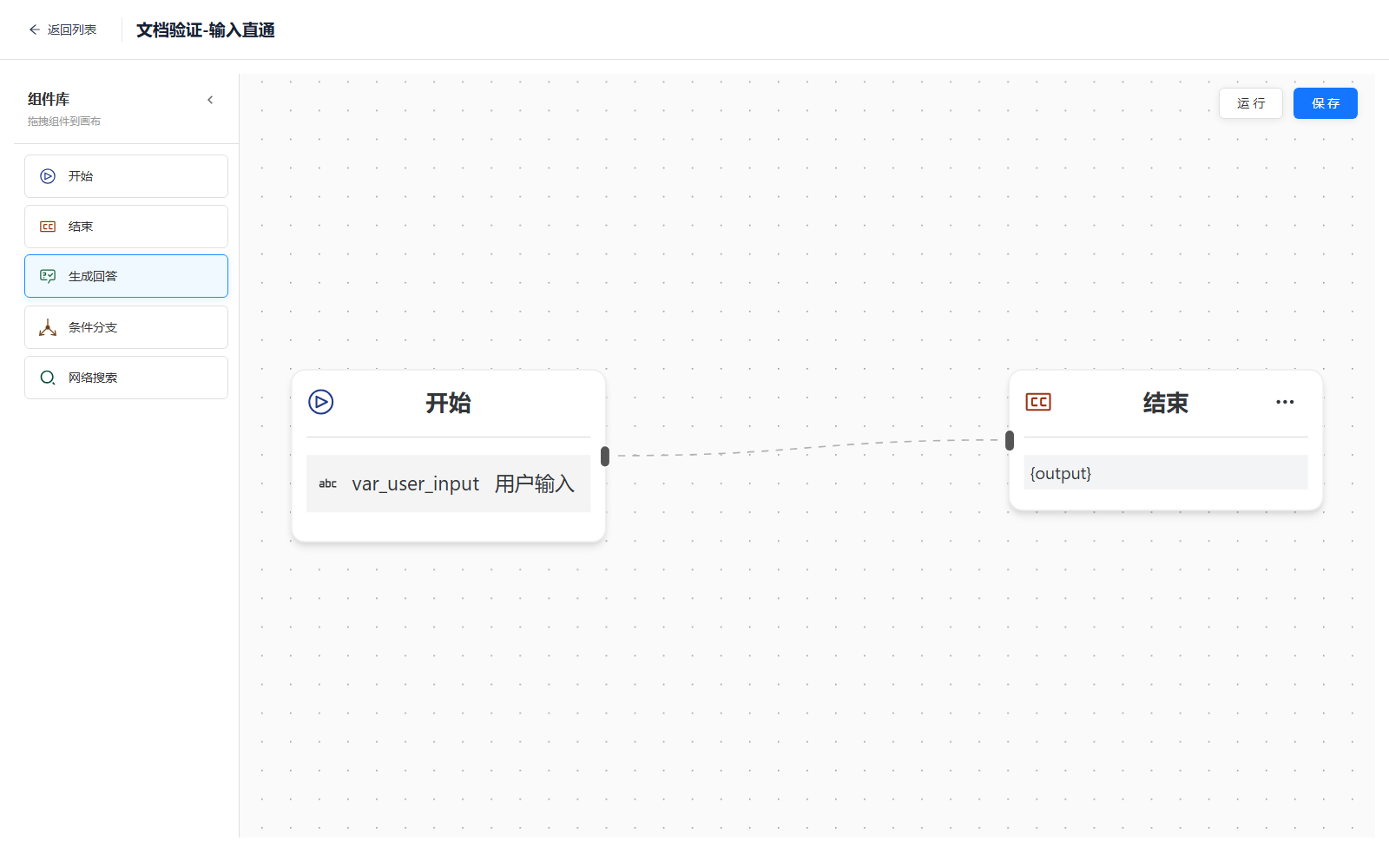
1. Create and connect the nodes
- Create a workflow in Chat Management → Orchestration Management.
- Keep the automatically created Start node.
- Add an End node.
- Connect Start → End.
- Give Start a fixed opening message, such as
文档验证流程已执行. - Set End's result to Start's
outputand save.
2. Run and verify
Click Run, enter any text, and submit. Verify all of the following:
- The run reports success.
- Execution details contain Start and End.
- Final output is
文档验证流程已执行. - The Network panel has no 4xx/5xx response and the backend has no node exception.
This screenshot comes from an actual local run:
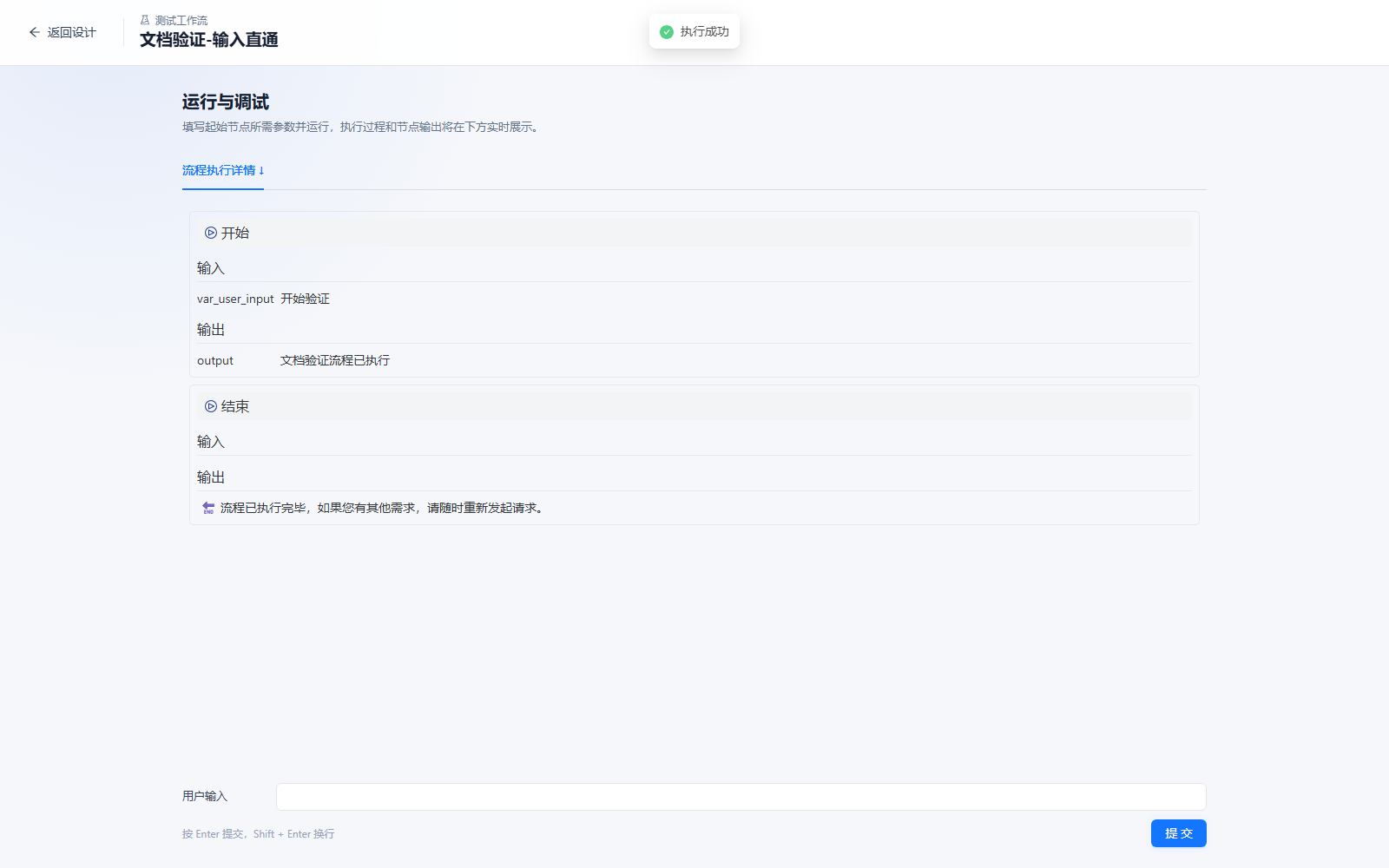
If it fails, inspect saving, edges, references, SSE, and server logs first. This test does not depend on a model key.
Model question-answering workflow
After the smallest workflow succeeds, create:
开始 → 生成回答 → 结束Start node
Keep one required text input, such as question. Leave the fixed opening message empty so Start outputs the user's question.
Generate Answer node
Select a chat model already tested in model management. Example prompt:
请准确、简洁地回答下面的问题:
{question}
Use the variable selector to reference Start's field. A name typed into the prompt without a corresponding reference will not resolve. The selected model name must exactly match the database's model_name.
End node
Reference the Answer node's output and use {output} as the result template. During execution, confirm that Answer emits streamed content and End receives the complete text.
Knowledge retrieval workflow
Use the local verification knowledge base from Knowledge Base:
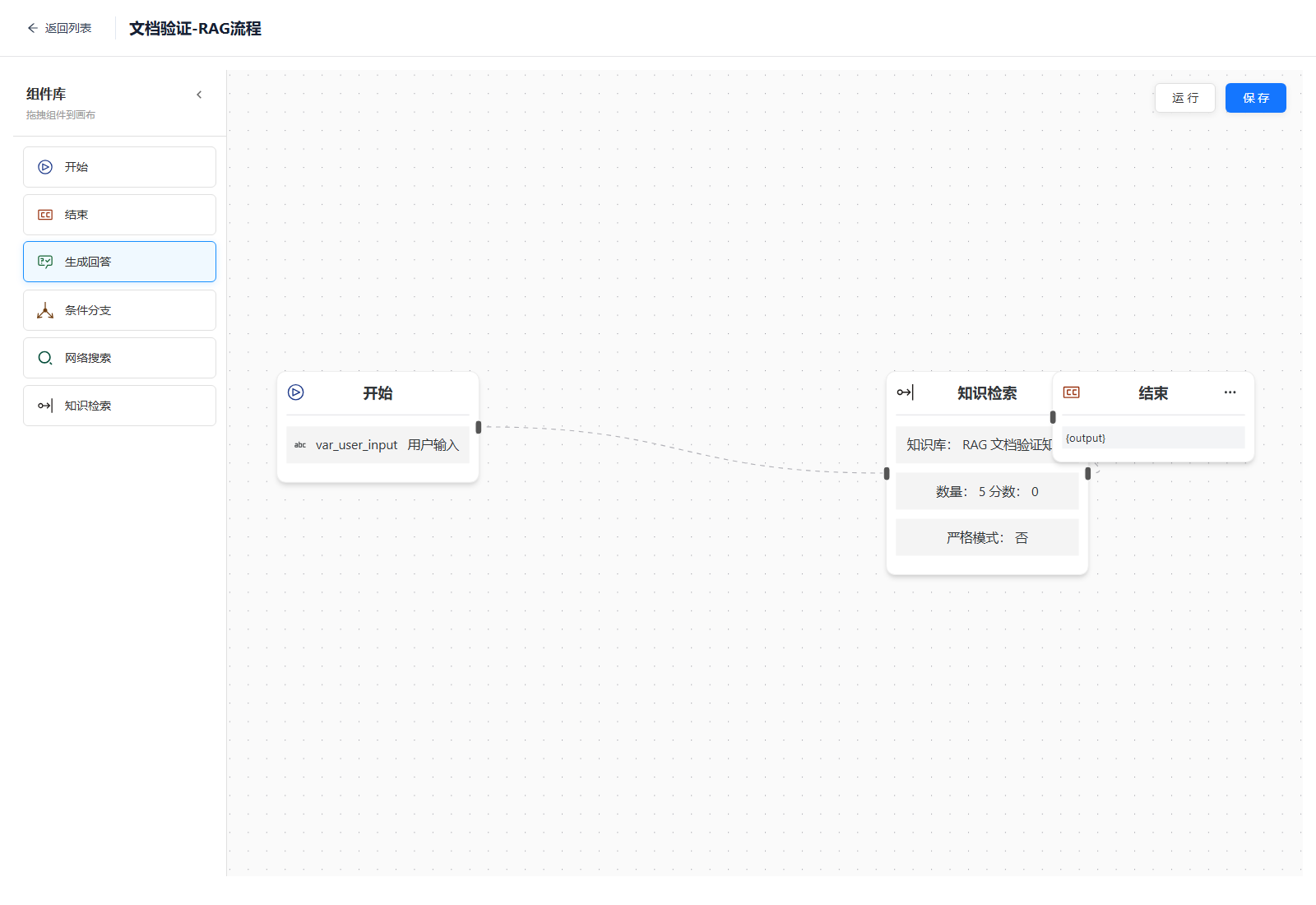
开始 → 知识检索 → 结束1. Enable and add the node
The current full initialization SQL includes Knowledge Retrieval. For an existing database, run docs/script/sql/update/2026-09-11-knowledge-retrieval-node.sql from the backend repository, refresh the designer, and add the node. The script inserts missing records; existing disabled records must be enabled separately.
2. Configure retrieval
| Parameter | First-test value | Meaning |
|---|---|---|
| Knowledge base | One with parsed documents | The node stores the numeric ID, not the display name |
| Count | 5 | top_n |
| Score | 0 | Avoid filtering during the initial test; raise it after confirming retrieval |
| Mode | vector | Select vector or hybrid retrieval; the node selection overrides the knowledge base hybrid setting |
| Strict mode | Enabled | Use the default response for empty retrieval results; when disabled, output empty text |
| Default response | No relevant content found. Please rephrase your question. | Fill this when strict mode is enabled; an empty value supplies no fallback |
The panel defaults to top_n=3 and score=0.6. The backend also supports query rewriting with prompt and source output with return_source; these fields are not exposed by this panel. Source output is enabled by default. Strict mode only handles this node's empty retrieval output: it neither stops the workflow nor constrains a downstream answer node. Retrieval exceptions can also appear as empty results, so inspect backend logs when diagnosing them.
Reference Start's output in the retrieval node, then pass retrieval's output to End.
3. Verify a run
Ask about an explicit fact in the verification document:
北辰项目的后端服务端口和发布负责人分别是什么?The existing local verification screenshot returned port 6039, owner 林小满, source file rag-verification-sample.md, and relevance 0.487. It documents input propagation, variable references, Ollama embeddings, Weaviate retrieval, node output, and SSE display in that environment.
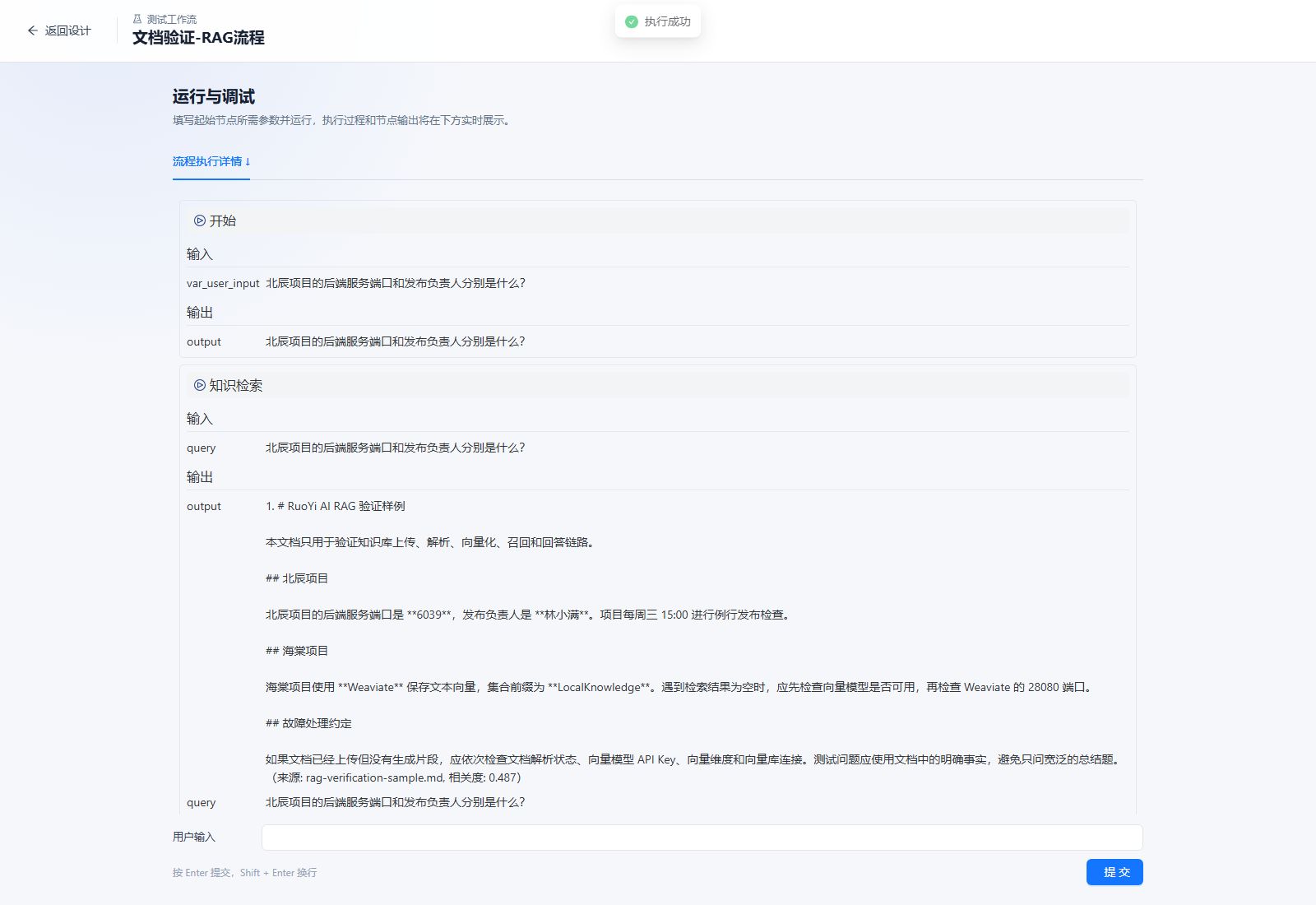
If knowledge management retrieves results but the workflow does not, check:
- The node stores the numeric knowledge-base ID.
scoreis not above the actual relevance score.- Start passes the question rather than a fixed opening message.
- An unintended rewriting prompt is not invoking an unavailable chat model.
- The embedding model, dimensions, and vector store still match the indexed documents.
Conditional branches
A branch selects one target using an upstream field:
                     ┌→ 网络搜索 → 生成回答 ┐
开始 → 条件分支 ─────┤                     ├→ 结束
                     └→ 生成回答 ──────────┘
Each rule needs a source node, field, operator, comparison value, and target. Multiple conditions support AND or OR. Always configure a default target so an unmatched request has a valid path.
Branches choose execution paths; they do not automatically merge outputs. End nodes should reference reachable results, and every path needs its own test.
Web search
Web Search calls the Zhipu Java SDK. Put the key in the backend environment:
$env:ZAI_API_KEY='你的智谱 API Key'
java -jar .\ruoyi-admin\target\ruoyi-admin.jar
Without this variable, the backend tries a valid model-management key with providerCode=zhipu. Keep keys out of queries, prompts, and screenshots.
Initial test parameters:
{
  "query": "{question}",
  "search_engine": "search_std",
  "result_count": 5,
  "search_domain_filter": "",
  "search_recency_filter": "noLimit",
  "content_size": "medium",
  "include_image": false
}
query is limited to 70 characters. Output is stable JSON containing query, count, and results, with result titles, content or summaries, links, sources, and publication times. A downstream Answer node must explicitly reference this output and preserve source links in its prompt.
| Environment variable | Default | Purpose |
|---|---|---|
ZAI_API_KEY | Empty | Zhipu API key |
ZHIPU_WEB_SEARCH_BASE_URL | https://open.bigmodel.cn/api/paas/v4/ | API base URL |
ZHIPU_WEB_SEARCH_CONNECT_TIMEOUT | 10 | Connection timeout in seconds |
ZHIPU_WEB_SEARCH_READ_TIMEOUT | 30 | Read timeout in seconds |
Tongyi Wanxiang
The image execution class ImageNode is selected only for component name Tongyiwanx. Configure an image model with:
- Exact, case-sensitive
providerCode=Tongyiwanx. - A Wanxiang model enabled for your Bailian account.
- A key with image-generation access.
- A node model name matching the model-management record exactly.
The node supports a prompt, size, and random seed. It returns the provider's image URL without automatically copying it to project OSS. Historical images may become unavailable when provider URLs expire.
Mail sending
Mail Send supports SMTP host and port, sender address and name, authorization code, recipients, CC, subject, and HTML content. Separate recipients with commas. SMTP SSL is currently always enabled, so port 465 is a suitable initial test configuration.
Current credential storage
The mailbox authorization code is stored in node_config JSON. AES encryption and decryption are commented out, so this value is not encrypted. Use a restricted test mailbox authorization code and implement server-side encryption or secret references before production use. Do not store a personal mailbox's main password in shared workflow configuration.
Some sending failures become an error output. Inspect node output and confirm delivery in the test inbox rather than relying only on the workflow's overall status.
HTTP requests
The HTTP node supports methods such as GET and POST, headers, query parameters, text/JSON/form bodies, timeouts, retries, and HTML cleanup. URLs, headers, and bodies can reference upstream variables.
Start with a test echo API your team controls. Verify the method and Content-Type, substitutions in headers/query/body, the real response in output, and readable errors for timeouts or 4xx/5xx responses.
Outbound access controls
The current node has no destination allowlist, private-network blocking, or complete SSRF protection. Restrict protocols, domains, ports, and network ranges through a gateway before production use, and do not expose arbitrary URL control to untrusted users.
How node data moves
| Data | Storage | Purpose |
|---|---|---|
| User inputs | Start input_config.user_inputs | Generate run-page fields |
| Referenced inputs | Node input_config.ref_inputs | Read fields from selected upstream nodes |
| Node settings | Node node_config | Model, prompt, retrieval, and external-service configuration |
| Execution edges | t_workflow_edge | Define reachable graph paths |
| Runtime results | Runtime and runtime-node tables | Store run inputs, outputs, and statuses |
Edges define execution order. Configure field references separately in the downstream property panel. Card text is a summary; JSON configuration and WfState determine execution.
Backend path:
运行页提交输入
  → WorkflowController 建立 SSE
  → WorkflowStarter 读取流程和启用组件
  → WorkflowGraphBuilder 构建 LangGraph4j StateGraph
  → WorkflowNodeRunner 逐节点执行
  → WfState 保存输入与输出
  → SSE 推送节点状态
  → 运行页渲染并持久化运行记录
Add a custom node
Update at least four layers together:
- Backend configuration and an
AbstractWfNodeexecution class. WfComponentNameEnumand theWfNodeFactorybranch.t_workflow_componentinitialization or migration SQL.- Frontend card, defaults, property panel, and icon mapping.
The component name is a cross-layer contract and must match exactly. Define stable output, failure behavior, credential storage, network limits, and a minimal end-to-end acceptance case. A frontend card or enum without factory execution support is incomplete.
Troubleshooting
A node exists in code but not in the designer
Query:
SELECT id, name, title, is_enable, is_deleted
FROM t_workflow_component
ORDER BY display_order, id;
The current baseline registers Knowledge Retrieval; older databases can use its upgrade script. Use the supplied initialization SQL for Wanxiang, Mail, and HTTP nodes, then refresh and check the exact component names.
A run never returns a result
- Check
/workflow/runin the Network panel for 401, 404, or 502 responses. - Confirm the backend is running on its actual port, commonly
6039. - Find the last started node in backend logs.
- Check that edges form a reachable path from Start to End.
- Verify referenced node UUIDs and output fields still exist.
If omitting a required field produces only [START] and a WorkflowMessageUtil.saveWorkflowMessage null-pointer error, the failure handler accessed runtime state before it was created. The companion backend fix adds a null-state guard; rebuild and restart an old process to use it. Clients should still time out and mark interrupted runs as failed or stopped.
Production proxies must support long-lived connections and disable response buffering for SSE. During development, use the supplied proxy first to isolate gateway issues.
Overall success but mail or HTTP failed
These nodes convert some exceptions into error outputs. Inspect their runtime details and verify the external result instead of relying on the top-level status.
Retrieval reports unsupported GraphRAG
This node implements vector and hybrid retrieval only. Set retrieval_mode to vector or hybrid. Knowledge-management graph settings do not add GraphRAG support to the workflow node.
Acceptance checklist
- [ ] The baseline library shows Start, End, Answer, Branch, Web Search, and Knowledge Retrieval.
- [ ] Start → End executes and displays real SSE output.
- [ ] The chat model works in model management before testing Answer.
- [ ] Knowledge management retrieves the test document before workflow retrieval is tested.
- [ ] Every condition and default path has been run separately.
- [ ] Search, images, mail, and HTTP are verified with test credentials or services.
- [ ] Shared logs, screenshots, and workflow JSON contain no API keys, SMTP codes, or access tokens.
- [ ] Credential encryption and outbound access controls are in place before enabling mail and HTTP in production.