
Knowledge base guide
RuoYi AI knowledge bases manage documents, retrieve relevant content, and provide reference material for agents and workflows. Upload business documents, inspect parsed fragments, test retrieval, and then attach the knowledge base to an application.
Supported capabilities
| Capability | What it does | Instructions |
|---|---|---|
| Document management and parsing | Upload, parse automatically or manually, inspect fragments, and reparse updated material. | Upload and parse, Maintenance. |
| Retrieval testing | Inspect matching fragments, sources, and relevance scores; adjust threshold and result count. | Retrieval test. |
| Retrieval tuning | Combine semantic and keyword search, or rerank candidate fragments. | Tune retrieval. |
| Knowledge-based answers | Attach one or more knowledge bases to an agent so its chat model can use retrieved material. | Attach an agent. |
| Workflow and API integration | Use a retrieval node or pass a knowledge-base ID from a custom chat frontend. | Integration. |
Uploads support text, Markdown, PDF, Word, Excel, CSV, JSON, and various source-code formats. The current user app accesses knowledge through agents; ordinary chat has no direct knowledge-base selector.
How knowledge participates in an answer
Knowledge-based chat uses RAG (Retrieval-Augmented Generation): retrieve relevant material first, then ask a chat model to compose the answer. Parsing, retrieval testing, and answer generation are separate stages.
| Concept | Meaning |
|---|---|
| Knowledge base and fragments | A knowledge base groups documents and retrieval settings. Parsing splits documents into smaller fragments used for retrieval. |
| Embedding model and vector store | The model converts documents and questions into numerical representations; the store keeps those vectors for similarity search. |
| Retrieval and reranking | Retrieval finds candidates; an optional reranker scores and orders them again. Hybrid retrieval combines semantic similarity and keyword matching. |
| Chat model | Reads the question and retrieved fragments to generate an answer. A retrieval test only checks fragments. |
Documents must be parsed and embedded before retrieval. Confirm fragment content and retrieval first, then evaluate the model's answer.
Follow environment and models → create a knowledge base → upload and parse → test retrieval → ask through the user app. Sections 1–6 cover first use; tuning and maintenance follow. Code excerpts identify APIs and can be skipped when following the UI steps.
The current revision checked page entry points and source code. Successful parsing and retrieval screenshots are from an earlier run; end-to-end verification could not be repeated in the revision environment. See verification notes.
1. Open the admin console and prepare services
Follow Local installation, sign in to the admin console, and open Chat Management → Knowledge Management.
Use the following addresses, or the actual ports in your startup logs. 5173 is reserved for documentation.
| Application | Local address | Role |
|---|---|---|
| Admin console | localhost:5666 | Models, documents, retrieval tests, and agent associations. |
| User app | localhost:5180 | Select an agent from the market and ask questions. |
| Backend | http://127.0.0.1:6039 | Upload, parsing, retrieval, and model calls. |
If needed, start the frontends in separate terminals, replacing checkout paths:
# 管理端
cd D:\Project\github\ruoyi-admin
pnpm run dev:antd# 用户端,避开文档站点的 5173 端口
cd D:\Project\github\ruoyi-web
pnpm run dev --port 5180Before uploading, check:
| Dependency | Requirement |
|---|---|
| MySQL | Initialization and applicable migrations from the installation guide, including knowledge_attach.file_hash and knowledge_fragment.fid. |
| Object storage | A usable default under System Management → File Management → File Configuration; local examples use MinIO. |
| Vector store | Local examples use Weaviate at backend-configured 127.0.0.1:28080. |
| Embedding model | At least one model that actually produces vectors. |
Object storage holds originals; the vector store holds retrieval vectors. Both must be available. A loaded admin page does not prove parsing dependencies are running.
2. Prepare embedding and chat models
The basic flow needs an embedding model and a chat model. Reranking can wait:
| Model | Purpose | Selection |
|---|---|---|
Embedding (vector) | Convert documents and questions into vectors. | Knowledge base's Embedding model. |
Chat (chat) | Compose an answer from retrieved fragments. | Agent's Bound model in section 6. |
Rerank (rerank, optional) | Reorder retrieved candidates. | Enable after the basic flow works. |
2.1 Configure models
Configure the service in Provider Management, then add or inspect its models in Model Management. See Model management for addresses and credentials. Categories come from chat_model_category; add missing values through the category dictionary. A chat model cannot serve as an embedding model simply by changing its category.
The retained local retrieval screenshots use the following Ollama configuration. Its HTTP URL belongs to the earlier runtime; new records must also satisfy the current save rules below.
| Field | Example |
|---|---|
| Provider | ollama |
| Category | Embedding (vector) |
| Model name | all-minilm:v2 |
| Description | For example, Ollama local embeddings. |
| Dimension | 384 |
| API Host | http://127.0.0.1:11434, for a backend on the host machine. |
| Key | Empty in the local Ollama example. |
See the local embedding example for installation and model downloads. A containerized backend needs an address reachable from its container; 127.0.0.1 inside a container refers to itself.
New configurations must satisfy current save rules
Local Ollama can use an HTTP or HTTPS address reachable by the backend. Leave the Key empty for services without authentication. The Ollama embedding adapter does not read a Key; authenticated gateways still require adapter support. Enter the actual API Key for cloud embedding providers such as Qianwen directly in ruoyi-admin Model Management. See Model management.
A dropdown entry only confirms the record exists. Local services must be running with the model downloaded; cloud credentials must match the actual adapter.
2.2 Why only embedding models appear
The Add Knowledge Base form loads category vector, displays descriptions, and saves model names. See ruoyi-admin/apps/web-antd/src/views/knowledge/info/components/KnowledgeAddModal.vue:
const response = await modelList({ category: 'vector', pageSize: 1000 });
const models = Array.isArray(response)
  ? response
  : (response.rows || response.records || []);
embeddingModelOptions.value = models.map((model: any) => ({
  label: model.modelDescribe || model.modelName,
  value: model.modelName,
}));
Parsing looks up that name. For example, OllamaEmbeddingProvider.embedAll() calls the configured URL and model:
EmbeddingModel model = OllamaEmbeddingModel.builder()
        .baseUrl(chatModelVo.getApiHost())
        .modelName(chatModelVo.getModelName())
        .build();

return model.embedAll(textSegments);
It does not call a chat model. Documents and queries in one knowledge base must use the same embedding model, even if another model has the same dimension. With Milvus, collection dimensions must also match actual output.
3. Create a knowledge base and configure splitting
Download the project-information sample for this walkthrough. It is intentionally retained in Chinese to match the recorded tests: the Beichen project (北辰项目) uses backend port 6039, and its release owner is Lin Xiaoman (林小满). Use this small file before importing business material.
3.1 Fill in the Add form
Open Chat Management → Knowledge Management → Add:
| Field | Example | Notes |
|---|---|---|
| Name | RAG document verification | Separate it from production material; select the same name when attaching an agent. |
| Public | No | Not required for agent association. |
| Vector store | Weaviate | Match the deployed service. |
| Embedding model | The verified model from section 2 | Check explicitly; the dropdown may default to its first option. |
| Reranking | Off | Verify basic retrieval first. |
| Hybrid search | Off | Start with vector retrieval. |
| Result count | 5 | Starting value for this sample. |
| Description | Verify retrieval and answers for Beichen project material | Identify the purpose. |
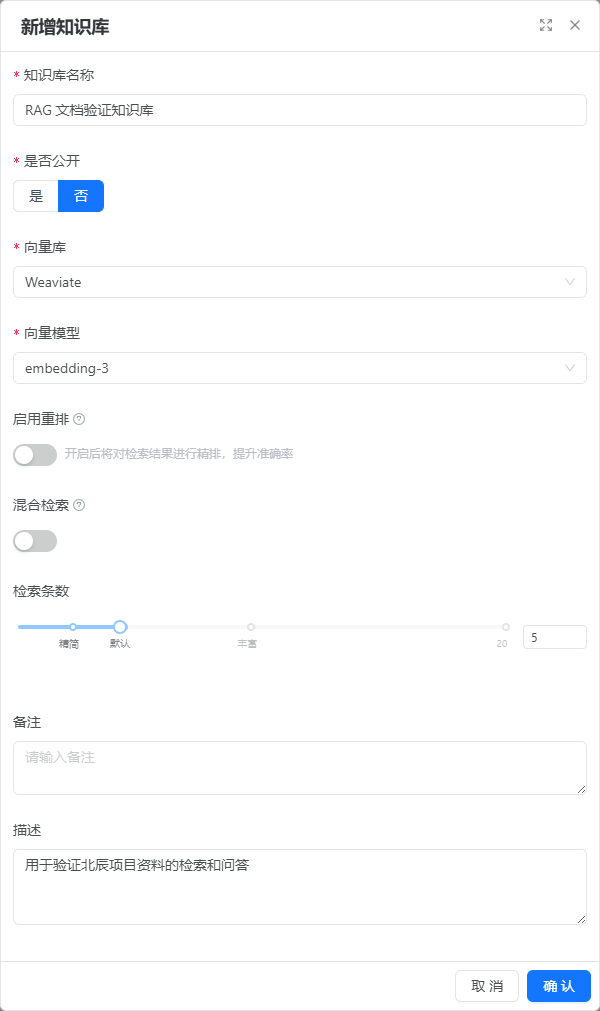
This form was opened but not submitted in the revision environment, where embedding-3 was selected by default. Choose your verified model; an option's presence does not prove a working call.
Save, find the new row, and open Details. A document count of zero is expected initially.
3.2 Set splitting options in Knowledge Base Configuration
Details has File Management, Retrieval Test, and Knowledge Base Configuration tabs. Open configuration, set the following, and click Save update. Chunk size and overlap are not in the Add dialog.
| Field | Value | Purpose |
|---|---|---|
| Chunk size | 300 | Small searchable pieces for this short sample. |
| Overlap | 30 | Preserve context across fragment boundaries. |
| Separator | Keep the existing newline configuration | Actual splitting also depends on file type and splitter. |
| Similarity threshold | 0 | Establish a result first, then raise based on quality. |
| Result count | 5 | Match the test settings. |
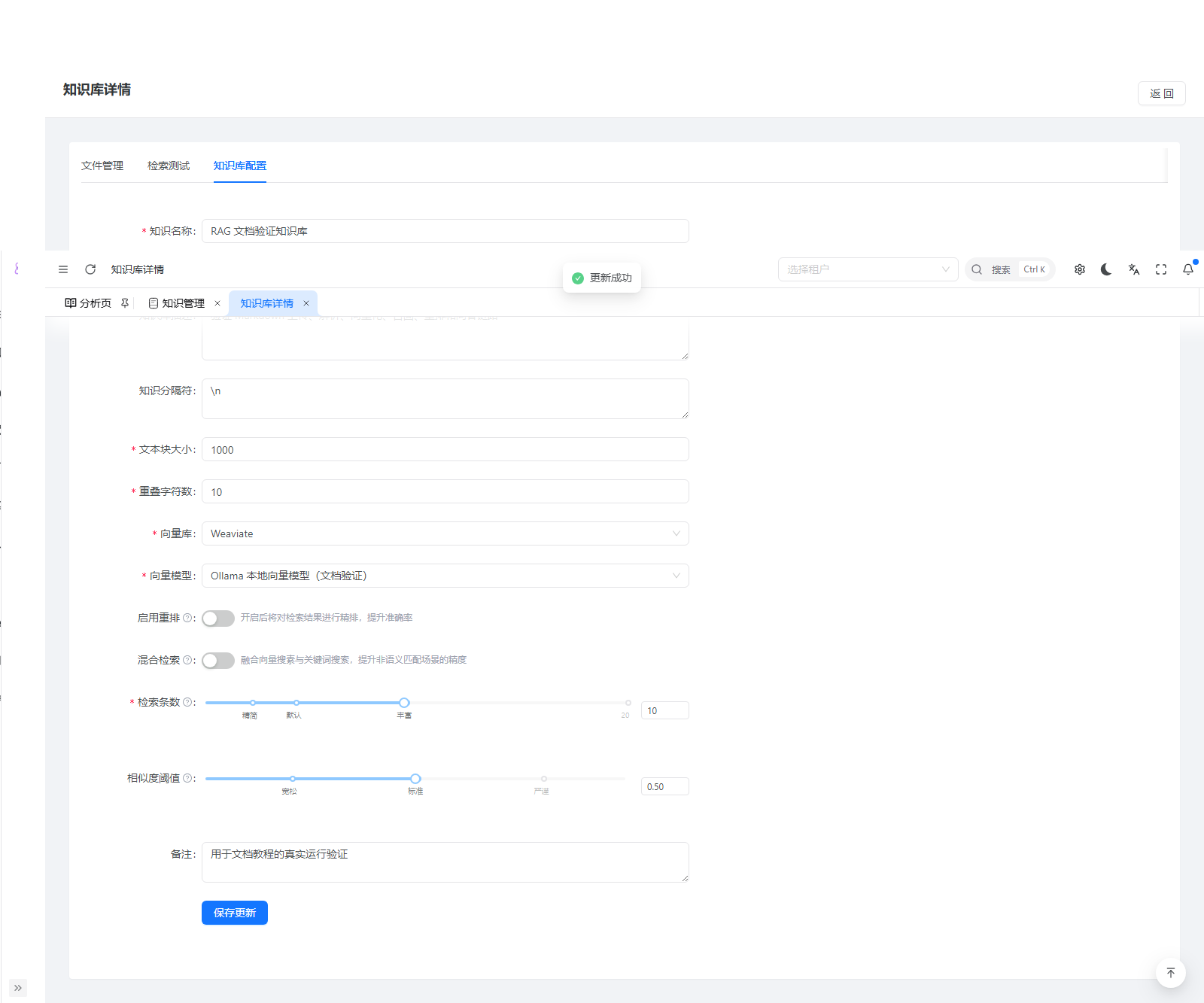
DocumentSplitConfig validates that overlap is smaller than chunk size:
if (blockSize <= 0) {
    throw new ServiceException("文本块大小必须大于0");
}
if (overlap < 0 || overlap >= blockSize) {
    throw new ServiceException("重叠字符数必须大于等于0且小于文本块大小");
}
Custom frontends use POST /system/info to add and PUT /system/info to update. Updates also need the actual id:
{
  "name": "RAG 文档验证知识库",
  "share": 0,
  "vectorModel": "weaviate",
  "embeddingModel": "all-minilm:v2",
  "textBlockSize": 300,
  "overlapChar": 30,
  "retrieveLimit": 5,
  "similarityThreshold": 0,
  "enableHybrid": 0,
  "enableRerank": 0
}
Despite its name, vectorModel stores the vector-store type; embeddingModel stores the embedding model name. Creation currently returns an operation status; the admin refreshes the list to find the new row. Do not assume the response contains its ID.
4. Upload documents and inspect parsed fragments
4.1 Upload a file
In File Management:
- Click Upload document.
- Leave Automatic parsing enabled.
- Select
rag-verification-sample.md. - Check the pending file and click Confirm and save.
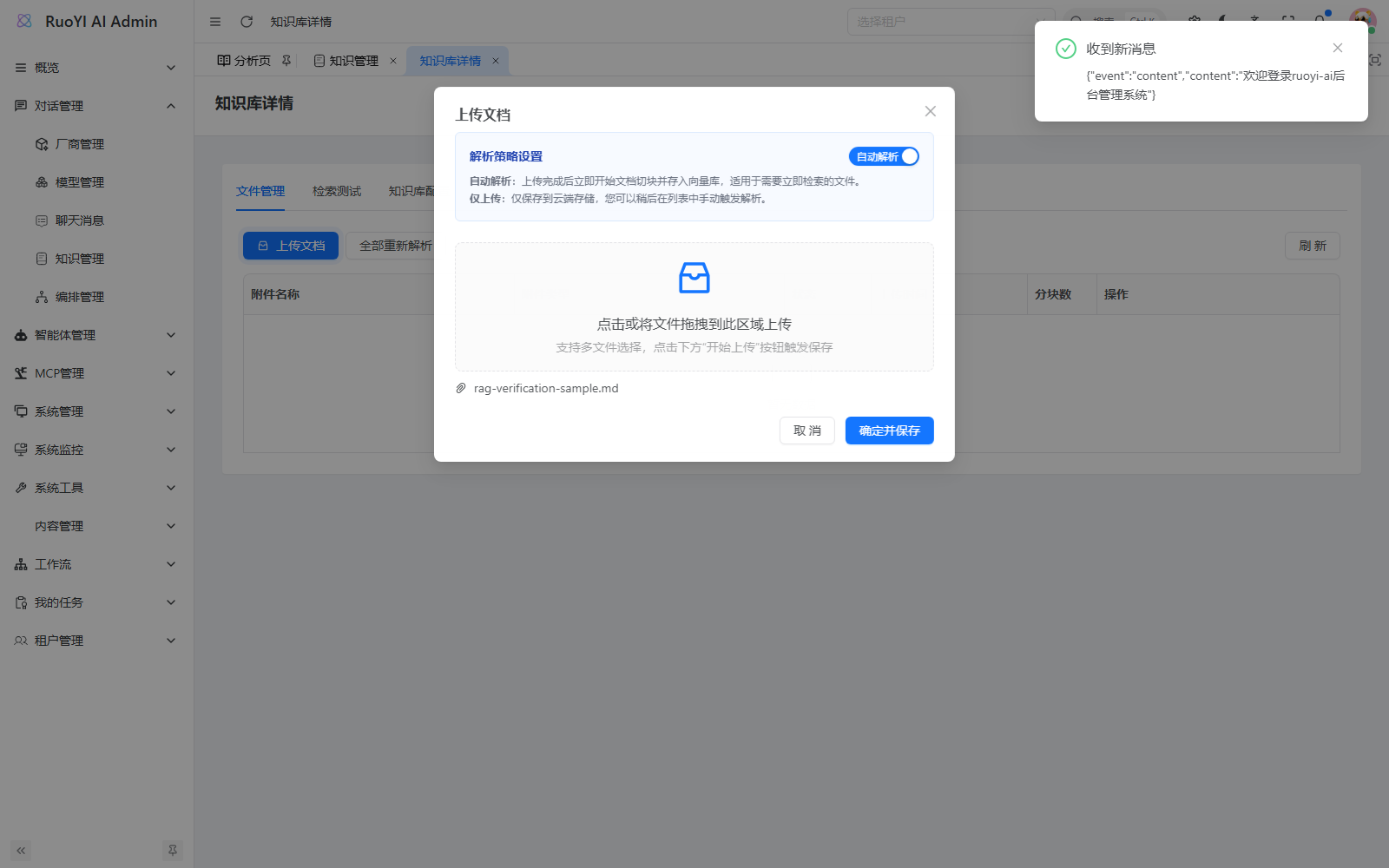
FileManagement.vue builds FormData per file, including the knowledge-base ID and parsing switch:
const formData = new FormData();
const rawFile = file.originFileObj || file;
formData.append('file', rawFile);
formData.append('knowledgeId', String(props.knowledgeId));
formData.append('autoParse', String(autoParse.value));
await requestClient.post('/system/attach/upload', formData);
requestClient handles login authentication. A custom upload client also needs the current application's authentication headers; a model provider API key is not a RuoYi AI login token.
The backend hashes content with SHA-256 and deduplicates by knowledge-base ID plus digest. Renaming identical content does not make it a new file. Reparse with the row's Parse action instead of reuploading. Existing databases need the relevant columns and unique index from the installation guide.
4.2 Wait for parsing
The file appears after upload while parsing continues asynchronously. Click Refresh later:
| State | Meaning | Action |
|---|---|---|
| Pending | Saved but not parsed. | Click Parse if automatic parsing was disabled. |
| Parsing | Reading, splitting, embedding, and saving. | Wait and refresh. |
| Parsed | This parse completed. | Check chunk count and open Knowledge fragments. |
| Failed | A parsing-stage error occurred. | Hover the status for details and inspect backend logs. |
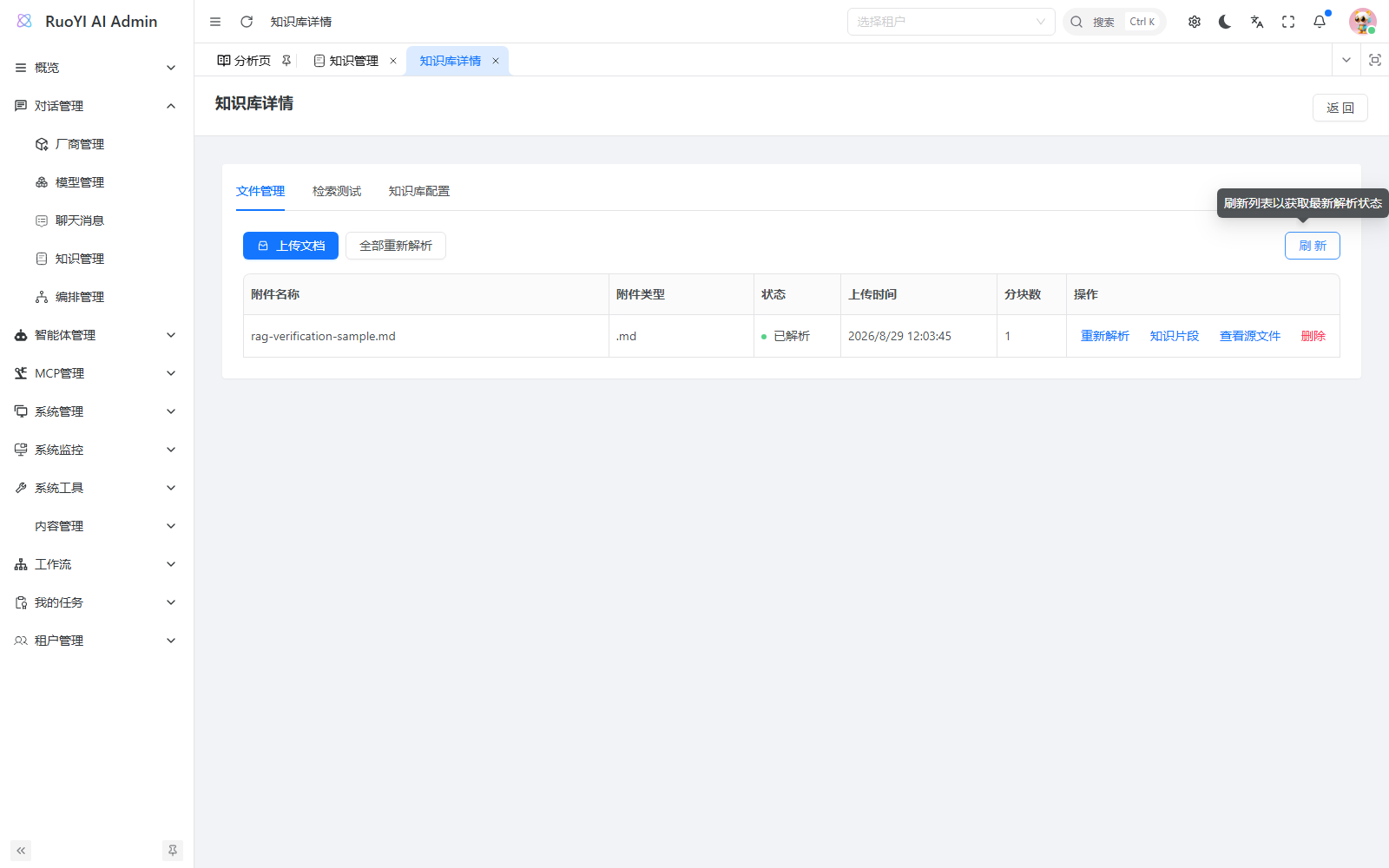
Successful upload and completed parsing are different. KnowledgeAttachServiceImpl.upload() saves the attachment and starts parsing asynchronously through the Spring proxy:
baseMapper.insert(knowledgeAttach);

if (Boolean.TRUE.equals(bo.getAutoParse())) {
    SpringUtils.getBean(IKnowledgeAttachService.class)
        .parse(knowledgeAttach.getId());
}
parse() uses @Async("knowledgeParseExecutor"). It reads the original from object storage, selects a loader, splits with current settings, and writes vectors and fragments. This excerpt shows writes; see the full method for setup and failure cleanup:
vectorStoreService.removeByDocId(docId, String.valueOf(knowledgeId));
vectorStoreService.storeEmbeddings(storeEmbeddingBo);

// 向量写入成功后,替换该文件的片段记录。
knowledgeFragmentMapper.delete(Wrappers.<KnowledgeFragment>lambdaQuery()
    .eq(KnowledgeFragment::getDocId, docId));
knowledgeFragmentMapper.insertBatch(knowledgeFragmentList);
knowledgeRetrievalService.invalidateKnowledge(String.valueOf(knowledgeId));

attach.setStatus(KnowledgeAttachStatus.COMPLETED.getCode());
baseMapper.updateById(attach);
4.3 Inspect fragment content
Open Knowledge fragments on the sample row. Find the Beichen project fragment and check that it contains 6039 and 林小满. Open details if the preview is truncated.
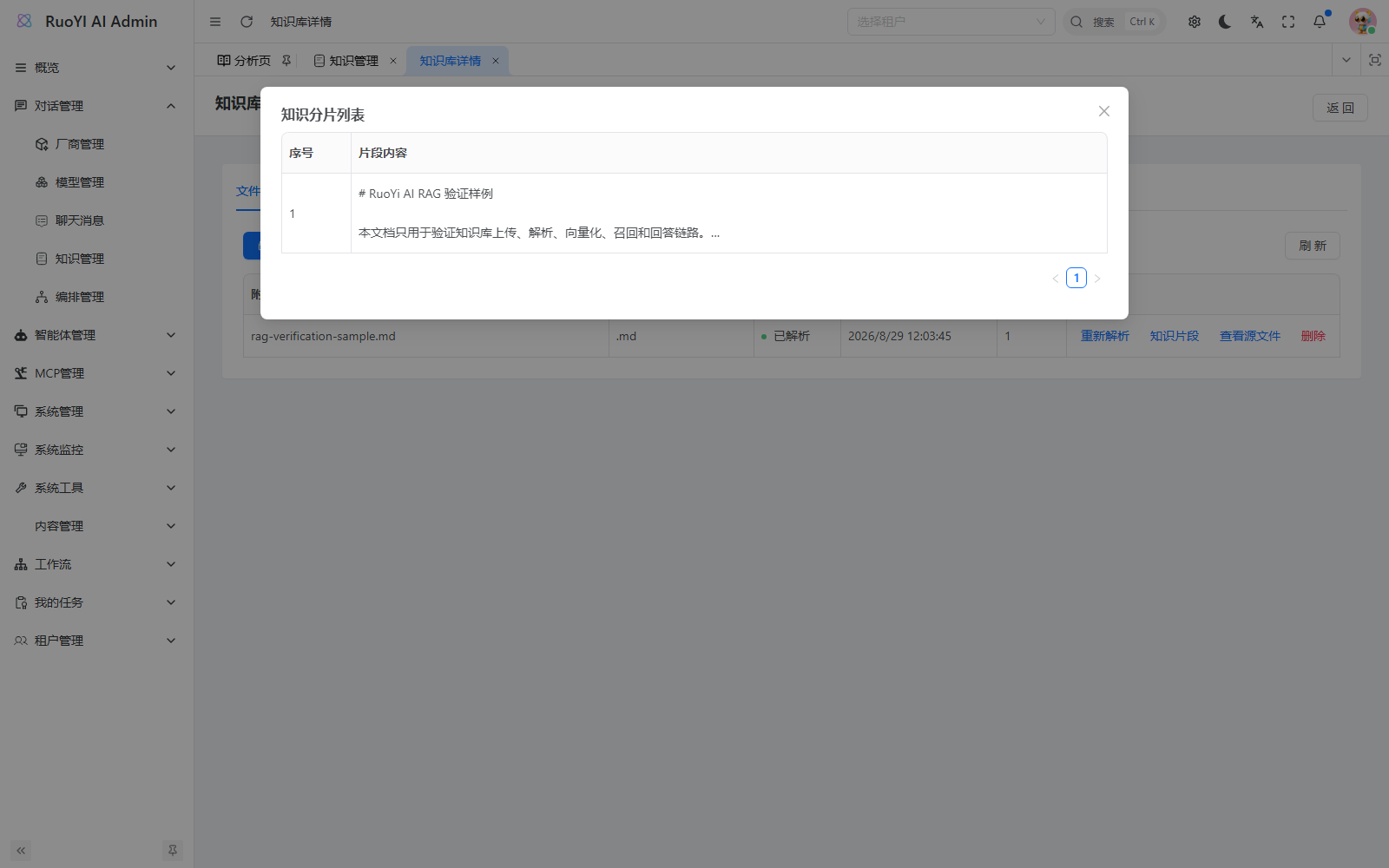
Before retrieval, require all three: Parsed status, more than zero fragments, and the original text present. Otherwise resolve parsing first.
Supported upload formats include text, Markdown, PDF, Word, Excel, CSV, JSON, and code. Start with the small Markdown sample. For scans or complex layouts, inspect extracted text. Folder and GitHub loaders exist in the backend, but the upload dialog has no corresponding import entry.
5. Test retrieval before generating answers
5.1 Ask a question with a known answer
In Retrieval Test, enter:
北辰项目的后端服务端口和发布负责人分别是什么?This asks for the project's backend port and release owner. Set threshold 0, Top K 5, hybrid search off, and reranking off, then start the test.
Recheck test-page parameters
RetrievalTest.vue initially uses local defaults including threshold 0.5 and Top K 10; it does not load all saved knowledge-base retrieval settings automatically. Check them even if you saved settings earlier.
The test returns fragments, not a generated answer. Check:
- Content includes both correct facts.
- Source is
rag-verification-sample.md. - Relevant fragments rank near the top; open them for full content.
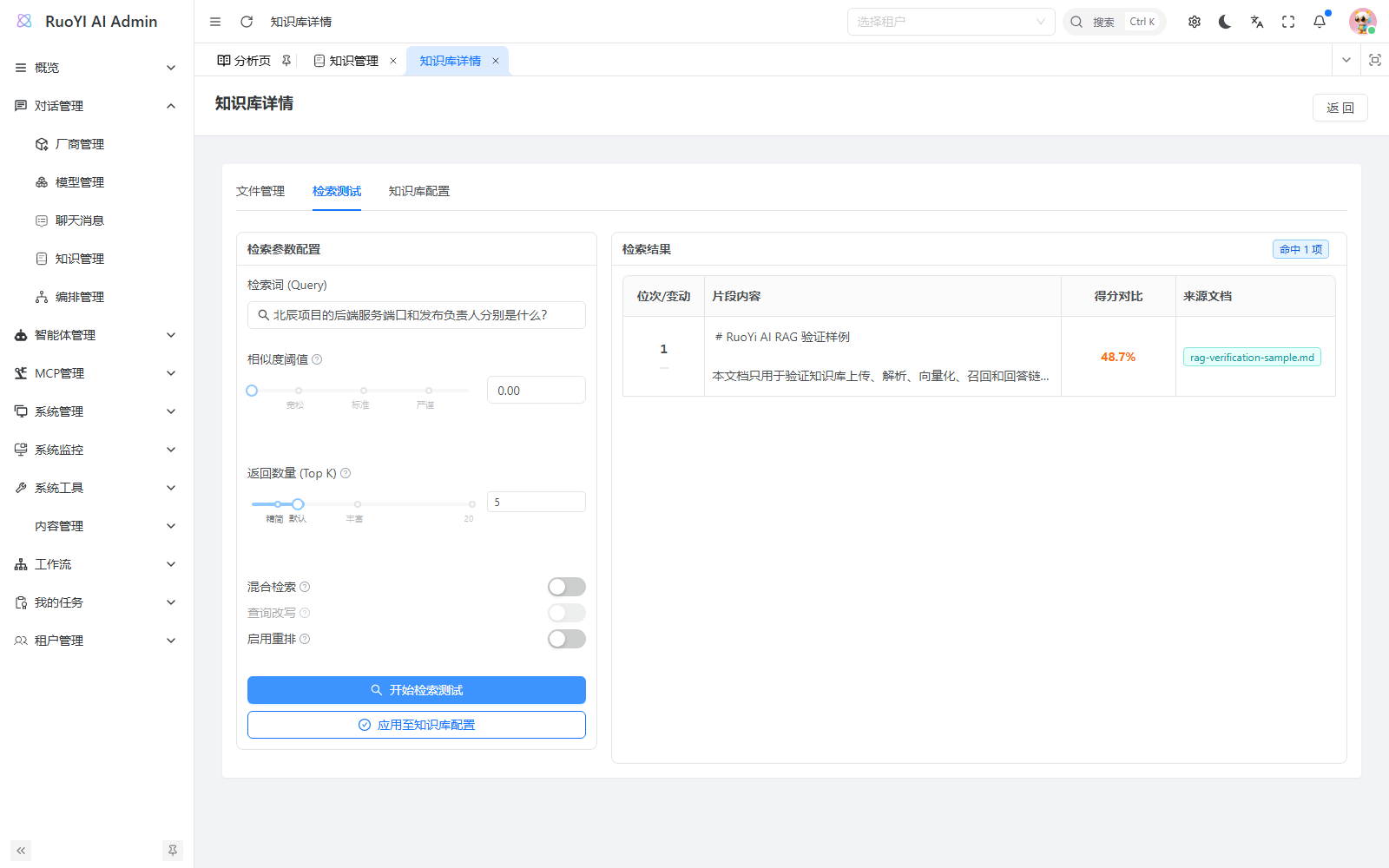
The earlier test used all-minilm:v2, threshold 0, Top K 5, and scored about 48.7%. This is a retrieval relevance measure, not answer accuracy, and is not a universal threshold for other embedding models.
5.2 What the test sends
RetrievalTest.vue calls POST /system/fragment/retrieval:
const res = await knowledgeRetrieval({
  knowledgeId: props.knowledgeId,
  query: query.value,
  topK: config.value.topK,
  threshold: config.value.similarityThreshold,
  enableRerank: config.value.enableRerank,
  rerankModel: config.value.rerankModelName,
  enableHybrid: config.value.enableHybridSearch,
  hybridAlpha: config.value.hybridAlpha,
});
KnowledgeFragmentServiceImpl.retrieval() loads the knowledge base and embedding configuration, then calls the shared retrieval service. Request parameters override saved settings; omitted values fall back:
queryVectorBo.setMaxResults(bo.getTopK() != null
    ? bo.getTopK() : knowledgeInfoVo.getRetrieveLimit());
queryVectorBo.setSimilarityThreshold(bo.getThreshold() != null
    ? bo.getThreshold() : knowledgeInfoVo.getSimilarityThreshold());

return knowledgeRetrievalService.retrieve(queryVectorBo);
5.3 Apply working parameters to the knowledge base
Click Apply to knowledge-base configuration, confirm, then inspect the saved configuration. Moving sliders and testing alone does not change settings used by subsequent chat.
The action reads the latest record, merges fields, and calls infoUpdate(). The merge in handleApplyConfig() is:
const updatedData = {
  ...record,
  retrieveLimit: config.value.topK,
  similarityThreshold: config.value.similarityThreshold,
  enableHybrid: config.value.enableHybridSearch ? 1 : 0,
  hybridAlpha: config.value.hybridAlpha,
  enableRerank: config.value.enableRerank ? 1 : 0,
  rerankModel: config.value.rerankModelName,
};
await infoUpdate(updatedData);
For reranking, the test uses Top K and threshold for rerank count and filtering too, but Apply does not currently write separate rerankTopN or rerankScoreThreshold. Retest actual chat after tuning; the two paths are not necessarily identical.
6. Attach an agent and ask through the user app
6.1 Attach the knowledge base in the admin console
Ordinary ruoyi-web chat has no direct knowledge selector. Use an agent:
- Open Agent Management → Agent List and add a verification agent.
- Use a name such as
Project material assistantand descriptionProject material Q&A; the user card displays the description. - Bind a verified chat model, not the
all-minilm:v2embedding model. - Select the knowledge base under Associated knowledge bases. Multiple associations are retrieved separately and merged.
- Leave extra MCP tools and skills unselected for this check, choose normal/enabled status, enter a prompt, and save.
Start with this prompt, which instructs the assistant to use the supplied project material:
你是项目资料助手。根据当前问题附带的知识库资料回答,
保留端口号、人名和时间等事实。资料中没有答案时,明确说明未找到,
不要猜测,也不要为了补充答案调用无关工具。
See Agents for the full form. The selector is defined in ruoyi-admin/apps/web-antd/src/views/agent/agent/data.tsx:
component: 'ApiSelect',
componentProps: {
  api: agentKnowledgeOptions,
  resultField: 'rows',
  labelField: 'name',
  valueField: 'id',
  mode: 'multiple',
  placeholder: '请选择关联的知识库',
},
fieldName: 'knowledgeIds',
label: '关联知识库',
Associations save an array of knowledge-base IDs, not names.
6.2 Verify the answer
- Sign in to the user app.
- Open Application Market, find your agent's description, and choose Start using.
- Confirm the agent is selected near the input, rather than an ordinary model.
- Send the same question from section 5.
- Check for
6039and林小满, without an invented project name or owner.
Then ask something absent from the sample, such as the production database password. The answer should say the material does not provide it. Prompts express the requirement; actual behavior must still be checked.
If wrong, return to retrieval. Missing facts point to splitting, embeddings, or retrieval settings. Correct fragments with a wrong answer point to agent selection, associations, or the chat model's use of context.
6.3 How knowledge reaches chat
The user app sends the question and agentId; the backend retrieves material and augments model input. See ruoyi-web/src/pages/chat/layouts/chatWithId/index.vue:
const payload: SendDTO = {
  model: modelStore.currentModelInfo.modelName ?? '',
  agentId: agentStore.currentAgentInfo?.id || undefined,
  content: lastUserMessage?.content ?? '',
  sessionId: route.params?.id !== 'not_login'
    ? String(route.params?.id)
    : undefined,
};
ChatServiceFacade loads the agent's model and knowledgeIds, then retrieves before Supervisor execution. The key part of augmentAgentInput() is:
RetrievalAugmentor augmentor = buildMultiKnowledgeAugmentor(knowledgeIds);
UserMessage userMessage = UserMessage.userMessage(content);
Metadata metadata = Metadata.from(
    userMessage, chatRequest.getSessionId(), new ArrayList<>());
AugmentationResult result = augmentor.augment(
    new AugmentationRequest(userMessage, metadata));
ChatMessage augmented = result.chatMessage();
return augmented instanceof UserMessage
    ? ((UserMessage) augmented).singleText() : content;
CustomVectorRetriever.retrieve() reads saved threshold, count, hybrid, and rerank settings and reuses KnowledgeRetrievalService. Apply test parameters to the knowledge-base configuration to affect this path.
An answer does not prove retrieval succeeded
If augmentation fails, the backend logs chat_rag operation=AUGMENT status=FALLBACK and uses the original question. Unavailable knowledge bases may also be skipped. Check retrieved content, backend logs, or RAG traces rather than only whether the model replied.
6.4 Integrate a custom chat frontend or workflow
For a custom frontend, ordinary model chat accepts knowledgeId in /chat/send; buildModelChatMessages() augments the current user message. Replace IDs and model names and retain the project's login and streaming handling:
{
  "model": "你的可用聊天模型名",
  "content": "北辰项目的后端服务端口和发布负责人分别是什么?",
  "knowledgeId": "你的知识库ID"
}
Agent-bound knowledgeIds take precedence; a request's single knowledgeId is only the fallback when there are no bindings. The standard user frontend does not currently send this field.
In a workflow, use Knowledge Retrieval, select a knowledge base, use the question as input, and pass fragments to a later model node. ruoyi-aiflow/.../node/knowledgeRetrieval/KnowledgeRetrievalNode.java uses the same shared retrieval service. See Workflows.
7. Tune retrieval after the basic flow works
Change one parameter group at a time and compare the same questions. Keep the working baseline from section 5.
7.1 Threshold and result count
A high threshold may exclude all fragments; a low one may admit irrelevant content. First retrieve the answer-bearing fragment, then raise the threshold gradually. More results add material and context length, so judge relevance as well as coverage.
7.2 Use hybrid retrieval for exact terms
Enable Hybrid search in the test and start at weight 0.5. The backend runs vector search and MySQL keyword search in parallel and merges ranks with RRF. KnowledgeRetrievalServiceImpl.calculateRRF() uses:
double finalScore = (1 - alpha) * vectorScores.getOrDefault(id, 0.0)
                  + alpha * keywordScores.getOrDefault(id, 0.0);
vo.setScore(finalScore * 60.0);
Higher alpha favors keywords; lower favors vectors. It weights ranks, so scores are not directly comparable to pure vector similarity. Semantic concepts and synonyms may benefit from vectors; model numbers, error codes, and exact field names may benefit from keywords.
7.3 Rerank candidates when ordering is poor
Configure a usable rerank model, enable reranking, and explicitly select it in the test.
The backend retrieves three times the requested count, reranks, and truncates. Failed reranking falls back to coarse results, which may still pass through the rerank threshold filter. If results disappear, check both model calls and thresholds.
Apply improvements and retest user-app chat. Query rewriting is currently displayed disabled and cannot be enabled here.
8. Keep knowledge current after document changes
| Change | Action |
|---|---|
| Threshold, result count, or hybrid settings | Save/apply and retest; no reupload needed. |
| Chunk size, overlap, or separator | Save, then File Management → Reparse all; wait before testing. |
| One failed file | Fix storage, model, or file issues, reparse that row, and refresh. |
| Original content changed | Test the new version in a verification base, then remove the old attachment and upload/parse the replacement to avoid mixed versions. |
| Embedding model or vector store changed | Prefer a new knowledge base, fully import and verify, then switch agent associations. Do not mix old document vectors and new query vectors. |
Reparse all calls POST /system/attach/reparse/knowledge/{knowledgeId}, returning submitted, skipped, and total counts. Files already parsing are skipped. A response confirms submission, not completion; refresh the file list.
Reparsing deletes old file vectors before writing new ones, so it is not seamless. Schedule updates appropriately for active knowledge bases.
Deleting an attachment cleans up its fragments, vectors, and original file. Deleting a knowledge base clears its data; check agent/workflow associations first. Do not update knowledge by directly editing fragment text in the database: the fragment-update API does not regenerate vectors. Reparse the source document instead.
9. Code entry points for further development
Excerpts reflect the current workspace. Admin paths start at ruoyi-admin/apps/web-antd/src; backend paths mainly start at ruoyi-ai/ruoyi-modules/ruoyi-chat/src/main/java/org/ruoyi.
| Operation | API | Implementation |
|---|---|---|
| Add/configure knowledge base | POST /system/info, PUT /system/info | KnowledgeAddModal.vue, KnowledgeConfig.vue, KnowledgeInfoServiceImpl. |
| Upload | POST /system/attach/upload | FileManagement.vue, KnowledgeAttachServiceImpl.upload(). |
| Parse/reparse | POST /system/attach/parse/{id}, POST /system/attach/reparse/knowledge/{knowledgeId} | parse(), reparseKnowledge(). |
| Fragments | GET /system/fragment/list | KnowledgeFragmentServiceImpl, filtered by docId. |
| Retrieval test | POST /system/fragment/retrieval | KnowledgeFragmentServiceImpl.retrieval() → KnowledgeRetrievalServiceImpl. |
| Embeddings | During parsing and querying | EmbeddingModelFactory → service/embed/impl. |
| Vector writes/queries | During parsing and querying | VectorStoreService, service/vector/impl. |
| Answer augmentation | POST /chat/send | ChatServiceFacade → CustomVectorRetriever. |
For formats, inspect ResourceLoaderFactory and service/knowledge/impl; for splitting, inspect service/knowledge/impl/split. A new embedding provider needs provider/model configuration and factory routing, not just a dropdown option.
10. Troubleshooting
| Symptom | Check |
|---|---|
| Missing menu or action | Account permissions: system:info:*, system:attach:*; retrieval needs system:fragment:list. |
| Embedding model missing | Category vector and account visibility. |
| Model listed but parsing call fails | Provider state, address, credentials, and actual service readiness. |
| Duplicate upload | Same content digest in the same base; use Parse or follow section 8 for content updates. |
| Upload hangs/fails | Default OSS, connectivity, and response; do not leave external example storage selected. |
Missing file_hash / fid | Apply the relevant RAG migration. |
| File remains pending | Automatic parsing setting; trigger Parse and refresh. |
| Parse fails or fragments are empty | Original file accessibility, loader, splitter, embeddings, and vector store, in that order. |
| No retrieval results | Temporarily use threshold 0, disable hybrid/rerank, and check base, model, and fragments. |
| Test works but answer is wrong | Applied settings, correct agent and associations, RAG logs, and actual context. |
| No knowledge selector in ordinary chat | Attach an agent or pass knowledgeId in your own frontend. |
| Agent absent in market | Saved record, normal status, user identity, and list response. |
| Old material still retrieved | Old attachments and reparse completion; configuration changes do not rebuild documents automatically. |
Screenshot and verification notes
The Add dialog was captured from the actual revision environment without submitting it. Five other configuration, upload, fragment, and retrieval screenshots come from an earlier local run with all-minilm:v2 and Weaviate. Successful results were not fabricated from simulated responses.
The 2026-09-08 revision rechecked admin entry points, the Add dialog, model selection, and current frontend/backend code. Docker Desktop failed during startup with a dockerInference listener error, preventing restoration of vector-store dependencies. Parsing, retrieval, and knowledge-based chat were therefore not reverified end to end. Section 6 describes supported steps and acceptance checks, not a successful chat recorded during that revision.