
Tool management
Tools let agents read files, query data, and call business services.
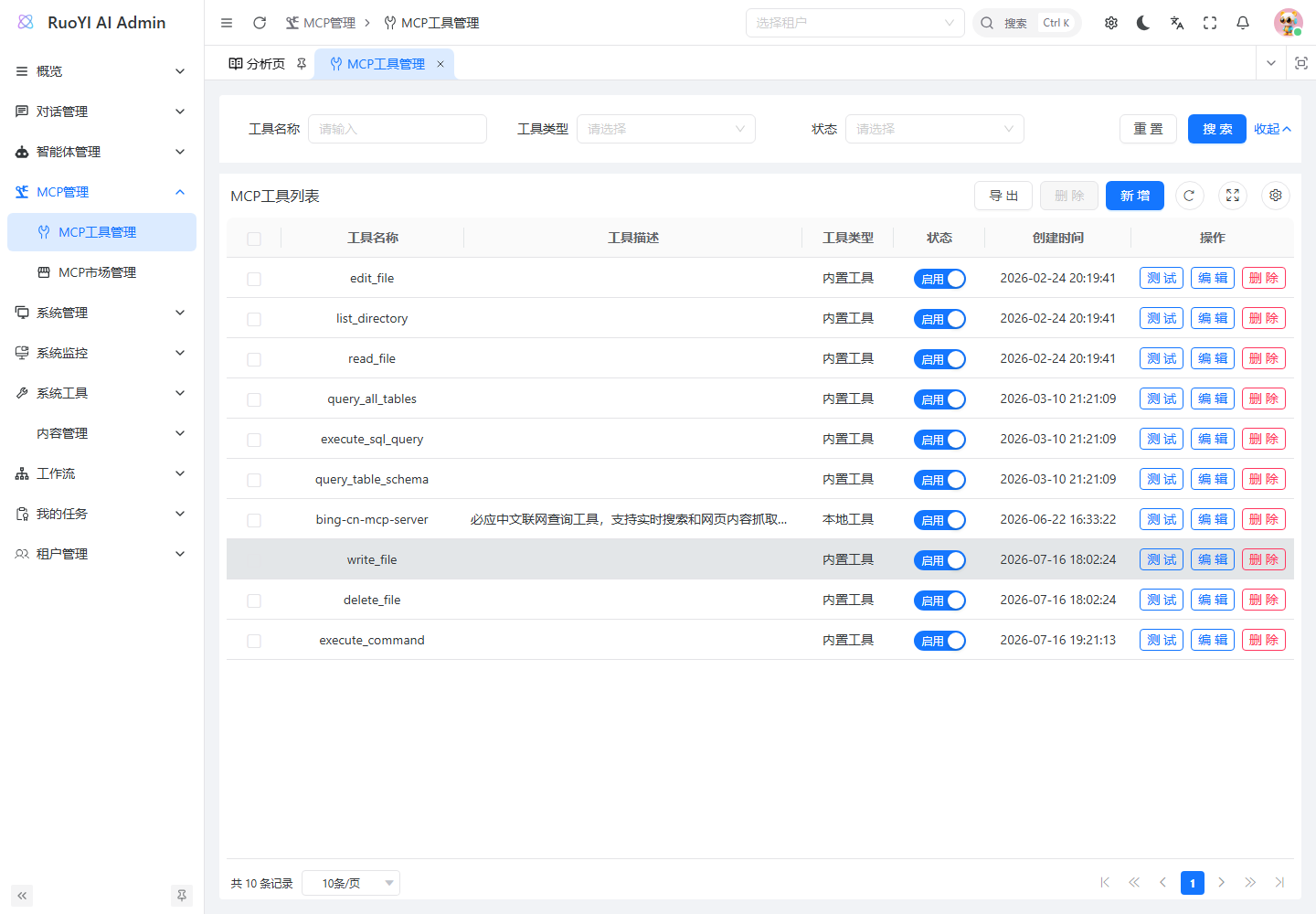
Open MCP Management → MCP Tool Management. Behavior below follows the current ruoyi-ai backend. See Models, Agents, MCP protocols and lifecycle, and the ModelScope walkthrough for related setup.
1. Choose an integration method
| Need | Choice | Work required |
|---|---|---|
| Existing file, command, or database capabilities | BUILTIN | Prepare the environment and attach the tool to an agent; minimal example. |
| Expose Java business logic to a model | New BUILTIN | Add @Tool methods and implement BuiltinToolProvider; Java tool. |
| Let the backend launch a Node.js/Python MCP server | LOCAL | Configure executable and arguments for STDIO; external MCP. |
| Connect to a deployed MCP server | REMOTE | Configure a backend-reachable Streamable HTTP endpoint; external MCP. |
BUILTIN runs inside Java without an MCP server. Each LOCAL or REMOTE record represents one server that may expose multiple functions. Associations currently select the whole record, without selecting individual functions within it.
Management names and function names
getToolName() registers a built-in tool and matches mcp_tool.name. The model sees the name in @Tool(name = "..."), falling back to the Java method name. For example, associating read_file exposes readFile. See the reference table.
External record names are also management identifiers; the MCP server supplies function names and parameters.
2. Run one tool call
Use the existing file reader first; it needs neither an external MCP server nor database-tool setup.
2.1 Prepare the environment and sample file
- Run the backend and both frontends using Local installation.
- Configure a chat model supporting Function Calling. A successful connection test alone does not verify tool-call generation.
- Check the Java process's working directory. Built-in file tools default to
${user.dir}/workspace;user.diris the backend launch directory, not the browser's directory.
For a backend started from D:/Project/github/ruoyi-ai, run in that directory:
New-Item -ItemType Directory -Force .\workspace
Set-Content -LiteralPath .\workspace\tool-demo.txt -Value 'RUOYI_TOOL_DEMO_OK' -Encoding utf8
(Resolve-Path -LiteralPath .\workspace\tool-demo.txt).Path
Use the absolute path printed by the last line. In an IDE, check the run configuration's Working directory; in a container, use its internal paths.
2.2 Associate the tool with an agent
- Find the automatically synchronized
read_filein MCP Tool Management. - Click Test to confirm registration.
- Add/edit an agent under Agent Management → Agent List and select the configured chat model.
- Select
read_fileunder Associated tools and save. - Choose this agent in the user app. Selecting only a regular model does not use this agent tool-assembly path.
2.3 Invoke and verify
Replace the example with the absolute path above and send:
请使用文件读取工具 readFile,读取 D:/Project/github/ruoyi-ai/workspace/tool-demo.txt,
只返回文件正文。如果工具执行失败,请说明失败原因,不要猜测文件内容。
Expect RUOYI_TOOL_DEMO_OK. During development, break in ReadFileTool#readFile and check that execution enters the method, filePath is correct, and returned text contains the marker. Existing execution logs can help; the model's claim alone does not prove execution.
What Test verifies
- BUILTIN: registration of the management name, not instance creation or execution of
@Toolmethods. - LOCAL / REMOTE: client creation and connection, not a business-function call.
- Inspect
data.successanddata.message; failures may still be wrapped inR.ok(...)and HTTP 200.
Successful test responses currently fix toolCount at 1 and return the record name in tools. They do not report the server's actual function count.
3. Develop a Java built-in tool
Wrap existing Java business logic. This date-calculation example requires no third-party service and demonstrates registration, argument generation, and execution.
3.1 Create the tool class
Add this backend file:
ruoyi-modules/ruoyi-chat/src/main/java/org/ruoyi/mcp/tools/DateOffsetTool.javapackage org.ruoyi.mcp.tools;
import dev.langchain4j.agent.tool.P;
import dev.langchain4j.agent.tool.Tool;
import org.ruoyi.mcp.service.core.BuiltinToolProvider;
import org.springframework.stereotype.Component;
import java.time.LocalDate;
import java.time.format.DateTimeParseException;
@Component
public class DateOffsetTool implements BuiltinToolProvider {
private static final String DESCRIPTION =
"计算指定日期增加或减少若干天后的日期。输入和输出均为 yyyy-MM-dd。";
// 注册表通过无参构造创建执行实例。
public DateOffsetTool() {
}
@Tool(name = "add_days", value = DESCRIPTION)
public String addDays(
@P("起始日期,例如 2026-01-01") String date,
@P("增减天数,正数向后、负数向前,范围 -3650 到 3650") int days) {
if (date == null || date.isBlank()) {
return "Error: date 不能为空";
}
if (days < -3650 || days > 3650) {
return "Error: days 必须在 -3650 到 3650 之间";
}
try {
return LocalDate.parse(date).plusDays(days).toString();
} catch (DateTimeParseException e) {
return "Error: date 必须是有效的 yyyy-MM-dd 日期";
}
}
@Override
public String getToolName() {
return "add_days";
}
@Override
public String getDisplayName() {
return "日期偏移计算";
}
@Override
public String getDescription() {
return DESCRIPTION;
}
}| Declaration | Purpose |
|---|---|
@Component + BuiltinToolProvider | Spring discovery and registration by BuiltinToolRegistry. |
getToolName() | Unique registered name matching the database. |
@Tool(name, value) | Function name and description exposed to the model. Explicitly use a matching name for new tools. |
@P | Parameter meaning and format; the method must still validate inputs. |
getDisplayName() / getDescription() | Metadata; they do not replace the model-facing @Tool description. |
The registry currently generates an empty description for database synchronization, and the initializer syncs it. getDescription() therefore does not automatically populate the management description field.
3.2 Register and verify
- Rebuild and restart Java, ensuring Spring scans the class.
- Check the startup registration log for
add_days.SystemToolInitializerautomatically creates an enabledBUILTINrecord; no manual SQL is needed. - Test registration in the list and attach it to an agent.
- Ask the agent to call
add_daysfor seven days after2026-01-01. Break inaddDays: expectdate="2026-01-01",days=7, and result2026-01-08.
You can first verify the method directly with new DateOffsetTool().addDays("2026-01-01", 7).
Built-ins are code-managed: the management API blocks adding, editing, deleting, or toggling them and converting external records to BUILTIN. Control ordinary agent tools through associations; see assembly for SQL-agent exceptions.
3.3 Calling Spring business services
BuiltinToolRegistry stores classes and creates runtime objects with getDeclaredConstructor().newInstance(). The executing object is not the Spring-injected bean.
- Keep an accessible no-argument constructor; registration tests can pass even when actual instantiation fails.
- Do not rely on injected fields, constructor injection, or
@Transactionalproxies on the tool object. Existing SQL tools retrieve dependencies lazily withSpringUtils.getBean(...). - Put transactions, current-user permissions, and business validation in the called Spring service. User IDs supplied as tool arguments do not replace server authentication.
- Prefer stateless methods and clear results/errors. Explain use cases, units, and return values in descriptions.
To support constructor injection consistently, extend the registry's creation strategy first.
4. Connect external MCP servers
No Java interface implementation is needed. Add a record with name, description, type, configuration, and enabled status; save, test, and attach it to an agent.
4.1 LOCAL: backend-launched server
Enter one server configuration without an outer mcpServers wrapper. For example:
{
  "command": "npx",
  "args": [
    "-y",
    "@modelcontextprotocol/server-filesystem",
    "D:/Project/github/ruoyi-ai/workspace"
  ]
}
Replace and precreate the backend-host directory. The MCP server's arguments control its allowed directory independently from Java file tools' workspace.
| Field | Current behavior |
|---|---|
command | Required executable only; do not concatenate arguments. |
args | Array of separate string arguments. |
env, cwd, and others | Not read by the current parser. |
Verify the executable under the backend's account and environment, for example npx --version. Java runs command --version and requires exit within five seconds before launching the configured server. Use STDIO; send diagnostic logs to stderr so stdout protocol messages remain valid.
On Windows, bare npx, npm, node, pnpm, yarn, uv, and uvx currently get .cmd appended. If the actual executable is node.exe or uv.exe, use that filename or an absolute path, such as C:/Program Files/nodejs/node.exe.
ChildProcessSecretSanitizer filters child environments, including the backend's DEEPSEEK_API_KEY. Design MCP-specific deployment or credential injection when needed; neither JSON env nor backend model keys are automatically supplied.
4.2 REMOTE: deployed server
Choose the remote type and enter:
{
  "baseUrl": "https://mcp.example.com/mcp"
}
Replace mcp.example.com with your endpoint. The backend reads only baseUrl and uses StreamableHttpMcpTransport. Legacy SSE-only servers are not automatically compatible.
The endpoint must be reachable from Java. headers and auth fields are ignored; authenticated services need createRemoteClient changes or a controlled authenticating proxy.
4.3 Editing configurations and using the market
configJson is write-only: lists, details, and exports omit the original JSON. An empty edit retains it; changes require a complete new JSON value. An empty detail field does not mean lost configuration and cannot be used to clear it.
External record edits, status changes, and deletion remove cached client references; later assembly reloads database settings. Three consecutive creation or health-check failures cause a five-minute process-local temporary disable. Business-function errors do not count as these connection failures. Editing configuration does not clear the timer; wait or restart Java after correcting the issue.
You can also load records through MCP Market Management, then inspect, test, and attach them. A configured market source is optional for built-ins and manual MCP connections.
5. Assemble tools in backend code
5.1 Regular agent execution
ChatServiceFacade#handleAgentChat reads mcpToolIds and calls LangChain4jMcpToolProviderService#getToolProvider. Enabled records are loaded by ID and combined into a LangChain4j ToolProvider.
| Layer | Behavior |
|---|---|
| Management data | mcp_tool records; agent mcpToolIds associations. |
| Assembly | Built-in instances and ToolService.findTools; created or reused MCP clients for external servers. |
| Execution | Associated tools go to WebSearchAgent; Supervisor decides whether to dispatch it, then it chooses functions. |
Association scope
SqlAgent and EchartsAgent directly use .tools(new QueryAllTablesTool(), new QueryTableSchemaTool(), new ExecuteSqlQueryTool()), independently of mcpToolIds. Removing SQL associations does not disable their SQL capabilities.
Coding Harness has a separate registry and execution mechanism; these settings do not change its tool set automatically.
WebSearchAgent currently describes search/browser duties. If Supervisor does not dispatch it for date calculations or order queries, update its @Agent description and system prompt or add a business-specific subagent in handleAgentChat. Editing a management description alone does not change routing.
5.2 Reuse tools in a custom call chain
Inject LangChain4jMcpToolProviderService and pass its provider to an AI Service/Agent builder. Here plannerModel is an existing chat model and agentVo is an authorized, loaded configuration:
ToolProvider toolProvider = langChain4jMcpToolProviderService
    .getToolProvider(agentVo.getMcpToolIds());

WebSearchAgent searchAgent = AgenticServices.agentBuilder(WebSearchAgent.class)
    .chatModel(plannerModel)
    .toolProvider(toolProvider)
.build();| Method | Use |
|---|---|
getToolProvider(List<Long> toolIds) | Agent record IDs; filters disabled records, null IDs, and duplicates. Empty input gives an empty set. |
getToolProviderByNames(List<String> toolNames) | Enabled database management names such as read_file. |
getAllEnabledToolsProvider() | All enabled records, only for callers needing them all. |
ToolProviderFactory#getAllEnabledMcpToolsProvider() delegates to the last method. getAllBuiltinToolObjects() creates every registered built-in without reading database status. Use ID-based assembly to honor agent associations.
6. Built-in tool reference
These nine tools implement BuiltinToolProvider; Coding Harness tools are separate.
| Management name | Function and arguments | Behavior |
|---|---|---|
read_file | readFile(filePath) | Read UTF-8; truncate content at 32 KiB and append file information. |
list_directory | listDirectory(filePath, recursive, maxDepth) | List directories with recursion depth 1–10. |
write_file | writeFile(filePath, content) | Create or overwrite a complete file and create parent directories. |
edit_file | editFile(filePath, diff) | Replace complete existing-file content; diff is not patch syntax. |
delete_file | deleteFile(filePath, recursive) | Delete files/directories; nonempty directories require recursive=true. |
execute_command | executeCommand(command) | Allowed commands, 30-second timeout, last 8 KiB of stdout/stderr. |
query_all_tables | queryAllTables() | Loaded allowlisted table summaries. |
query_table_schema | queryTableSchema(tableName) | Validate name and allowlist, then return SHOW CREATE TABLE DDL. |
execute_sql_query | executeSql(sql) | Validate one SELECT and AST table references; 30-second timeout, up to 1,000 retained rows; show first 10 rows and 8 columns with truncation notice. |
6.1 Files and commands
Default file tools require absolute paths under ${user.dir}/workspace, checked by WorkspaceGuard. The command tool uses that working directory, which is not an operating-system sandbox.
Current command allowlist:
npm pnpm yarn git mvn gradle java javac python python3 pip
node tsc eslint prettier cat ls dir echo
Commands use ProcessBuilder(List) without a shell. &, |, ;, backticks, $, <, >, and line breaks are rejected. Arguments are split on whitespace without quote parsing, so paths with spaces, pipes, and redirection cannot be copied directly from terminal commands. Allowed names must resolve to executable programs, not shell built-ins.
6.2 Database tools
Set AGENT_ALLOWED_TABLES to comma-separated names without spaces; * is unsupported. Development defaults to empty. In the terminal that starts Java:
$env:AGENT_ALLOWED_TABLES = 'sys_dict_type,sys_dict_data'Restart Java, or set the variables in the IDE run configuration. Tables must exist in the actual data source.
TableSchemaManager uses @DS("agent"); the accompanying fixes explicitly route queryTableSchema and executeSql there too. Development configuration comments out this data source and sets strict=true, so configure an explicit read-only named agent source. An allowlist alone or fallback to the primary source is insufficient. See Agent SQL configuration.
Call queryAllTables first, then execute queries with explicit columns and LIMIT.
Allowlist boundaries
The accompanying fixes add schema allowlisting and AgentSqlValidator AST validation. Update older regex-based or incorrectly routed implementations first. These checks are not full database isolation: direct JDBC does not automatically apply MyBatis row permissions, and SQL subagents share the allowlist. Use database read-only permissions and controlled business tools or isolated connections for user, department, and tenant boundaries.
7. Management API reference
Paths are relative to the backend. Reuse application login headers.
| Operation | Method and path | Parameters / permission |
|---|---|---|
| Paged list | GET /mcp/tool/list | name, type, status, pagination; mcp:tool:list. |
| Full list | GET /mcp/tool/all | keyword, type, status; mcp:tool:list. |
| Agent options | GET /mcp/tool/options | Enabled only; any of agent:agent:list, agent:agent:add, agent:agent:edit. |
| Details | GET /mcp/tool/{id} | mcp:tool:query; omits connection JSON. |
| Add external tool | POST /mcp/tool | McpToolBo; mcp:tool:add. |
| Edit external tool | PUT /mcp/tool | Body includes id; mcp:tool:edit. |
| Toggle external tool | PUT /mcp/tool/{id}/status?status=ENABLED | ENABLED / DISABLED; mcp:tool:edit. |
| Delete external tools | DELETE /mcp/tool/{ids} | Comma-separated IDs; mcp:tool:remove. |
| Test registration/connection | POST /mcp/tool/{id}/test | Inspect data.success; mcp:tool:test. |
| Export | POST /mcp/tool/export | mcp:tool:export. |
For creation, configJson is a JSON string, not a nested object. Replace the example endpoint:
{
  "name": "business-mcp",
  "description": "业务查询服务",
  "type": "REMOTE",
  "status": "ENABLED",
  "configJson": "{\"baseUrl\":\"https://mcp.example.com/mcp\"}"
}
Creation returns R<Void>, not the new ID. Retrieve it from the list before testing and binding. Names are required and limited to 200 characters; use uppercase type values.
8. Troubleshoot by execution stage
| Symptom | Check |
|---|---|
| New Java tool absent | BuiltinToolProvider, Spring scanning, rebuild/restart, registration and sync logs. |
| Built-in test passes but execution fails | No-argument constructor, @Tool methods, uninjected fields, getBuiltinToolObject, and ToolService.findTools. |
| Description edit has no effect | Function descriptions come from @Tool or the server, not management metadata. |
| Missing or uncalled tool | Management/function names, status, association IDs, assembly, and Supervisor dispatch to WebSearchAgent. |
| LOCAL command unavailable | Backend-account command --version, PATH, five-second limit, Windows suffix handling. |
| LOCAL connection hangs | Separate arguments, STDIO support, and stdout log contamination. |
| REMOTE connection fails | Backend reachability, Streamable HTTP, and unsupported authentication configuration. |
| Empty configuration in edit form | Write-only field; empty retains, full new JSON replaces. |
| Still temporarily disabled after correction | Wait for the five-minute timer or restart; cache invalidation does not reset it. |
| File read fails | Absolute workspace path, IDE/container directory, and file permissions. |
| Wrong or empty database results | Allowlist, named agent source, schema cache, and SQL routing. |
| HTTP 200 but failure | data.success or actual tool return; Error: ... strings do not necessarily trigger HTTP errors. |
The generic client creation code does not attach MyMcpClientListener. Where attached elsewhere, it mainly sends status rather than complete arguments/results. Use breakpoints, return values, and available logs; complete MCP SSE details are not an acceptance requirement for this path.
Paths below are relative to ruoyi-modules/ruoyi-chat/src/main/java/org/ruoyi/:
| Area | Entry point |
|---|---|
| Discovery and registry | mcp/service/core/BuiltinToolProvider.java, BuiltinToolRegistry.java. |
| Startup synchronization | config/mcp/SystemToolInitializer.java. |
| Assembly, parsing, client cache | mcp/service/core/LangChain4jMcpToolProviderService.java. |
| APIs, write-only config, built-in protection | controller/mcp/McpToolController.java, service/mcp/impl/McpToolServiceImpl.java. |
| Agent binding and assembly | service/chat/impl/ChatServiceFacade.java, agent/WebSearchAgent.java. |
| Files and commands | mcp/tools/. |
| SQL and allowlisting | agent/tool/, agent/manager/TableSchemaManager.java. |