
Model management
Model Management maintains names, categories, service addresses, and API Keys for chat, agents, knowledge bases, and media. See Model categories for different uses.
Configuration has two parts: Provider Management selects an adapter and the default address for new models; Model Management selects the actual model, purpose, and credentials. Each provider can have multiple independently configured models.
This guide explains that relationship, admin setup, user-app usage, and troubleshooting. DeepSeek is the configuration example; the existing PPIO integration illustrates provider development.
Complete Local installation first and keep Java running. Both frontends must connect to the same backend.
1. Start and sign in to the admin console
In the admin frontend repository ruoyi-admin, run:
Set-Location D:\Project\github\ruoyi-admin
pnpm install
pnpm run dev:antd
Replace the path; skip installation if dependencies are already available. Open the terminal's URL, normally http://localhost:5666. Sign in and find Provider Management and Model Management under Chat Management.
Start with providers: their records supply the model form's provider options.
Which backend the admin console uses
The standalone ruoyi-admin frontend differs from the Java startup module of the same name inside ruoyi-ai.
Development defaults to port 5666, with apps/web-antd/vite.config.mts forwarding /api to http://127.0.0.1:6039. Update that proxy if the backend address changes.
2. Configure a provider
2.1 What a provider does
A provider supplies model services: DeepSeek is a provider, and deepseek-v4-flash is one of its models. Models from one provider usually share a protocol.
In RuoYi AI, the provider selects implementation code and the default address for new models. Its name, icon, and description also support display. Configure the provider once, then add model-specific categories, IDs, and API Keys.
2.2 Add or edit a provider
Open Chat Management → Provider Management. Edit an existing record if available; otherwise add one.
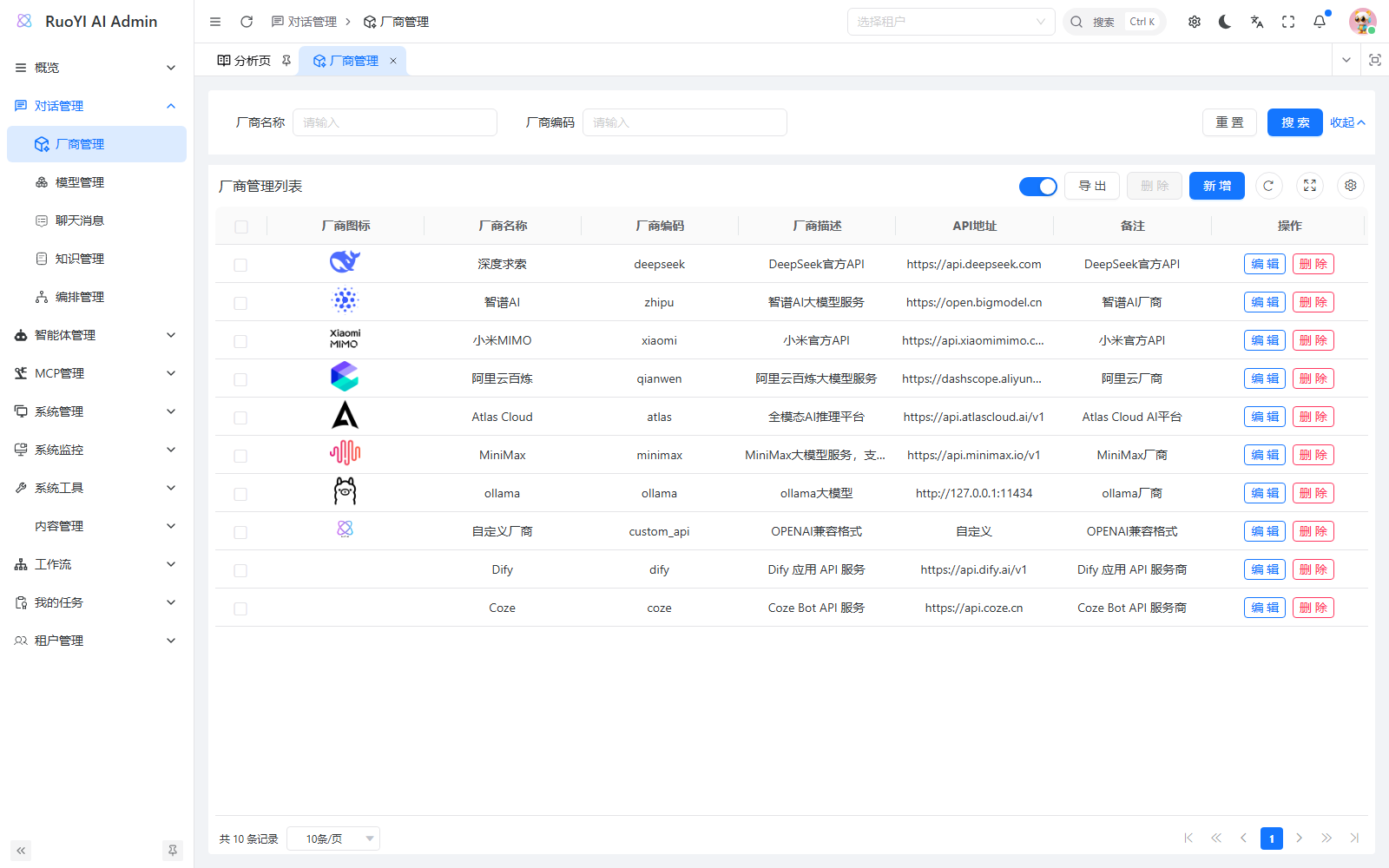
For DeepSeek:
| Field | Value | Meaning |
|---|---|---|
| Name | DeepSeek | Customizable display name. |
| Code | DeepSeek, deepseek | Selects its backend adapter. |
| API address | https://api.deepseek.com | Default copied to new models; use the service address matching the model and Key. |
| Sort order | 0 | Ascending, then provider ID. |
| Status | Enabled | Required for model configuration and new calls. |
| Icon, description, notes | Optional | Display metadata, not protocol settings. |
Save and confirm the row appears. Provider forms do not contain API keys or call a model on save.
Within a tenant, undeleted providers cannot share a code, including disabled records. For duplicate-code errors, reuse the existing row. Editing its name or address while retaining its code is allowed.
To suspend a provider, edit its status to Disabled. It disappears from provider choices and its models disappear from user selections. Existing model settings remain, but subsequent calls are rejected. Re-enable it to restore access without recreating models.
Disabling affects new requests and does not forcibly interrupt calls already sent. Use status filters to find disabled rows.
2.3 How provider settings take effect
Selecting DeepSeek copies its address and saves providerCode=deepseek on the model. Chat loads the model and selects DeepseekServiceImpl. The main ChatServiceFacade logic, omitting null checks, is:
// 读取用户选择的模型
ChatModelVo chatModelVo =
    chatModelService.selectModelByName(chatRequest.getModel());

// 根据厂商编码选择对应的接入实现
AbstractChatService chatService =
    chatServiceFactory.getOriginalService(chatModelVo.getProviderCode());
The code connects stored configuration to implementation. Display names may change; codes must match adapters.
Providers, models, and copied addresses
ChatProvider persists to chat_provider; ChatModel to chat_model. Models store a providerCode string rather than providerId.
A regular provider's address is copied into the model form and saved independently. Later provider-address edits do not update existing model apiHost. Selecting custom_api or custom_anthropic instead clears the address for explicit entry.
Providers sort by sortOrder, then id. Each model-form opening requests enabled status=0 records in that order. Editing a model with an unavailable provider prompts you to enable it or choose another.
ChatProviderServiceImpl.requireEnabled() checks existence and status on model creation, editing, and lookup by name. Direct API calls cannot bypass it. queryAvailableList() filters user options; admin lists/details retain old configurations.
Embedding and rerank factories reload the model and check provider status before reading cached clients. Caches distinguish model records and providers, avoiding reuse after provider changes or across same-named models.
validEntityBeforeSave() checks duplicate codes within the tenant, excluding logical deletions and the current edit row. Initialization includes unique_provider_code(provider_code, tenant_id, del_flag) as a concurrency safeguard; pre-save checks provide clearer feedback.
2.4 Extend a provider: PPIO example
For existing providers, continue to model setup. For a new service, first identify its protocol. OpenAI-compatible services can follow CustomApiServiceImpl or PPIO; proprietary protocols require their own adapter.
PPIO exposes complete and streaming OpenAI-compatible chat at /openai/v1/chat/completions; see PPIO documentation.
PPIO is already integrated. The following explains the implementation for reuse with another provider; ordinary PPIO users only need the configuration at the end of this section.
Existing chat adapters
Classes are in org.ruoyi.service.chat.impl.provider:
| Provider | Code | Adapter |
|---|---|---|
| DeepSeek | deepseek | DeepseekServiceImpl |
| PPIO | ppio | PpioChatServiceImpl |
| OpenAI | openai | OpenAIServiceImpl |
| Qwen / Bailian | qianwen | QianWenChatServiceImpl |
| Zhipu | zhipu | ZhiPuChatServiceImpl |
| Ollama | ollama | OllamaServiceImpl |
| MiniMax | minimax | MinimaxServiceImpl |
| Xiaomi MiMo | xiaomi | MiMoServiceImpl |
| Atlas Cloud | atlas | AtlaServiceImpl |
| Custom OpenAI | custom_api | CustomApiServiceImpl |
| Custom Anthropic | custom_anthropic | CustomAnthropicServiceImpl |
| Dify | dify | DifyChatServiceImpl |
| Coze | coze | CozeChatServiceImpl |
Choose an existing provider adapter or a compatible custom protocol, then configure its address, model ID and real API Key in Model Management.
Ollama chat and embedding adapters do not read a Key. For a local service without authentication, use a reachable HTTP or HTTPS address and leave the Key empty. Authenticated Ollama gateways require adapter authentication support.
Dify and Coze use dedicated adapters. FastGPT and RAGFlow have no dedicated classes and can use custom_api when compatible. See Platform integration.
Step 1: implement a chat adapter. PPIO and DeepSeek can both use OpenAI-compatible clients. PPIO uses its own ppio identity and credentials.
Implement AbstractChatService with:
| Method | Purpose |
|---|---|
getProviderName() | Provider code, ppio here. |
buildStreamingChatModel(...) | Streaming client for incremental output. |
buildChatModel(...) | Complete-response client for agents and Supervisor. |
PpioChatServiceImpl
Define the code in ChatModeType:
PPIO("ppio", "PPIO 派欧云"),The implementation in org.ruoyi.service.chat.impl.provider.PpioChatServiceImpl, with imports omitted:
package org.ruoyi.service.chat.impl.provider;

import dev.langchain4j.model.chat.ChatModel;
import dev.langchain4j.model.chat.StreamingChatModel;
import dev.langchain4j.model.openai.OpenAiChatModel;
import dev.langchain4j.model.openai.OpenAiStreamingChatModel;
import org.ruoyi.common.chat.domain.dto.request.ChatRequest;
import org.ruoyi.common.chat.domain.vo.chat.ChatModelVo;
import org.ruoyi.enums.ChatModeType;
import org.ruoyi.observability.MyChatModelListener;
import org.ruoyi.service.chat.AbstractChatService;
import org.springframework.stereotype.Service;

import java.time.Duration;
import java.util.List;

/** PPIO 的 OpenAI Chat Completions 兼容接入。 */
@Service
public class PpioChatServiceImpl implements AbstractChatService {

    @Override
    public StreamingChatModel buildStreamingChatModel(ChatModelVo config, ChatRequest request) {
        String baseUrl = normalizeBaseUrl(config.getApiHost());
        return OpenAiStreamingChatModel.builder()
            .baseUrl(baseUrl)
            .apiKey(config.getApiKey())
            .modelName(config.getModelName())
            .listeners(List.of(new MyChatModelListener()))
            .returnThinking(Boolean.TRUE.equals(request.getEnableThinking()))
            .timeout(Duration.ofMinutes(3))
            .build();
    }

    @Override
    public ChatModel buildChatModel(ChatModelVo config) {
        String baseUrl = normalizeBaseUrl(config.getApiHost());
        return OpenAiChatModel.builder()
            .baseUrl(baseUrl)
            .apiKey(config.getApiKey())
            .modelName(config.getModelName())
            .listeners(List.of(new MyChatModelListener()))
            .timeout(Duration.ofMinutes(3))
            .build();
    }

    private String normalizeBaseUrl(String apiHost) {
        if (apiHost == null) {
            return null;
        }
        String baseUrl = apiHost.replaceAll("/+$", "");
        return baseUrl.endsWith("/openai") ? baseUrl + "/v1" : baseUrl;
    }

    @Override
    public String getProviderName() {
        return ChatModeType.PPIO.getCode();
    }
}
@Service enables discovery. ChatServiceFactory collects AbstractChatService beans by getProviderName() at startup, so no factory branch is needed. Codes must be unique; the current Map.put() would overwrite duplicates.
Both builders validate before resolving keys and use normalized https://api.ppio.com/openai/v1. LangChain4j appends /chat/completions. The adapter also normalizes official /openai examples and trailing slashes.
PPIO serves multiple model families, so this adapter does not copy DeepSeek-specific thinking, reasoning_effort, or parallel_tool_calls. returnThinking receives returned reasoning; it does not enable the remote model's reasoning mode. Configure tools, image input, and reasoning options according to the selected model.
Step 2: use the configured API Key. Read ChatModelVo.getApiKey() when creating the provider client. Administrators enter the real Key in Model Management. Model creation, editing and batch updates store the supplied value directly.
Use the Key issued by the selected service: a DeepSeek model hosted by PPIO still needs a PPIO Key.
Step 3: configure the provider in the admin console. apps/web-antd/src/views/chat/provider/options.ts already contains:
{ label: 'PPIO', value: 'ppio' },Rebuild/restart the updated backend, then add or edit PPIO:
| Field | Value |
|---|---|
| Name | PPIO |
| Code | ppio |
| API address | https://api.ppio.com/openai/v1 |
| Status | Enabled |
| Ordering, icon, description | Optional |
Save, then select it in Model Management. Static options only provide codes; an enabled provider record must still be saved.
Keep three sources aligned: ChatModeType constants, provider-form options.ts, and saved provider records loaded by model forms. Backend /system/model/providerOptions does not automatically update the current static provider dropdown.
2.5 Choose a custom provider protocol
Custom providers support OpenAI Chat Completions and Anthropic Messages. Inspect the service's API or curl example first:
| Option | Code | Common path | Authentication |
|---|---|---|---|
| Custom OpenAI | custom_api | /v1/chat/completions | Authorization: Bearer ... |
| Custom Anthropic | custom_anthropic | /v1/messages | x-api-key plus anthropic-version |
For /v1/messages with x-api-key, choose Custom Anthropic. Compare the OpenAI and Anthropic schemas.
Choose a recognizable name and enable the record. Maintain one record per code and multiple models under it. Existing custom_api remains OpenAI-compatible after upgrade; its code need not change.
In Model Management → Add, select the saved provider. Both show protocol information and an editable request address:
| Field | OpenAI-compatible | Anthropic-compatible |
|---|---|---|
| Provider | Saved Custom OpenAI record | Saved Custom Anthropic record |
| Category | Chat (chat) | Chat (chat) |
| Model name | Service model ID | Service model ID |
| Request address | https://openai-gateway.example/v1 | https://anthropic-gateway.example/v1 |
| Key | Actual API Key | Actual API Key |
Replace the example addresses with your service URLs, preserving required path prefixes such as /api/v1. Enter the service API Key directly in the same model form. Each model can have its own address and Key; no paired environment variables are needed.
Then save a model and chat in the user app, as with DeepSeek or PPIO.
Direct curl checks and address normalization
These Bash examples call the provider directly. Replace the domain and YOUR_MODEL_ID and set variables in the same terminal.
OpenAI Chat Completions:
curl https://openai-gateway.example/v1/chat/completions \
  -H "Authorization: Bearer $CUSTOM_OPENAI_API_KEY" \
  -H "Content-Type: application/json" \
  -d '{"model":"YOUR_MODEL_ID","stream":true,"messages":[{"role":"user","content":"你好"}]}'
Anthropic Messages:
curl https://anthropic-gateway.example/v1/messages \
  -H "x-api-key: $CUSTOM_ANTHROPIC_API_KEY" \
  -H "anthropic-version: 2023-06-01" \
  -H "Content-Type: application/json" \
  -d '{"model":"YOUR_MODEL_ID","max_tokens":4096,"stream":true,"messages":[{"role":"user","content":"你好"}]}'
Prefer the base URL without /chat/completions or /messages. Full matching endpoints are also accepted and normalized before client construction. Trailing slashes are handled; a domain-only address defaults to /v1. Retain other service-specific prefixes.
Both adapters support streaming and complete responses. Anthropic defaults to 4,096 output tokens. Parsing returned thinking does not enable reasoning across arbitrary compatible services. Extra headers, proprietary parameters, nonstandard authentication, or media endpoints require adapter changes.
Code behind the custom protocols
ChatModeTypeandprovider/options.tsdefine distinct codes.CustomApiServiceImplusesOpenAiChatModel/OpenAiStreamingChatModel;CustomAnthropicServiceImpluses the corresponding Anthropic clients. Factory lookup uses the code.model-modal.vueusesgetCustomProviderConfig()to show protocol, address, and API Key hints. New provider selection clears the address; editing retains it. An empty Key edit retains the previous Key.CustomApiCredentialPolicynormalizes custom-protocol addresses. Calls use the Key saved on the model. A provider-wide batch update applies the submitted Key to that provider's models.
Existing providerCode, apiHost, and apiKey fields are reused; no database columns are added. Update both applications and create the provider records.
3. Configure a model
3.1 Maintain the category dictionary
Categories come from a dictionary. Ordinary chat requires the stored value chat. If the option exists, continue; otherwise:
- Open System Management → Dictionary Management and find Model Category, type
chat_model_category. Create the type if missing. - Select it and inspect its data. Use a Chat label with value
chat; edit labels if needed. - Add missing values with label, value, and order.
- Return to the model form. If stale, click Refresh cache in Dictionary Management, refresh the admin page, and reopen the form.
| Dictionary field | Value | Meaning |
|---|---|---|
| Type | chat_model_category | Automatically selected from the dictionary type. |
| Label | Chat | Display label; customizable. |
| Value | chat | Stored as model category. |
| Order | 0 | Ascending. |
| Label style, notes | Optional | Display metadata. |
Keep the value chat even if the label changes. Changing a dictionary value does not update existing model categories.
How options reach the form
The admin defines the type in packages/@core/base/shared/src/constants/dict-enum.ts:
CHAT_MODEL_CATEGORY: 'chat_model_category',model-modal.vue reads and then supplements/filters options:
const options = [...getDictOptions(DictEnum.CHAT_MODEL_CATEGORY)];The first getDictOptions() call requests GET /system/dict/data/type/chat_model_category and caches it. dictLabel becomes label; dictValue becomes value. Lists use the same dictionary.
The form supplies missing image, audio, video, and rerank options and filters reranking by provider. A new category entry alone does not implement a capability: adapters, backend queries, and frontend entry points are also needed. PPIO chat reuses chat.
3.2 Select the configured provider
Open Chat Management → Model Management → Add and choose DeepSeek or PPIO.
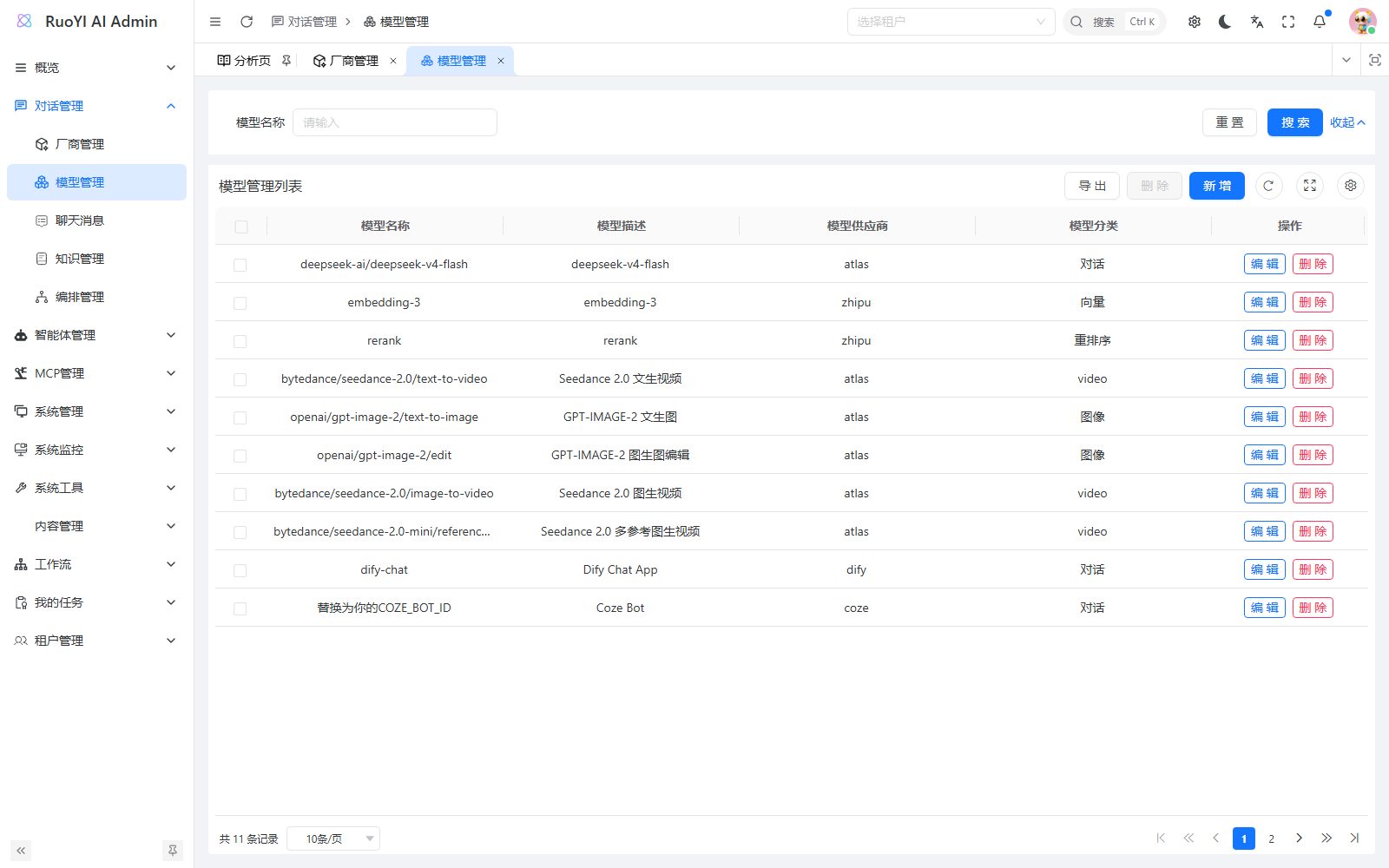
Options display names but save provider codes. If a new provider is missing, ensure it is enabled and reopen the form. Each opening requests GET /system/provider/list with status=0.
3.3 Fill in model settings
Start with ordinary chat. For a DeepSeek model allowed by the current code:
| Field | Example | Notes |
|---|---|---|
| Provider | DeepSeek | Configured record. |
| Category | Chat (chat) | Default category for ordinary chat. |
| Model name | deepseek-v4-flash | Actual service model ID. |
| Description | DeepSeek V4 Flash | User-facing name. |
| Request address | https://api.deepseek.com | Copied from the provider; hidden by default for regular chat providers. |
| Key | The actual DeepSeek API Key | Paste the Key from the provider console. |
| Notes | Optional | Intended use. |
Enter the actual Key in ruoyi-admin → Model Management. Leaving it empty when editing retains the previous Key; entering a new value replaces it. Save-time changes apply to new calls without restarting Java. Users do not supply Keys in chat.
For PPIO, use:
| Field | Example |
|---|---|
| Provider | PPIO |
| Category | Chat (chat) |
| Model name | Full authorized console ID, for example deepseek/deepseek-r1. |
| Description | PPIO DeepSeek R1, or another recognizable name. |
| Request address | Copied https://api.ppio.com/openai/v1. |
| Key | Actual API Key |
Enter the PPIO Key directly in Model Management, save, and verify in the user app.
Other providers
All implemented provider adapters read the API Key saved for the selected model. Use custom protocols for compatible services, or implement a dedicated adapter for another protocol.
Custom addresses and existing models
Manually enter a base URL for custom OpenAI or Anthropic models. For regular providers, model-modal.vue copies addresses with this logic, omitting validation:
if (getCustomProviderConfig(newProviderCode)) {
  formData.value.apiHost = undefined;
} else if (newProviderCode && providersMap.value.has(newProviderCode)) {
  const provider = providersMap.value.get(newProviderCode);
  formData.value.apiHost = provider.apiHost;
}
During editing, isLoading skips this logic to preserve the address. To change a regular chat model URL, PUT /system/model can submit a new apiHost together with required ID, provider code, model name, category, and other fields.
When creating a model through the API, supply the service address required by its adapter; ChatModelServiceImpl does not fill it from the provider table. Custom protocols support HTTP or HTTPS addresses.
3.4 Save the model
Save and inspect provider, category, name, and description. If the provider was disabled while editing, the backend rejects the save. Neither provider nor model saves test remote APIs; verify an actual conversation next.
3.5 Models for other purposes
Check category entries before creating knowledge or media models:
| Category | Purpose | Used in |
|---|---|---|
chat | Chat and reasoning | Ordinary chat, agents, workflow LLM nodes. |
vector | Embeddings | Knowledge-base embedding configuration. |
rerank | Retrieval reordering | Knowledge-base reranking. |
image | Image generation | Media Workspace, Image generation. |
audio | Speech generation | Speech synthesis. |
video | Video generation and lookup | Video generation. |
text, ppt, and music are currently extension/reserved categories. Embedding dimensions must match real output. See Knowledge and Media.
One provider, multiple capability factories
Capabilities use separate factories. For Bailian/Qwen:
| Capability | Provider code | Implementation |
|---|---|---|
| Chat | qianwen | QianWenChatServiceImpl |
| Text embeddings | qianwen | alibailian bean |
| Reranking | qianwen | qianwenRerank bean |
EmbeddingModelFactory maps qianwen to alibailian; other codes default to matching BaseEmbedModelService bean names. Existing beans include openai, ollama, alibailian, bailianMultiModel, zhipu, minimax, and siliconflow.
RerankModelFactory tries code + Rerank, then the original code. Existing beans include qianwenRerank, zhipuRerank, and siliconflowRerank. Update both filtering and switch validation associated with supportedRerankProviders in the form when adding one.
Current UI/data use rerank, while ModelType.RERANKER still contains reranker. Use rerank for models queried by the knowledge UI.
Embedding/rerank implementations receive settings through configure(ChatModelVo). If storing configuration in instance fields, use @Scope("prototype") to avoid sharing one model's settings across clients.
Media implementations use IImageGenerationService, IAudioGenerationService, and IVideoGenerationService, registered by getProviderName(). Factories currently fall back from custom_api to openai; the target still needs the corresponding media protocol.
4. Select and use a model in the user app
4.1 Start the user app
Keep Java and the admin console running. In a new terminal at ruoyi-web:
Set-Location D:\Project\github\ruoyi-web
pnpm install
pnpm run dev
Open the terminal URL and /chat, normally http://localhost:5173/chat. If documentation occupies 5173, use the actual allocated port or pnpm run dev --port 5180 and http://localhost:5180/chat.
VITE_API_URL must match the admin backend; the current default is http://127.0.0.1:6039.
4.2 Sign in and choose a model
Click Sign in and use an account in the model's tenant with access to it.
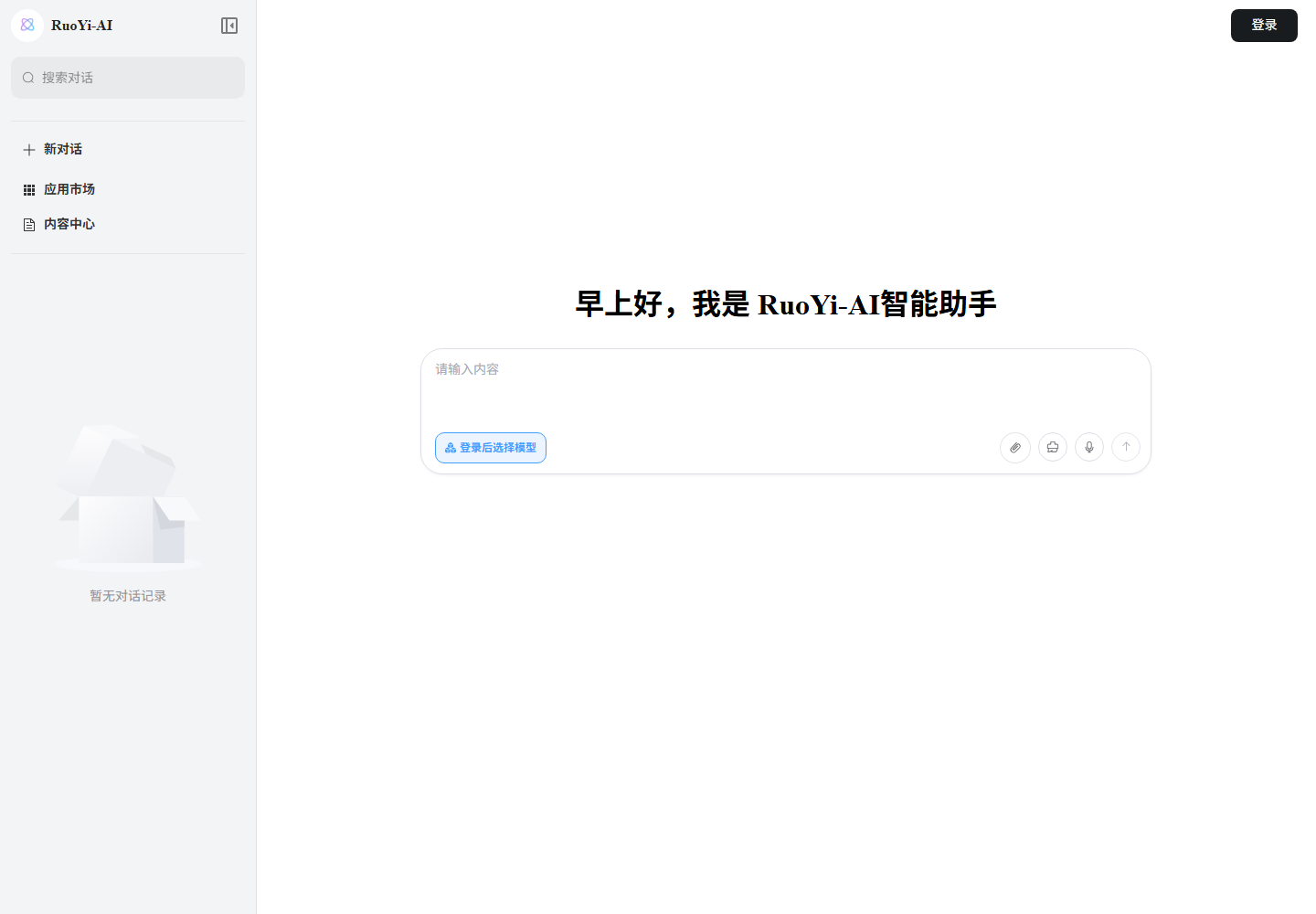
- Click New conversation.
- Open the model button below the input. If an agent/workflow is selected, choose Switch to model first. Before login, it prompts you to sign in.
- Select the configured model by description or ID. Descriptions are preferred; empty descriptions fall back to model IDs.
- Confirm the selection below the input before sending.
The selector reloads enabled-provider models whenever opened. Reopen after adding models or enabling providers; refresh if needed. Even if a disabled model remains selected in a stale page, the backend checks status on the next request.
4.3 Send the first message
Enter a simple question, for example:
你好,请用一句话介绍你能做什么。Send it. A session is created and output normally appears in fragments. After completion, ask a follow-up or reopen the session from the sidebar.
Verify ordinary chat first, then configure agents or workflows.
How selection reaches Java
ModelSelect calls GET /system/model/modelList without a category for ordinary chat, which defaults to chat. Embedding/rerank models therefore do not appear there.
useModelStore retains the selection; sending puts modelName into model. A simplified request, omitting session fields:
{
  "model": "deepseek-v4-flash",
  "content": "你好,请用一句话介绍你能做什么。"
}
POST /chat/send loads configuration by name, selects the provider, and resolves address and credentials in Java. Avoid duplicate model names within a tenant: the current lookup uses LIMIT 1.
Agent/workflow modes use their own bound models. New conversation alone does not clear an application mode; explicitly choose Switch to model.
4.4 Confirm readiness
- The new model can be found and selected.
- It returns an answer that finishes normally.
- Messages remain after refreshing or reopening the session.
Verify embeddings through document upload/retrieval, and reranking through call logs plus ordering/score changes. Rerank failures fall back to coarse results, so returned fragments alone do not prove reranking worked. Chat only verifies chat capability.
5. Troubleshooting
| Symptom | Check |
|---|---|
| Admin login/API failure | Java startup and proxy target. |
| Provider code absent | Static options.ts; a new backend enum does not update it automatically. |
| Duplicate provider code | Existing enabled or disabled records in the same tenant; reuse one. |
| Provider absent in model form | Enabled state, reopen form, tenant, and permissions. |
| Missing/stale Chat category | chat_model_category value chat; refresh dictionary cache and page. |
| Provider unconfigured/disabled on save or call | Matching provider row and status, or select another enabled provider. |
| Unable to save a model | Check enabled provider, category and model name. Enter the actual API Key directly. |
| Model missing in user list | Login, enabled provider, chat, same backend and tenant. |
| List permission error | system:model:list or coding:harness:use. |
| Calls retain the old provider address | Update the model's independently saved apiHost. |
| Unsupported model category error | Provider code matches getProviderName() and updated Java is running. |
| 401 / 403 | Check the API Key in Model Management, service permissions and quota. |
| 404 or unknown model | Final API URL and exact model ID. |
| Custom service call fails | Check the protocol, request address and API Key configured for this model. |
| Chat succeeds but agents fail | Complete-response client and required tool-call support. |
Display names in model selectors
Selectors and current-model buttons prefer modelDescribe, falling back to modelName for missing, empty, or whitespace descriptions. Before selection, the button says Select model. Hover an option for the full ID.
ChatModelSelectVo returns id, modelName, modelDescribe, and providerCode, without addresses, secrets, or internal notes. Selection uses record ID, so matching display names do not highlight multiple options.
Editing descriptions changes display only; calls retain modelName. After an upgrade, rebuild/restart the backend and user frontend, then refresh.
Code locations
Backend, under ruoyi-ai/ruoyi-modules/ruoyi-chat/src/main/java/org/ruoyi/:
controller/chat/ChatProviderController.java
controller/chat/ChatModelController.java
domain/entity/chat/ChatProvider.java
enums/ChatModeType.java
factory/ChatServiceFactory.java
factory/EmbeddingModelFactory.java
factory/RerankModelFactory.java
service/chat/AbstractChatService.java
service/chat/impl/ChatServiceFacade.java
service/chat/impl/ChatModelServiceImpl.java
service/chat/impl/ChatProviderServiceImpl.java
service/chat/impl/provider/
Shared models, selection DTOs, and credential rules under ruoyi-ai/ruoyi-common/ruoyi-common-chat/src/main/java/org/ruoyi/common/chat/:
entity/chat/ChatModel.java
domain/vo/chat/ChatModelVo.java
domain/vo/chat/ChatModelSelectVo.java
domain/bo/chat/ChatModelBo.java
domain/bo/chat/ModelBatchKeyBo.java
security/CustomApiCredentialPolicy.java
Admin frontend, under ruoyi-admin/apps/web-antd/src/:
views/chat/provider/options.ts
views/chat/provider/provider-modal.vue
views/chat/model/model-modal.vue
views/system/dict/index.vue
utils/dict.ts
store/dict.ts
api/chat/provider/index.ts
User frontend, under ruoyi-web/src/:
components/ModelSelect/index.vue
components/ChatSender/index.vue
stores/modules/model.ts
api/model/index.ts
pages/chat/layouts/chatWithId/index.vue