
Context management
RuoYi AI reads history within a session, persists and restores chat records, and uses a recent-message memory window. Users can ask follow-ups in the same session or reopen a saved conversation.
Context management determines which information the model receives, in what order, and under which message roles. System prompts, history, the current question, retrieved knowledge, and tool results can all contribute. Session memory is one part of context management.
This page incorporates the former Memory Management guide. It introduces concepts, verifies existing behavior, and then shows how to extend windows, storage, and long-term memory with LangChain4j. Read concepts, UI verification, current code, the standalone example, and extension options in that order.
Versions and scope
The Chinese source guide checked the LangChain4j 1.20.0 release on 2026-09-08: stable modules 1.20.0, corresponding beta modules 1.20.0-beta30. The local ruoyi-ai/pom.xml uses 1.17.2 / 1.17.2-beta27, with community modules 1.17.0-beta27.
Sections 1–3 describe the current project. Section 4 onward is a 1.20.0 development tutorial requiring new classes, tables, and wiring. It does not describe existing admin features or upgrade backend dependencies.
See Example project and key code, or download the complete Maven project, including JDBC snapshots and a verification entry point without an external model.
1. History, memory, and context
1.1 How a model remembers a previous turn
A normal model call does not store the application's entire conversation. The application selects and resends relevant information:
| Concept | Meaning | Project example |
|---|---|---|
| History | What the user and assistant actually said, for review. | chat_message database records. |
| Chat memory | History retained for the next request; older content may be evicted or summarized. | Session-based reads and MessageWindowChatMemory. |
| Context | The actual input sent in this request. | System prompt, selected history, current question, and optional knowledge. |
A message visible in the UI may no longer be visible to the model. ChatMemory manages model memory; the application preserves complete history separately. See Chat Memory.
1.2 Persistence versus long-term memory
| Need | Capability | Current project |
|---|---|---|
| Follow up in the original session | Session memory | Implemented. |
| Review chat after refreshing | History persistence and restoration | Implemented. |
| Limit long-conversation input | Message or token window; tokens measure model input/output and are not character counts | Most recent 20 historical messages. |
| Remember a Java-example preference in a new session | Cross-session facts/preferences and retrieval | No separate data model or recall path yet. |
| Summarize older turns automatically | Summary generation, storage, and reinjection | Configuration placeholders only. |
MySQL persistence prevents data loss when a process exits. Long-term memory also decides what to retain, who owns it, when to recall it, and how to update it. Knowledge bases typically hold business material; long-term memory holds user/task facts. Retrieval technology can be shared while keeping scopes separate.
1.3 Parts of a request context
| Part | Purpose | Current source and limits |
|---|---|---|
| System prompt | Role, duties, style, constraints | Agent systemPrompt and subagent prompts; ordinary model chat does not automatically inject agent prompts. |
| History | Resolve follow-ups such as “continue” | Saved text by sessionId, at most 20 historical messages. |
| Current question | This turn's task | ChatRequest.content, after history; augmented when using knowledge. |
| Knowledge fragments | Business facts and references | Request/agent knowledge associations; see Knowledge. |
| Tool results | Return query/action output to the model | Actual agent tool execution; MCP currently goes to the web-search subagent, see MCP. |
| Output constraints | JSON, SQL, tables, or other structured results | Business prompts and validation, without a unified context-policy admin page. |
Ordinary chat, Supervisor, workflows, and Coding Harness assemble inputs separately. Not every request contains every part.
1.4 Context-writing principles
- Separate rules and reference material. Keep system duties distinct from retrieved text, history, and tool output, retaining sources.
- State the task and output. Provide the question, background, constraints, and format; validate JSON/SQL in code.
- Budget the whole request. History limits do not include every prompt, retrieval result, current input, or output reservation. See section 6.
- Inspect actual messages before tuning prompts. Check order, duplicates, relevance, and returned tool output with the breakpoints below.
2. Verify existing memory in the UI
2.1 Prepare a working session
- Complete Local installation.
- Configure a working chat model and confirm it is selectable.
- Sign in, start New conversation, select an ordinary model, and use plain text first.
There is no long-term-memory admin page or switch to enable first. Ordinary chat already reads same-session history.
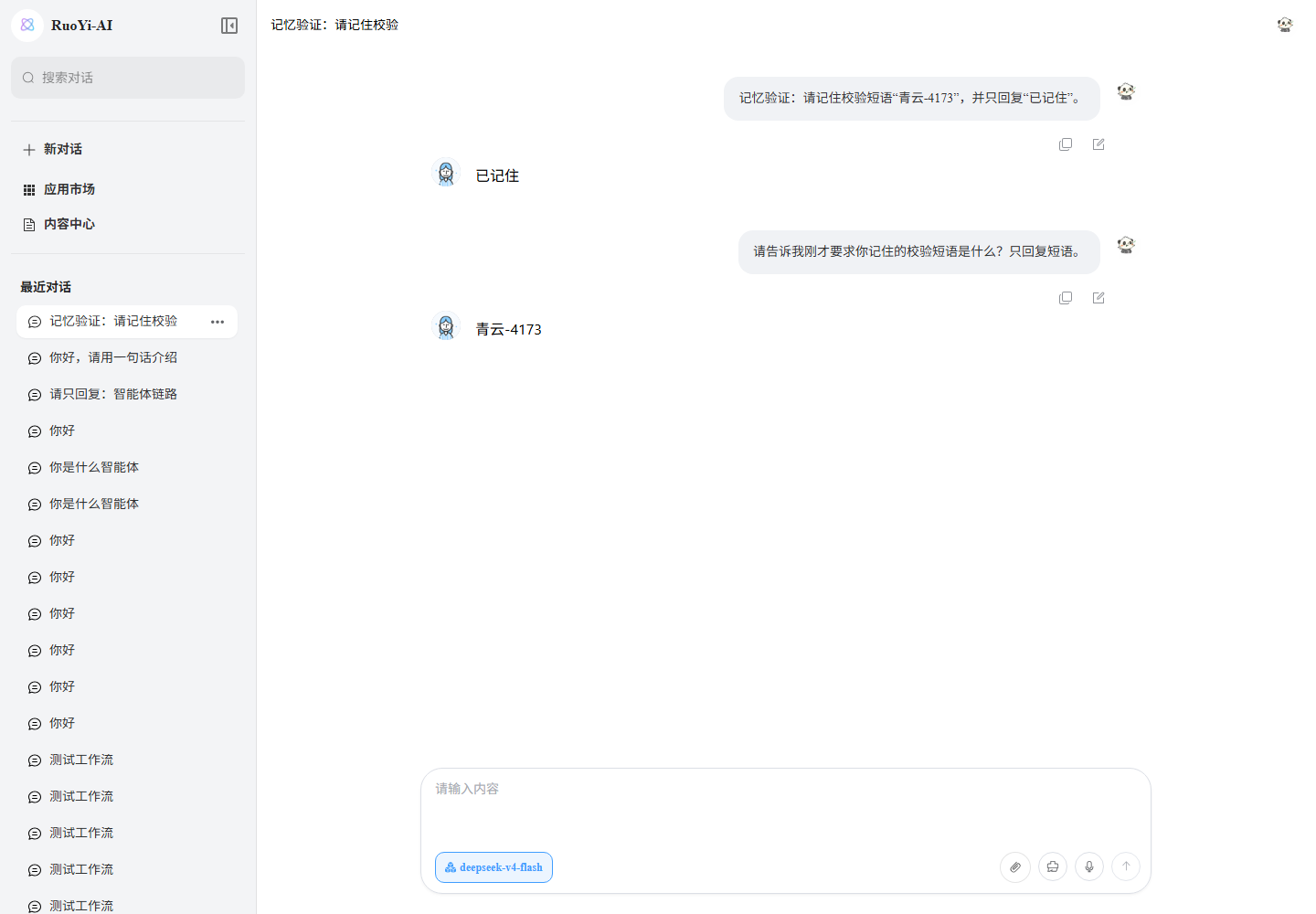
2.2 Use two turns to verify context
Send these in the same session, waiting for the first answer to finish:
第一轮:记忆验证:请记住校验短语“青云-4173”,并只回复“已记住”。
第二轮:请告诉我刚才要求你记住的校验短语是什么?只回复短语。
The second answer should contain the temporary marker 青云-4173. A made-up marker avoids answers guessed from general knowledge; extra wording is acceptable if the marker is correct.
2.3 Check persistence, restoration, and isolation
| Action | Expected result | Evidence |
|---|---|---|
| Record the session URL ID, refresh, and reopen | Four user/assistant messages from two turns remain | Server history restoration. |
| Ask for the marker again in the restored session | Correct marker | Restored history reaches the model. |
| Start another session and ask for the previous marker | New request excludes old-session messages | Isolation; inspect messages rather than trusting the answer alone. |
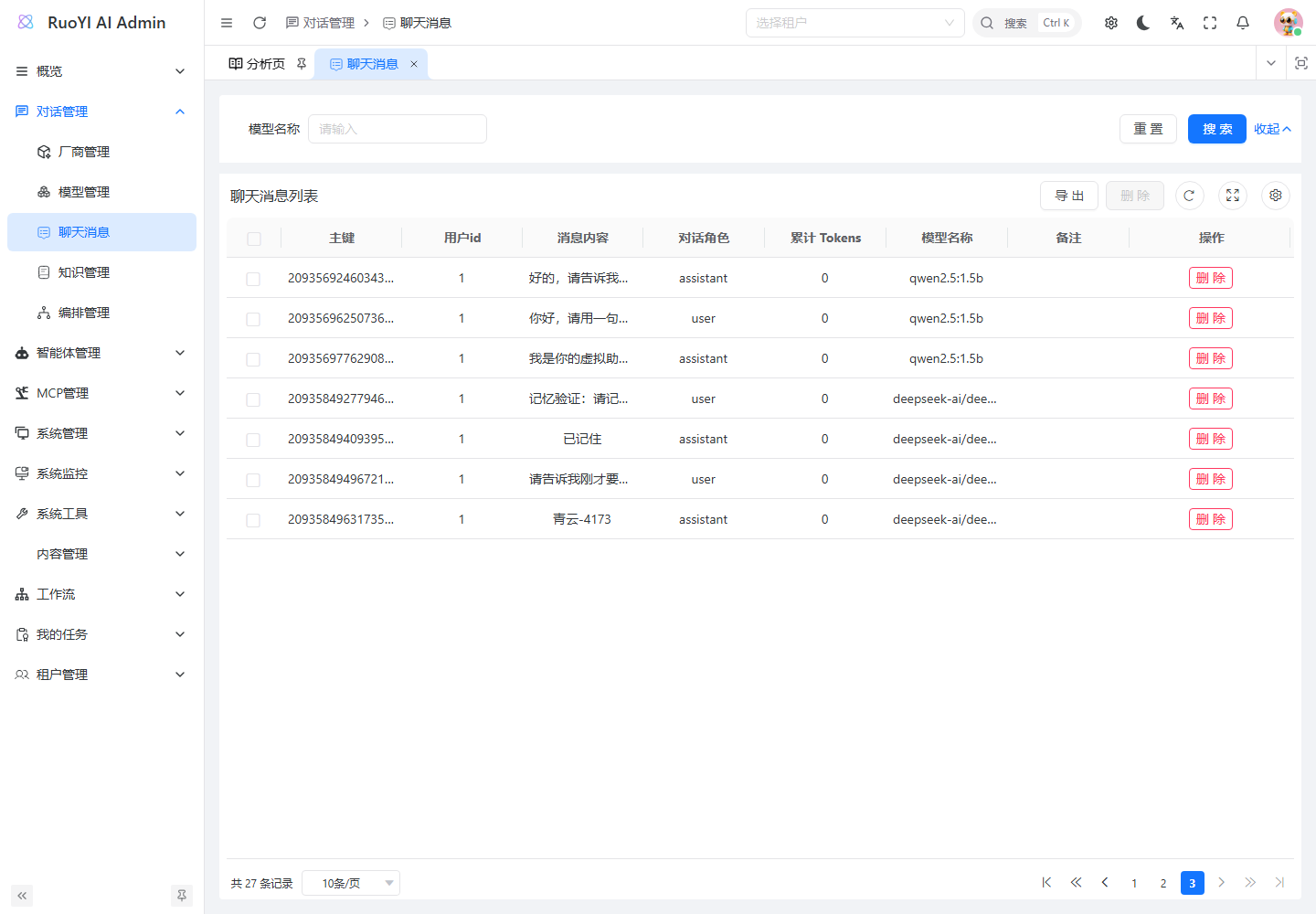
| Open Chat Management → Chat Messages in admin | Corresponding user and assistant rows | Persistence; additional turns increase the count. |
Break at streamingChatModel.chat(messages, ...) in ChatServiceFacade#handleModelChat. Inspect messages before sending: old-session history is present, a new session excludes the marker, and the last message is the current question. Browser Network shows only frontend input; history is appended in Java.
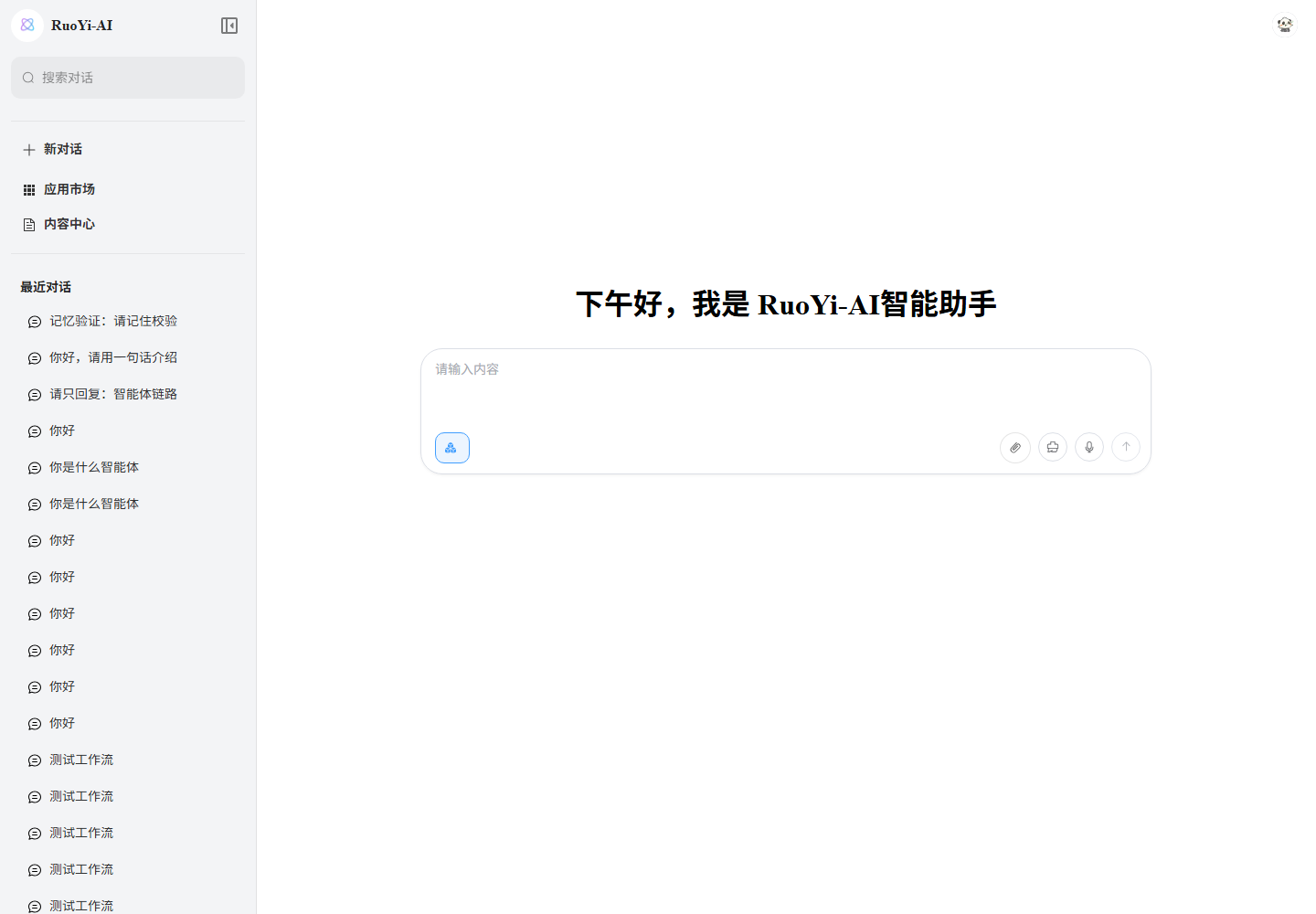
These earlier screenshots use deepseek-v4-flash to demonstrate recall, refresh recovery, and persistence. They do not show deployment of the 1.20.0 extension code.
3. Current context and memory assembly
3.1 Trace a request
In ruoyi-ai:
ChatServiceFacade#sseChatchecks session ownership.buildContextMessagescallscreateChatMemoryby session ID.PersistentChatMemoryStore#getMessagesloads and convertschat_messagerecords.MessageWindowChatMemory.messages()selects up to 20 historical messages, then the current question is appended separately.- The final request is assembled, with optional knowledge augmentation. Business services save user input; the normal stream-completion callback saves the answer.
20 means historical messages, not 20 exchanges or a total request limit. A question/answer pair usually takes two entries; the current input is outside this window. Prompts and knowledge increase request length further.
History conversion currently restores text user/assistant messages only. Persisting tool-call sequences or multimodal content across requests requires extending the format.
3.2 Actual storage and configuration behavior
PersistentChatMemoryStore method | Behavior |
|---|---|
getMessages(memoryId) | Load session messages from the database. |
updateMessages(memoryId, messages) | Log only; no database write. |
deleteMessages(memoryId) | Delete session messages through deleteBySessionId. |
ChatMessageServiceImpl#saveChatMessage performs inserts. The business layer saves history; the memory window reads/selects it. Attaching this existing store to AI Services will not make memory.add() persist new messages.
These ChatMemoryProperties fields are defined but not wired into the path:
| Setting | Default | Current effect |
|---|---|---|
chat.memory.enabled | true | Cannot disable history injection yet. |
chat.memory.max-messages | 20 | Still uses DEFAULT_MAX_MESSAGES = 20. |
chat.memory.persistence-enabled | true | Cannot disable business-message writes yet. |
chat.memory.summarize-enabled | false | No summary execution. |
chat.memory.auto-cleanup-days | 0 | No expiry cleanup job using this field. |
YAML edits alone do not implement them. See section 6.
3.3 Read the ordinary-chat assembly code
In ruoyi-modules/ruoyi-chat/src/main/java/org/ruoyi/service/chat/impl/ChatServiceFacade.java, buildContextMessages orders system prompt, when agent settings exist → history → current question. Ordinary chat then uses:
private List<ChatMessage> buildModelChatMessages(ChatRequest chatRequest) {
    List<ChatMessage> messages = new ArrayList<>(chatRequest.getContextMessages());
    String augmentedInput = augmentAgentInput(chatRequest, null);
    int lastIndex = messages.size() - 1;
    if (lastIndex >= 0 && messages.get(lastIndex) instanceof UserMessage) {
        messages.set(lastIndex, UserMessage.userMessage(augmentedInput));
    }
    return messages;
}
new ArrayList<>(...)copies the assembled sequence.augmentAgentInput(chatRequest, null)reuses knowledge augmentation with request knowledge rather than an agent configuration.messages.set(lastIndex, ...)replaces the current input, avoiding duplication.
handleModelChat sends this list to the streaming model. Earlier user/assistant messages should precede the current question; knowledge appears in the augmented current input.
3.4 Context across execution paths
| Path | Assembly | Entry |
|---|---|---|
| Ordinary model chat | History plus current input, optionally augmented | handleModelChat. |
| Supervisor agent | formatHistoryMessages turns history into dialogue text; current input is augmented separately and combined with the system prompt; tools execute within subagents | handleAgentChat, Agents. |
| Workflow | Startup inputs and preceding outputs feed nodes with their own prompts/settings | handleWorkflowChat → WorkFlowStarterService#streaming, Workflows. |
| Coding Harness | Own prompt, state, and skill assembly | DefaultHarnessPromptAssembler, Skills. |
The ordinary-chat 20-message window is not a shared policy for every path. Locate the execution path before editing context behavior.
3.5 Extend business prompts
This template is not an existing configuration field. Map placeholders to real retrieval results, tool output, and business inputs before integration:
任务:根据参考资料回答当前问题。
当前问题:{question}
参考资料:{retrieved_documents}
工具返回:{tool_results}

要求:
1. 区分资料中已经确认的事实与推断。
2. 资料不足或工具失败时,说明缺口。
3. 按 {output_schema} 输出,并保留可追溯的资料来源。
For RAG, explain what to do when evidence is missing. For tools, state when to use them and which arguments need clarification. For media, separate subject, scene, style, dimensions, and reference material, respecting actual API support. Avoid putting all history, knowledge, and tool results into one undifferentiated string.
4. Run a minimal LangChain4j 1.20.0 example
4.1 Relevant APIs
| API | Responsibility | Use |
|---|---|---|
ChatMemory | Add, read, replace, clear memory | Manual assembly. |
MessageWindowChatMemory | Message-count limit | Simple, relatively consistent message lengths. |
TokenWindowChatMemory | Estimated token limit | Long text and input budgeting. |
ChatMemoryStore | Current window for one ID | Database or Redis storage. |
ChatMemoryProvider, @MemoryId | Per-session memory | Multi-user/session AI Services. |
ChatMemoryAccess | Access instances and evict caches | Inspection and idle-session release. |
Dynamic windows and experimental asynchronous memory APIs introduced in 1.20.0 are covered later. Not every basic API above was introduced in that release.
4.2 Create a standalone Maven example
Create memory-demo outside the backend, with JDK 17+ and Maven. Save this pom.xml and place Java files in src/main/java:
<project xmlns="http://maven.apache.org/POM/4.0.0"
         xmlns:xsi="http://www.w3.org/2001/XMLSchema-instance"
         xsi:schemaLocation="http://maven.apache.org/POM/4.0.0 https://maven.apache.org/xsd/maven-4.0.0.xsd">
    <modelVersion>4.0.0</modelVersion>
    <groupId>example</groupId>
    <artifactId>memory-demo</artifactId>
    <version>1.0.0</version>
    <properties>
        <maven.compiler.release>17</maven.compiler.release>
        <project.build.sourceEncoding>UTF-8</project.build.sourceEncoding>
    </properties>
    <dependencies>
        <dependency>
            <groupId>dev.langchain4j</groupId>
            <artifactId>langchain4j</artifactId>
            <version>1.20.0</version>
        </dependency>
    </dependencies>
    <build>
        <plugins>
            <plugin>
                <groupId>org.apache.maven.plugins</groupId>
                <artifactId>maven-compiler-plugin</artifactId>
                <version>3.14.0</version>
            </plugin>
            <plugin>
                <groupId>org.codehaus.mojo</groupId>
                <artifactId>exec-maven-plugin</artifactId>
                <version>3.5.0</version>
            </plugin>
        </plugins>
    </build>
</project>
Save src/main/java/MemoryDemo.java:
import dev.langchain4j.data.message.AiMessage;
import dev.langchain4j.data.message.UserMessage;
import dev.langchain4j.memory.chat.MessageWindowChatMemory;
import dev.langchain4j.store.memory.chat.InMemoryChatMemoryStore;

public class MemoryDemo {
    public static void main(String[] args) {
        var store = new InMemoryChatMemoryStore();
        var memory = MessageWindowChatMemory.builder()
                .id("session-1001")
                .maxMessages(3)
                .chatMemoryStore(store)
                .build();

        // 手工添加消息,观察窗口行为,不调用模型。
        memory.add(UserMessage.from("项目代号是青云-4173"));
        memory.add(AiMessage.from("已记住"));
        memory.add(UserMessage.from("请用 Java 举例"));
        memory.add(AiMessage.from("好的"));
        System.out.println("window size = " + memory.messages().size());
        System.out.println("oldest retained = "
                + ((AiMessage) memory.messages().get(0)).text());

        // 相同 ID + 相同 store:新实例读取已保存的窗口。
        var restored = MessageWindowChatMemory.builder()
                .id("session-1001").maxMessages(3).chatMemoryStore(store).build();
        System.out.println("restored size = " + restored.messages().size());
        var other = MessageWindowChatMemory.builder()
                .id("session-1002").maxMessages(3).chatMemoryStore(store).build();
        System.out.println("other session size = " + other.messages().size());
        memory.clear();
        System.out.println("after clear = " + restored.messages().size());
    }
}
Run from memory-demo:
mvn -q compile exec:java "-Dexec.mainClass=MemoryDemo"Expected output, apart from Maven/logging messages:
window size = 3
oldest retained = 已记住
restored size = 3
other session size = 0
after clear = 0
No API key or model answer is involved. It checks eviction, same-ID restoration, different-ID isolation, and clearing. InMemoryChatMemoryStore lasts only within the JVM; section 5 adds persistence.
4.3 Let AI Services manage conversation messages
AI Services creates a model-backed Java interface and adds inputs/outputs to memory. Save src/main/java/MemoryAssistantFactory.java:
import dev.langchain4j.memory.chat.MessageWindowChatMemory;
import dev.langchain4j.model.chat.ChatModel;
import dev.langchain4j.service.AiServices;
import dev.langchain4j.service.MemoryId;
import dev.langchain4j.service.UserMessage;
import dev.langchain4j.service.memory.ChatMemoryAccess;
import dev.langchain4j.store.memory.chat.ChatMemoryStore;

public class MemoryAssistantFactory {
    public interface Assistant extends ChatMemoryAccess {
        String chat(@MemoryId String memoryId, @UserMessage String question);
    }

    public static Assistant create(ChatModel model, ChatMemoryStore store) {
        return AiServices.builder(Assistant.class)
                .chatModel(model)
                .chatMemoryProvider(id -> MessageWindowChatMemory.builder()
                        .id(id)
                        .maxMessages(20)
                        .alwaysKeepSystemMessageFirst(true)
                        .chatMemoryStore(store)
                        .build())
                .build();
    }
}
model is an already-configured ChatModel, such as one from the project's selected service's buildChatModel. Initially use InMemoryChatMemoryStore for store. From a service holding both:
var assistant = MemoryAssistantFactory.create(model, store);
// 示例 ID;实际先校验会话归属,再由服务端生成。
String memoryId = "tenant-1:user-42:agent-7:session-1001";
String first = assistant.chat(memoryId, "项目代号是青云-4173,请记住。");
String second = assistant.chat(memoryId, "项目代号是什么?");
Reuse the assistant and pass the same ID and type for a session. A shared store also requires builder .id(id); @MemoryId does not set a custom builder's storage ID. The composite string shown cannot be passed directly to the existing PersistentChatMemoryStore, which parses a Long.
Here 20 limits all messages added to memory, including the current question, unlike the current project's 20 historical messages plus current input. Do not add the same history/input again manually. See AI Services memory and concurrency.
5. Persist windows while retaining full history
5.1 Assign storage responsibilities
updateMessages(id, messages) receives the complete latest window snapshot, not a single new message. Replace the old snapshot, including with an empty list. Appending snapshots duplicates data; replacing full chat history with a window loses evicted history. See ChatMemoryStore 1.20.0.
| Data | Content | Update |
|---|---|---|
Existing chat_message | Actual user/assistant history | Append business messages for UI review. |
Proposed chat_memory_snapshot | Model continuation window with message types | Replace by memory_id. |
| Future long-term memory | Preferences/facts and sources | Update, expire, or delete facts. |
5.2 Add a database or Redis adapter
Save src/main/java/JsonChatMemoryStore.java. SnapshotRepository is an application interface defined by this guide, not a LangChain4j component. Implement it for cross-process restoration; the downloadable project includes JDBC.
import dev.langchain4j.data.message.ChatMessage;
import dev.langchain4j.data.message.ChatMessageDeserializer;
import dev.langchain4j.data.message.ChatMessageSerializer;
import dev.langchain4j.store.memory.chat.ChatMemoryStore;
import java.util.ArrayList;
import java.util.List;
import java.util.Objects;

public class JsonChatMemoryStore implements ChatMemoryStore {
    public interface SnapshotRepository {
        String find(String memoryId); // 不存在时返回 null
        void replace(String memoryId, String json); // 原子替换整个快照
        void delete(String memoryId); // 不存在时也视为成功
    }

    private final SnapshotRepository repository;

    public JsonChatMemoryStore(SnapshotRepository repository) {
        this.repository = Objects.requireNonNull(repository);
    }

    @Override
    public List<ChatMessage> getMessages(Object memoryId) {
        String json = repository.find(key(memoryId));
        return json == null ? new ArrayList<>()
                : new ArrayList<>(ChatMessageDeserializer.messagesFromJson(json));
    }

    @Override
    public void updateMessages(Object memoryId, List<ChatMessage> messages) {
        Objects.requireNonNull(messages);
        repository.replace(key(memoryId), ChatMessageSerializer.messagesToJson(messages));
    }

    @Override
    public void deleteMessages(Object memoryId) {
        repository.delete(key(memoryId));
    }

    private static String key(Object memoryId) {
        return Objects.requireNonNull(memoryId, "memoryId").toString();
    }
}
Official serializers preserve roles and tool-call structures. toString() or plain text alone cannot reliably restore them. Remote resource availability still depends on link expiry.
For MySQL, create this example table and implement the repository with MyBatis or JDBC:
CREATE TABLE chat_memory_snapshot (
    memory_id VARCHAR(191) CHARACTER SET utf8mb4 COLLATE utf8mb4_bin NOT NULL,
    messages_json LONGTEXT NOT NULL,
    updated_at TIMESTAMP(3) NOT NULL DEFAULT CURRENT_TIMESTAMP(3)
        ON UPDATE CURRENT_TIMESTAMP(3),
    PRIMARY KEY (memory_id)
);
find reads by primary key; replace uses a parameterized upsert for the complete JSON; delete removes by key. Add schema changes to migrations. Composite server-generated IDs scope data but do not automatically enable RuoYi tenant interception; management APIs need explicit tenant/user authorization.
For Redis, a key such as chat:memory:{memoryId} maps to GET, SET, and DEL, with an appropriate TTL. Snapshot expiry does not delete MySQL history.
5.3 Integrate and verify recovery
- Implement/inject
SnapshotRepositoryand reuse oneJsonChatMemoryStore. - Pass it to
MemoryAssistantFactory.create(model, store). - Complete two exchanges and confirm one current JSON snapshot per ID, without duplicate messages.
- Restart and continue with the same ID; confirm storage is read again and other IDs stay separate.
- Simulate unavailable storage and require an explicit failure. Returning empty history on database errors silently loses memory.
Atomic replacement prevents partial writes but not concurrent read-modify-write overwrites. Serialize each entire turn per ID, including across application instances.
6. Extend windows and integrate with the project
6.1 Choose an integration approach
| Approach | Implementation | Use |
|---|---|---|
| Retain the Facade | Business history writes, window selection, configuration wiring | Smaller changes to existing session memory. |
| Adopt AI Services | Provider and writable snapshot store from sections 4–5 | New services or consistent message/tool/window management. |
Assign one writer per responsibility. Do not write the same input through both Facade and AI Services. The steps below are development work, not already-active settings.
6.2 Wire existing switches and message limits
- Inject
ChatMemoryPropertiesintoChatServiceFacadeusing its constructor and afinalfield. - Guard historical reads in
buildContextMessageswithBoolean.TRUE.equals(chatMemoryProperties.getEnabled()). Keep the current question and required system prompt when disabled. - Replace
DEFAULT_MAX_MESSAGESwith a nonnull, positive validatedgetMaxMessages(). - Define configuration refresh: static limits are fixed at instance creation. Restart after startup-setting changes, or implement dynamic providers/config refresh or instance eviction.
- Compare actual outgoing messages for enabled/disabled states and different limits, with exactly one current question.
Only after wiring can backend application.yml or its active profile use:
chat:
  memory:
    enabled: true
    max-messages: 20
Prefer defining enabled: false as “do not inject history this turn,” while still retaining full records. Persistence is a separate behavior requiring business-write changes. Summary/cleanup switches need actual execution logic too.
6.3 Use a token window for long text
Equal message counts can contain vastly different lengths. Supply a model-appropriate TokenCountEstimator to src/main/java/TokenMemoryFactory.java:
import dev.langchain4j.memory.ChatMemory;
import dev.langchain4j.memory.chat.TokenWindowChatMemory;
import dev.langchain4j.model.TokenCountEstimator;
import dev.langchain4j.store.memory.chat.ChatMemoryStore;

public class TokenMemoryFactory {
    public static ChatMemory create(String id, int memoryBudget,
                                    TokenCountEstimator estimator,
                                    ChatMemoryStore store) {
        return TokenWindowChatMemory.builder()
                .id(id)
                .maxTokens(memoryBudget, estimator)
                .alwaysKeepSystemMessageFirst(true)
                .chatMemoryStore(store)
                .build();
    }
}
For supported OpenAI text models, langchain4j-open-ai:1.20.0 provides OpenAiTokenCountEstimator. OpenAI-compatible HTTP does not imply compatible tokenization, and the estimator does not cover every image/audio/video input. See its implementation.
For an illustrative 32,768-token model, reserving 4,096 for output and 8,192 for tools, retrieval, out-of-window prompts, and margin leaves at most 20,480 for memory. Compute real budgets for the chosen model and request. Do not count messages already inside the window twice.
With the existing Facade's current-input-outside-window approach, subtract current-question tokens before allocating history. AI Services already includes the current question in its window.
Token windows evict whole messages; they do not split oversized text automatically. Reject, split, or compress an oversized current question before it is evicted. Even a retained system message may exceed the budget, so check final request length. See TokenWindowChatMemory.
6.4 Dynamic windows, system messages, and tools
The 1.20.0 builders accept functions mapping a memory ID to a positive limit:
// 替换固定 .maxMessages(20),每次操作读取当前限制。
.dynamicMaxMessages(id -> windowLimits.maxMessages(id))

// 替换固定 .maxTokens(memoryBudget, estimator)。
.dynamicMaxTokens(id -> windowLimits.maxTokens(id), estimator)
windowLimits is your own configuration service. A dynamic provider does not watch YAML automatically. messages() trims a returned copy without persisting that trim. Once a later add() or set() writes a smaller snapshot, increasing the limit cannot recover evicted content; rebuild from full history if needed.
System messages consume count/token budget. One system message is maintained per window; replace its content when rules change and use alwaysKeepSystemMessageFirst(true) to keep it first. Evicting an AiMessage with tool requests also removes corresponding results to preserve pairing. See MessageWindowChatMemory.
6.5 Check backend dependency upgrades
The standalone example uses stable modules. RuoYi AI also uses provider, MCP, agentic, and community dependencies; do not replace every version with 1.20.0. Align actual published modules and BOMs; community releases separately.
Inspect direct/transitive dependencies, compile, and run relevant module tests:
mvn -pl ruoyi-modules/ruoyi-chat -am dependency:tree "-Dincludes=dev.langchain4j:*"Cover ordinary text, stream completion/interruption, and session restoration before tools, RAG, and agents. A dependency upgrade alone does not activate placeholder configuration.
7. Summaries and cross-session long-term memory
7.1 Summarize older conversation content
Summaries can retain decisions, constraints, and open tasks alongside recent verbatim turns. The application must implement the policy: ChatMemory#set(...) replaces a window, but does not generate summaries automatically, nor does summarize-enabled: true. See ChatMemory.
- Check budget before eviction and select completed, unsummarized turns; preserve recent text and complete tool groups.
- Use a separate summarization service, avoiding recursive use of the same memory-backed assistant.
- Save summary, covered message IDs/sequences, version, and timestamp. Keep old state if summarization fails.
- Assemble summary, recent text, and current question without reinserting all covered history; check budget.
- Update the snapshot under per-session serialization; retain original
chat_messagerecords for tracing and regeneration.
Summaries can omit or distort details. Preserve traceability and inject them as conversation data, not system rules.
7.2 Remember preferences across sessions
A preference such as “Use Java examples” should survive into a new session without merging every session into one memory window. Increasing limits or using only a user ID as memory ID is insufficient.
Add a separate user-memory layer, starting with structured preferences:
| Stage | Development | Acceptance |
|---|---|---|
| Store | Tenant, user, scope, fact, source message, update time, status, optional expiry | Ownership and source are known. |
| Update | Merge/replace rules, such as Kotlin replacing Java | Conflicting old preferences do not remain active. |
| Recall | Filter by identity, authorization, scope, and expiry before direct reads or semantic retrieval | Relevant user facts reach new sessions. |
| Inject | Small amounts of reference data within the token budget | Preferences inform answers while business rules remain effective. |
| Manage | View, edit, disable, delete, and remove corresponding vectors | Corrected/deleted facts are no longer recalled. |
See Knowledge for embeddings. Restrict tenant/user/authorization during retrieval, not after global similarity search through prompt instructions.
Administrators should maintain global business rules in system prompts or knowledge bases. Ordinary user statements should not become shared rules automatically. The project has no long-term-memory page or memory-write approval flow yet; design confirmation requirements according to the product and content.
8. Asynchronous memory and streaming in 1.20.0
Version 1.20.0 adds experimental memory APIs for nonblocking AI Services. Synchronous methods remain available; adopting asynchronous calls requires support throughout the dependency chain.
| Layer | Async methods |
|---|---|
ChatMemory | addAsync, setAsync, messagesAsync; clearing remains synchronous clear(). |
ChatMemoryStore | getMessagesAsync, updateMessagesAsync, deleteMessagesAsync. |
For asynchronous deletion, await a supported store's deleteMessagesAsync(id), then evict the instance. ChatMemory has no clearAsync() in 1.20.0.
Implementing only the three synchronous store methods leaves default async methods returning failed Futures with AsyncNotSupportedException; blocking JDBC is not automatically moved to a background thread. Section 5's adapter is synchronous. Use a nonblocking client or an explicit bounded executor for JDBC/MyBatis, with timeout, cancellation, and error handling. See ChatMemoryStore.
Browser SSE does not imply use of these async memory APIs. Check model, storage, and AI Services separately.
Serialize the whole turn: history read, generation, tool execution, and final write per memory ID. For streaming, release only after completion/failure/cancellation cleanup; locking getMessages() alone is insufficient. Failed model calls may already have saved user input, so define retry and rollback behavior to avoid duplication.
9. Clear, delete, and verify
9.1 Three different operations
| Operation | Meaning | Persistence |
|---|---|---|
assistant.evictChatMemory(id) | Evict the AI Services instance cache | External data remains and can reload. |
memory.clear() | Call store deleteMessages(id) | Deletes the store-managed window; historical effects depend on the adapter. |
| Product “Delete session” | Remove the session and designated related data | Requires business transactions and cross-store cleanup. |
getChatMemory(id) can be null. To clear persisted data, authorize, stop in-flight writes, delete directly from the store, then evict the cache. Do not clear only when an instance exists. See ChatMemoryService.
Current ChatSessionServiceImpl#deleteWithValidByIds deletes only chat_session; initialization has no cascading message foreign key. Although PersistentChatMemoryStore#deleteMessages can delete messages, the session-deletion path does not call it. A disappeared list row does not prove complete deletion.
Implement authorized transactional session/message cleanup plus snapshots, memoryCache, summaries, and product-required long-term/vector cleanup. Cross-store operations need retries, and late stream callbacks must not recreate deleted data. If a cleared window rebuilds from old history, forgotten content returns; define a rebuild boundary or memory starting point.
9.2 Acceptance checks after development
These are checks for your extension, not a record of already-implemented backend features.
| Scenario | Verify |
|---|---|
| Two turns | Prior messages present; current input appears once. |
| Different sessions/users/tenants | Context and storage remain scoped. |
| Restart | Persistent windows restore; JVM-only stores lose data as expected. |
| Count/token overflow | Older window messages evict, full history remains, current input is not accidentally lost. |
| System/tool/multimodal messages | Correct position, request/result pairing, and restoration. |
| Memory disabled | No history injection; retention follows the product definition. |
| Concurrency, stream failure, retry | Stable ordering, no overwrites or duplicate/partial turns. |
| Clear/delete | Cleared content does not return through caches, snapshots, or history. |
| Summaries/long-term memory | Traceable summaries, updated preferences, no recall of deleted facts. |
10. Troubleshooting and code entry points
10.1 First checks
| Symptom | Check |
|---|---|
| No recall on turn two | Same sessionId, completed first answer, saved rows, actual outgoing history. |
| UI restores but model forgets | Window eviction, conversion, and request assembly. |
max-messages has no effect | Wiring first, then profile, validation, and cached instances. |
| AI Services loses messages | Existing log-only updateMessages() or a new in-memory store each turn. |
| Sessions mix | Shared .chatMemory(...), missing @MemoryId / .id(id), incorrectly scoped storage keys. |
| Duplicate/growing snapshots | Appended snapshots or duplicate Facade/AI Services input. |
AsyncNotSupportedException | Async calls with synchronous-only store/model implementations. |
| Deleted facts return | History reconstruction, snapshots, summaries, long-term memory, cache, late callbacks. |
10.2 Backend locations
Paths refer to ruoyi-ai, not this documentation repository. Business classes mainly live under ruoyi-modules/ruoyi-chat/src/main/java/org/ruoyi/:
| Responsibility | File/method |
|---|---|
| Versions | Root pom.xml, ruoyi-common/ruoyi-common-chat/pom.xml. |
| Session authorization | service/chat/impl/ChatServiceFacade.java, sseChat. |
| Windows and assembly | Same file, createChatMemory, buildContextMessages. |
| Existing adapter | service/chat/impl/memory/PersistentChatMemoryStore.java. |
| Unwired settings | service/chat/impl/memory/ChatMemoryProperties.java. |
| History reads/writes | ChatMessageServiceImpl, getMessagesBySessionId, saveChatMessage. |
| Deletion | ChatSessionServiceImpl, deleteWithValidByIds. |
| Management APIs | /system/session, /system/message. |
Read the request entry, context builder, storage adapter, and message service before choosing an extension layer.
11. Example project and key code
11.1 Download and run
Download the LangChain4j 1.20.0 memory project, extract it, and enter langchain4j-memory containing pom.xml. With JDK 17+ and Maven:
mvn test
mvn -q compile exec:java "-Dexec.mainClass=example.memory.MemoryDemo"
Sources also live at examples/langchain4j-memory/ in this docs repository. Unlike the standalone excerpts, packaged classes use example.memory, so commands need fully qualified names.
No API key is required for default checks. Run four separate processes for write, restart/read, clear, and read again:
mvn -q compile exec:java "-Dexec.mainClass=example.memory.PersistenceDemo" "-Dexec.args=write"
mvn -q exec:java "-Dexec.mainClass=example.memory.PersistenceDemo" "-Dexec.args=read"
mvn -q exec:java "-Dexec.mainClass=example.memory.PersistenceDemo" "-Dexec.args=clear"
mvn -q exec:java "-Dexec.mainClass=example.memory.PersistenceDemo" "-Dexec.args=read"
Expect message counts 2, 2, 0, 0; the first read also prints the marker-bearing messages. H2 stores files in data/ under the working directory, so run all four commands there in order.
For real answers, set CHAT_BASE_URL, CHAT_API_KEY, and CHAT_MODEL, then run example.memory.ChatDemo. It sends two turns to the configured OpenAI-compatible service. The included README.md covers configuration and MySQL.
11.2 Key code by responsibility
| File | Focus |
|---|---|
MemoryAssistantFactory | @MemoryId and builder .id(id) isolation. |
JsonChatMemoryStore | Official serialization and snapshot replacement. |
JdbcSnapshotRepository | Parameterized reads, upserts, and deletes. |
MemoryConversationService | Whole-turn synchronous serialization, eviction, and clearing. |
DynamicMemoryFactory / TokenMemoryFactory | Dynamic windows and token budgets. |
AsyncJsonChatMemoryStore | Async methods, executor rejection, and errors. |
PersistenceDemo / ChatDemo | Disk persistence and real model calls. |
Expand these source files to inspect or copy them:
Session isolation and AI Services
package example.memory;

import dev.langchain4j.memory.chat.MessageWindowChatMemory;
import dev.langchain4j.model.chat.ChatModel;
import dev.langchain4j.service.AiServices;
import dev.langchain4j.service.MemoryId;
import dev.langchain4j.service.UserMessage;
import dev.langchain4j.service.memory.ChatMemoryAccess;
import dev.langchain4j.store.memory.chat.ChatMemoryStore;

public class MemoryAssistantFactory {
    public interface Assistant extends ChatMemoryAccess {
        String chat(@MemoryId String memoryId, @UserMessage String question);
    }

    public static Assistant create(ChatModel model, ChatMemoryStore store) {
        return AiServices.builder(Assistant.class)
                .chatModel(model)
                .chatMemoryProvider(id -> MessageWindowChatMemory.builder()
                        .id(id)
                        .maxMessages(20)
                        .alwaysKeepSystemMessageFirst(true)
                        .chatMemoryStore(store)
                        .build())
                .build();
    }
}
JSON snapshot storage
package example.memory;

import dev.langchain4j.data.message.ChatMessage;
import dev.langchain4j.data.message.ChatMessageDeserializer;
import dev.langchain4j.data.message.ChatMessageSerializer;
import dev.langchain4j.store.memory.chat.ChatMemoryStore;
import java.util.ArrayList;
import java.util.List;
import java.util.Objects;

public class JsonChatMemoryStore implements ChatMemoryStore {
    public interface SnapshotRepository {
        String find(String memoryId); // 不存在时返回 null
        void replace(String memoryId, String json); // 原子替换整个快照
        void delete(String memoryId); // 不存在时也视为成功
    }

    private final SnapshotRepository repository;

    public JsonChatMemoryStore(SnapshotRepository repository) {
        this.repository = Objects.requireNonNull(repository);
    }

    @Override
    public List<ChatMessage> getMessages(Object memoryId) {
        String json = repository.find(key(memoryId));
        return json == null ? new ArrayList<>()
                : new ArrayList<>(ChatMessageDeserializer.messagesFromJson(json));
    }

    @Override
    public void updateMessages(Object memoryId, List<ChatMessage> messages) {
        Objects.requireNonNull(messages);
        repository.replace(key(memoryId), ChatMessageSerializer.messagesToJson(messages));
    }

    @Override
    public void deleteMessages(Object memoryId) {
        repository.delete(key(memoryId));
    }

    private static String key(Object memoryId) {
        return Objects.requireNonNull(memoryId, "memoryId").toString();
    }
}
JDBC reads, replacement, and deletion
package example.memory;

import javax.sql.DataSource;
import java.sql.SQLException;
import java.util.Objects;

/** MySQL 快照实现;演示与测试使用 H2 的 MySQL 兼容模式。 */
public final class JdbcSnapshotRepository implements JsonChatMemoryStore.SnapshotRepository {
    private final DataSource dataSource;

    public JdbcSnapshotRepository(DataSource dataSource) {
        this.dataSource = Objects.requireNonNull(dataSource);
    }

    @Override
    public String find(String memoryId) {
        try (var connection = dataSource.getConnection();
             var statement = connection.prepareStatement(
                     "SELECT messages_json FROM chat_memory_snapshot WHERE memory_id = ?")) {
            statement.setString(1, memoryId);
            try (var result = statement.executeQuery()) {
                return result.next() ? result.getString(1) : null;
            }
        } catch (SQLException e) {
            // 查询失败必须向上报告,不能伪装成不存在的记忆。
            throw new IllegalStateException("读取记忆快照失败", e);
        }
    }

    @Override
    public void replace(String memoryId, String json) {
        // 一次 upsert 覆盖整个快照,不把窗口中的每条消息再次追加到历史表。
        String sql = "INSERT INTO chat_memory_snapshot (memory_id, messages_json) VALUES (?, ?) "
                + "ON DUPLICATE KEY UPDATE messages_json = ?";
        try (var connection = dataSource.getConnection();
             var statement = connection.prepareStatement(sql)) {
            statement.setString(1, memoryId);
            statement.setString(2, json);
            statement.setString(3, json);
            statement.executeUpdate();
        } catch (SQLException e) {
            throw new IllegalStateException("保存记忆快照失败", e);
        }
    }

    @Override
    public void delete(String memoryId) {
        try (var connection = dataSource.getConnection();
             var statement = connection.prepareStatement(
                     "DELETE FROM chat_memory_snapshot WHERE memory_id = ?")) {
            statement.setString(1, memoryId);
            statement.executeUpdate();
        } catch (SQLException e) {
            throw new IllegalStateException("删除记忆快照失败", e);
        }
    }
}
Synchronous session service and clearing
package example.memory;

import dev.langchain4j.model.chat.ChatModel;
import dev.langchain4j.store.memory.chat.ChatMemoryStore;
import java.util.Objects;
import java.util.concurrent.locks.ReentrantLock;

/** 单实例、同步聊天示例。业务调用前必须校验会话归属并生成 memoryId。 */
public final class MemoryConversationService {
    private final MemoryAssistantFactory.Assistant assistant;
    private final ChatMemoryStore store;
    // 固定数量的锁,避免为每个会话永久保留一个锁对象。
    private final ReentrantLock[] locks = new ReentrantLock[64];

    public MemoryConversationService(ChatModel model, ChatMemoryStore store) {
        this.store = Objects.requireNonNull(store);
        this.assistant = MemoryAssistantFactory.create(model, store);
        for (int i = 0; i < locks.length; i++) {
            locks[i] = new ReentrantLock();
        }
    }

    public String chat(String memoryId, String question) {
        var lock = lockFor(memoryId);
        lock.lock();
        try {
            // 锁覆盖 AI Services 的读、模型生成和写回,不仅锁住数据库查询。
            return assistant.chat(memoryId, Objects.requireNonNull(question));
        } finally {
            try {
                assistant.evictChatMemory(memoryId); // 快照已保存,可释放实例缓存。
            } finally {
                lock.unlock();
            }
        }
    }

    public void clear(String memoryId) {
        var lock = lockFor(memoryId);
        lock.lock();
        try {
            store.deleteMessages(memoryId); // 即使没有缓存实例,也删除持久化快照。
            assistant.evictChatMemory(memoryId);
        } finally {
            lock.unlock();
        }
    }

    private ReentrantLock lockFor(String memoryId) {
        if (memoryId == null || memoryId.isBlank() || memoryId.length() > 191) {
            throw new IllegalArgumentException("memoryId 必须为 1~191 个字符");
        }
        return locks[Math.floorMod(memoryId.hashCode(), locks.length)];
    }
}
Dynamic count and token windows
package example.memory;

import dev.langchain4j.memory.ChatMemory;
import dev.langchain4j.memory.chat.MessageWindowChatMemory;
import dev.langchain4j.memory.chat.TokenWindowChatMemory;
import dev.langchain4j.model.TokenCountEstimator;
import dev.langchain4j.store.memory.chat.ChatMemoryStore;
import java.util.function.Function;

public final class DynamicMemoryFactory {
    public static ChatMemory messages(String id, Function<Object, Integer> limits,
                                      ChatMemoryStore store) {
        return MessageWindowChatMemory.builder()
                .id(id).dynamicMaxMessages(limits)
                .alwaysKeepSystemMessageFirst(true).chatMemoryStore(store).build();
    }

    public static ChatMemory tokens(String id, Function<Object, Integer> budgets,
                                    TokenCountEstimator estimator, ChatMemoryStore store) {
        return TokenWindowChatMemory.builder()
                .id(id).dynamicMaxTokens(budgets, estimator)
                .alwaysKeepSystemMessageFirst(true).chatMemoryStore(store).build();
    }
}
Asynchronous storage adapter
package example.memory;

import dev.langchain4j.data.message.ChatMessage;
import java.util.List;
import java.util.Objects;
import java.util.concurrent.CompletableFuture;
import java.util.concurrent.Executor;
import java.util.concurrent.RejectedExecutionException;
import java.util.function.Supplier;

/** 显式将阻塞存储操作提交到调用方管理的执行器;底层 JDBC 仍为阻塞式。 */
public final class AsyncJsonChatMemoryStore extends JsonChatMemoryStore {
    private final Executor executor;

    public AsyncJsonChatMemoryStore(SnapshotRepository repository, Executor executor) {
        super(repository);
        this.executor = Objects.requireNonNull(executor);
    }

    @Override
    public CompletableFuture<List<ChatMessage>> getMessagesAsync(Object id) {
        return submit(() -> super.getMessages(id));
    }

    @Override
    public CompletableFuture<Void> updateMessagesAsync(Object id, List<ChatMessage> messages) {
        final List<ChatMessage> snapshot;
        try {
            snapshot = List.copyOf(messages); // 提交前复制列表,避免调用方随后增删。
        } catch (RuntimeException e) {
            return CompletableFuture.failedFuture(e);
        }
        return submit(() -> { super.updateMessages(id, snapshot); return null; });
    }

    @Override
    public CompletableFuture<Void> deleteMessagesAsync(Object id) {
        return submit(() -> { super.deleteMessages(id); return null; });
    }

    private <T> CompletableFuture<T> submit(Supplier<T> operation) {
        try {
            return CompletableFuture.supplyAsync(operation, executor);
        } catch (RejectedExecutionException e) {
            return CompletableFuture.failedFuture(e);
        }
    }
}
11.3 Example scope before integration
Reuse MemoryConversationService as a singleton. Its locks cover only synchronous calls through that instance; multiple replicas and SSE require broader coordination. It evicts cached instances after each turn and reloads from the shared store, which must support real writes.
clear(id) clears only the window; business logic handles history, summaries, and long-term facts. The example does not automatically roll back user input on model failure. The async adapter submits blocking work to a caller-managed executor; it does not make JDBC nonblocking, and timeout/cancellation does not guarantee SQL has stopped.
The database example verifies SQL in H2 MySQL compatibility mode. Actual MySQL still needs migrations and integration checks. Automatic summaries, cross-session fact extraction, and vector recall are extension work from section 7.