
Skills
Skills reuse task methods and project conventions for repository investigation, code changes, and verification. Coding Harness, the project's coding-task execution module, currently loads skills during execution. Document skills selected in regular agent forms currently save associations only.
This page covers support in both paths, skill structure and directories, creation, and API verification.
1. Current support
| Path | Skill source | Status |
|---|---|---|
| Agent form | ruoyi-admin/src/main/resources/skills | Lists and saves docx/pdf/xlsx; Supervisor does not load legacy shell-backed skills. |
| Coding Harness | Classpath coding-harness/skills and workspace directories | Loads instructions/resources through activate_skill and read_skill_resource, subject to workspace, permission, planning, and approval policies. |
Older documentation does not establish current execution support
SkillsAgent and agent skillNames still exist, but ChatServiceFacade logs “Legacy shell-backed skills are disabled” and does not add SkillsAgent to Supervisor. Selecting document skills in a regular agent form therefore does not execute them during ordinary chat.
There is no separate Skills CRUD, enable/disable, or execution-log page. The admin console has an agent-form dropdown only.
A Skill is a task-instruction package with SKILL.md as its entry point, optionally containing scripts, templates, and references. A Harness workspace is the session's working directory, where project-specific skills live. Loading a skill supplies instructions; subsequent file and command operations remain controlled by Harness tools and permissions.
2. Document skills visible in the admin console
| Name | Contents |
|---|---|
docx | Word creation, editing, extraction, formatting, scripts, and templates. |
pdf | Reading, generation, merging/splitting, tables, and forms. |
xlsx | Excel/CSV creation, editing, formulas, analysis, and recalculation. |
Open Agent Management → Agent List → Add → Associated skills. Recorded local verification of GET /agent/agent/skillOptions returned all three without 4xx/5xx or console errors. The selector displays descriptions, currently three English passages, while saving skill names.
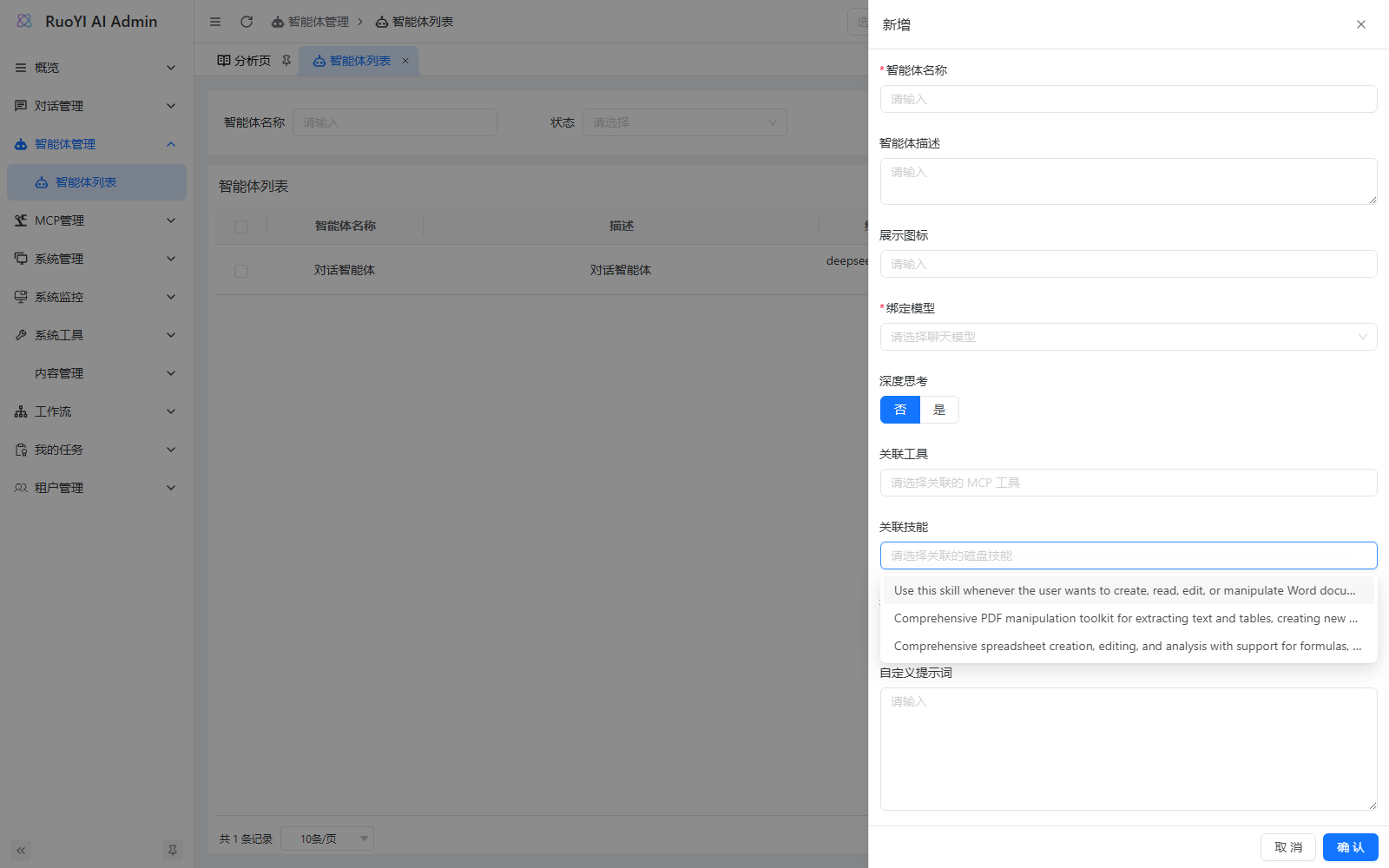
The endpoint reads:
${user.dir}/ruoyi-admin/src/main/resources/skillsFor source development, start Java from the ruoyi-ai root. Running only a copied JAR elsewhere usually leaves this disk path unavailable. Restoring the dropdown still does not bypass the Supervisor restriction above.
3. Coding Harness skill directories
Bundled skills:
| Name | Purpose |
|---|---|
repository-investigation | Investigate an unfamiliar repository and actual implementation before editing. |
safe-refactoring | Preserve behavior and concurrent changes during refactoring. |
verification | Verify completion through builds, tests, and runtime evidence. |
Each run also scans workspace directories in this order:
.agents/skills
.claude/skills
.codex/skills
The first loaded name wins, so classpath skills take precedence. Scanning skips .git, .idea, node_modules, target, dist, and build.
During planning, the model receives only names, descriptions, and sources. Full content is loaded on explicit invocation:
技能元数据 -> activate_skill(name) -> SKILL.md 正文
                             -> read_skill_resource(name, path)
This avoids loading all instructions into context at once. read_skill_resource accepts relative paths inside the skill directory and rejects ../, symlink escapes, and resources larger than 1 MiB.
4. Create a workspace skill
With the repository root as the Harness workspace, create:
.agents/
  skills/
    release-check/
      SKILL.md
      checklist.md
SKILL.md needs closed YAML frontmatter:
---
name: release-check
description: Check whether this repository is ready for a release.
---

# Release check

1. Read the repository build instructions.
2. Run only checks allowed by the current Harness phase.
3. Summarize failures with exact file or command evidence.| Item | Limit |
|---|---|
| Name | [a-z0-9][a-z0-9-]{0,63} |
| Description | Required, up to 1,000 characters. |
SKILL.md | 256 KiB. |
| Directory scan | Up to 100 skills, depth 6. |
| Resource read | 1 MiB per file. |
| Symlinks | Not followed. |
After adding or editing a workspace skill, create a new Harness run. Directories load per run; a backend restart is unnecessary.
5. Verify through the Harness API
The frontend repository currently has no Coding Harness page; use authenticated APIs. Regular accounts need coding:harness:use, write mode additionally needs coding:harness:write, and approval endpoints need coding:harness:approve. Superadmin bypasses ordinary role checks during local verification.
5.1 Prepare a model
model must exactly match a working chat model in Model Management and support multi-turn tool calls. Embedding models cannot run Harness.
The following shows request structure; do not save login tokens in scripts or documentation:
$headers = @{
  Authorization = '<登录后取得的令牌>'
  clientid = '<管理端登录使用的 client id>'
  'Content-Type' = 'application/json'
}
5.2 Create a read-only session
$sessionBody = @{
  workspacePath = 'D:\Project\github\ruoyi-ai'
  model = '<模型管理中的模型名称>'
  permissionMode = 'READ_ONLY'
  approvalPolicy = 'ON_REQUEST'
  title = 'Skills 只读验证'
  idempotencyKey = [guid]::NewGuid().ToString()
} | ConvertTo-Json

$session = Invoke-RestMethod -Method Post -Uri 'http://127.0.0.1:6039/coding/harness/sessions' -Headers $headers -Body $sessionBody
5.3 Create a run
Ask a question that requires activating the skill:
$runBody = @{
  requirement = '请激活 repository-investigation 技能,说明调查陌生仓库的第一步;不要修改任何文件。'
  idempotencyKey = [guid]::NewGuid().ToString()
  images = @()
} | ConvertTo-Json

$run = Invoke-RestMethod -Method Post -Uri "http://127.0.0.1:6039/coding/harness/sessions/$($session.data.sessionId)/runs" -Headers $headers -Body $runBody
Poll the run and messages:
$sessionId = $session.data.sessionId
$runId = $run.data.runId

Invoke-RestMethod -Uri "http://127.0.0.1:6039/coding/harness/sessions/$sessionId/runs/$runId" -Headers $headers
Invoke-RestMethod -Uri "http://127.0.0.1:6039/coding/harness/sessions/$sessionId/messages?afterSequence=0&limit=500" -Headers $headers
Or subscribe:
GET /coding/harness/sessions/{sessionId}/runs/{runId}/events/streamVerify that:
- Tool messages include
activate_skillwith the exact skill name. - Returned material matches
SKILL.md, rather than an invented summary. - The
READ_ONLYsession does not write files or execute modifying commands. - The run reaches
COMPLETEDor an explicit planning/approval wait state. - No unhandled 4xx/5xx or backend exceptions occur.
6. Choose the appropriate capability
| Need | Current approach |
|---|---|
| Java/MCP functions in a regular agent | Tool management and agent tool associations. |
| Repository investigation, controlled editing, verification | Coding Harness and its skill directories. |
| Direct DOCX/PDF/XLSX generation in ordinary chat | Integrate a safe execution runtime first; regular Supervisor does not load these disk skills. |
| Project conventions in Harness | Add a skill under workspace .agents/skills or another supported directory. |
7. Code reference
| Responsibility | Code |
|---|---|
| Admin skill options | AgentServiceImpl#listSkillOptions, SkillsPathResolver |
| Disable legacy Supervisor skills | ChatServiceFacade#handleAgentChat |
| Harness discovery | HarnessSkillCatalogFactory |
| Activation/resource reads | HarnessSkillTools, HarnessSkillCatalog |
| Harness tool assembly | DefaultHarnessToolRuntimeFactory |
| API | CodingHarnessController |
8. Troubleshooting
| Symptom | Action |
|---|---|
| Empty agent skill dropdown | Start from the project root; check the disk skills directory and logs. |
| Selected docx/pdf/xlsx does not run | Regular Supervisor explicitly disables legacy skills; this is not a prompt issue. |
| Model unconfigured/deleted error | Use an exact, real model name from Model Management. |
| API 403 | Grant coding:harness:use and write/approval permissions as needed. |
| Workspace skill missing | Check directories, size, frontmatter, name pattern, and scan depth. |
| Resource path rejected | Use an in-skill relative path without ../ or symlinks. |
| Old Harness task-claim errors repeat at startup | Startup recovers unfinished durable runs. List and cancel the original run through authenticated APIs; back up before state-store cleanup or migration. |
A recorded environment repeatedly retried an old run with Cannot claim terminal non-execution for uncertain tool effect. It did not block models, RAG, MCP, AI Flow, or regular Supervisor startup, but generated recurring errors. Handle it in this order:
- Find the current user's sessions with
GET /coding/harness/sessions. - Inspect unfinished runs with
GET /coding/harness/sessions/{sessionId}/runs. - Call
POST /coding/harness/sessions/{sessionId}/runs/{runId}/cancel. - If uncertain external effects prevent termination even after cancellation, do not delete isolated database rows. Stop Harness writes, back up the complete state, and recover or migrate using the same code version's data model.