
Agent Management
RuoYi AI agents combine models, knowledge bases, and tools for everyday questions, document retrieval, database queries, and chart generation. Configure an agent's name, model, prompt, and resources in the admin app, then open it in the user app to start a conversation. Business data and external services also require the appropriate data sources, access permissions, and tools.
Start with a basic conversation, then add the resources your application needs. The following sections explain configuration, a complete reporting example, troubleshooting, and backend extensions.
| What you want to do | Start here |
|---|---|
| Run your first agent conversation | Prerequisites, Create and use an agent |
| Connect business data | Knowledge and tools, SQL data source |
| Generate a report from a natural-language request | Complete reporting example |
| Diagnose an agent that saves successfully but behaves incorrectly | Troubleshooting |
| Add tools, subagents, or a deterministic reporting process | Source map, Extensions |
Implementation covered by this guide
This is a local, pre-release guide checked on September 8, 2026, based on the companion ruoyi-ai, ruoyi-admin, and ruoyi-web working trees. It includes the SQL validation, data source routing, and chart output fixes described below. These fixes are not yet tied to a public release. If you use the public repositories, compare your source with the change notes before running the examples. The sample orders are synthetic, and the expected results are acceptance criteria, not evidence of a successful run with your model account.
1. How agents work
1.1 One application, several subagents
Creating an agent in the admin app saves an agent_info record. This record is application configuration; it does not create a Java class or start an independent service.
When a chat request contains agentId, ChatServiceFacade reads that configuration and builds a LangChain4j Supervisor. The Supervisor plans the task and delegates steps to specialized subagents. The current implementation assembles five roles for each request:
| Subagent | Responsibility | Data and tools |
|---|---|---|
WebSearchAgent | Search, web content, and tasks covered by configured tools | Explicitly selected mcpToolIds; its current role description focuses on browsing and search |
SqlAgent | Query databases and return SQL, results, and analysis | Three Java tools: queryAllTables, queryTableSchema, and executeSql |
ChartGenerationAgent | Generate ECharts options from accurate data already supplied | User-provided data or a previous SQL result; it has no query tools |
EchartsAgent | Query a database and generate an ECharts chart | The same three SQL tools, with querying and chart generation in one subagent |
ChitChatAgent | Greetings and simple conversation | The model itself; used as the conversational fallback |
The chart agents are ChartGenerationAgent and EchartsAgent. They are unrelated to the agent's display icon. The admin form does not offer a drag-and-drop selector for arbitrary subagent combinations; adding or removing a role requires changes to the assembly code.
1.2 The request sequence
用户端选中智能体,POST /chat/send,携带 agentId + sessionId + content
  → 校验登录用户是否拥有这个会话、智能体是否存在且启用
  → 按智能体绑定的 modelId 解析模型,覆盖请求中的 model
  → 构建 Supervisor 和五个子智能体,按绑定记录装配 MCP 工具
  → 读取会话历史;可选地对当前问题执行一次知识库检索
  → 拼接:自定义提示词 + 历史对话 + 增强后的当前问题
  → Supervisor 规划,子智能体调用模型和工具,必要时继续下一步
  → 取最后一个子智能体结果,通过 SSE 发送 content、done
  → 保存助手回复并关闭本次连接
The Supervisor and every subagent currently share one plannerModel. A single user question can trigger several model requests, tool calls, and planning steps, so its latency and cost can exceed those of a normal chat request.
An SSE connection does not imply token streaming
The agent branch runs the synchronous supervisor.invoke(prompt) asynchronously, then sends the final content when it finishes. A period without text is not necessarily a failure. Planning steps and tool results are not streamed into the chat bubble; use logs and breakpoints to inspect execution.
1.3 Chat, agents, and workflows
| Mode | Request parameters | Suitable uses |
|---|---|---|
| Ordinary chat | No agentId; workflow disabled | Direct questions and answers, without assembling the five subagents or agent tools |
| Agent | An agentId | Let the model choose specialized roles and tools for the question |
| Workflow | enableWorkFlow=true with workflow parameters | Explicitly define, inspect, and maintain business steps and branches |
Agent and workflow modes are mutually exclusive. Supplying both produces a mode-conflict error. The Supervisor uses the LAST response strategy: only the last subagent's result is returned. If the last step produces a chart, an earlier SQL analysis is not automatically appended to it.
2. Prepare the environment and model
Follow Local Installation to start the backend, admin app, and user app, with MySQL and Redis available. Knowledge retrieval additionally needs an embedding model and its vector store. A basic agent conversation does not require a knowledge base.
| Service | Common local address | What to check |
|---|---|---|
| Java backend | http://127.0.0.1:6039 | Infrastructure connections, login, and chat API work |
Admin app, ruoyi-admin | http://127.0.0.1:5666 | Your role can create, edit, and query agents |
User app, ruoyi-web | Use Vite's output; often http://localhost:5173 | The app market and chat page are accessible |
Documentation, ruoyi-doc | The site you are reading | This is a separate project from the user app |
| Ollama, optional | http://127.0.0.1:11434 | The backend can reach it and the model is downloaded |
Use the port printed by your own process. If the documentation site occupies 5173, the user app may use 5174 or another port. Confirm that the browser shows the user application before testing.
2.1 Choose a model for the task
Configure a chat model under Chat Management → Providers / Models, as described in Model Management. A successful text reply verifies basic connectivity. SQL reporting also requires reliable tool calls, schema understanding, multi-step instructions, and valid JSON output.
Verify these separately: a short question, one tool call, then the reporting example. Adding several MCP servers, knowledge bases, and complex prompts at once makes failures harder to isolate.
2.2 Verify basic chat with local Ollama
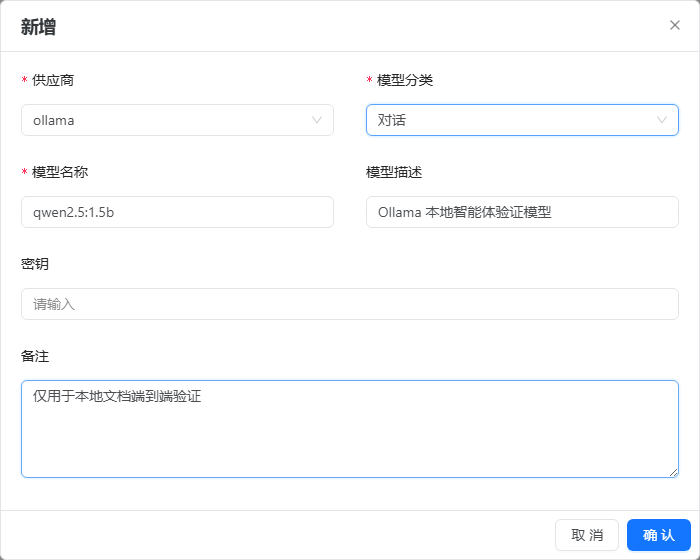
Earlier local demonstrations used qwen2.5:1.5b; their screenshots are retained below. They demonstrate basic connectivity. Supervisor planning and reporting tools require separate validation with the selected model.
With Ollama installed on the host:
ollama pull qwen2.5:1.5b
ollama list
With the project's Ollama container:
docker exec ruoyi-ai-ollama ollama pull qwen2.5:1.5b
docker exec ruoyi-ai-ollama ollama list
Call the model directly first to separate model connectivity from application configuration. In PowerShell:
$body = @{
  model = 'qwen2.5:1.5b'
  stream = $false
  messages = @(@{ role = 'user'; content = '只回复 OK' })
} | ConvertTo-Json -Depth 5

Invoke-RestMethod -Uri 'http://127.0.0.1:11434/api/chat' `
  -Method Post -ContentType 'application/json' `
  -Body ([System.Text.Encoding]::UTF8.GetBytes($body))
The illustrated configuration uses provider ollama, the full model name and tag from ollama list, and an empty key. A host backend can normally reach Ollama at http://127.0.0.1:11434; a containerized backend needs an address reachable from its own network, such as http://ollama:11434. Inside a container, 127.0.0.1 refers to that container.
The screenshot reflects an earlier HTTP configuration. New models require HTTPS. For an Ollama endpoint without authentication, use a backend-accessible HTTPS address and leave the key field untouched. API clients should omit apiKey or send null, not an empty string. The Ollama chat adapter does not read a key; a gateway requiring authentication also needs adapter support. See Model Management.
3. Create, use, and maintain an agent
3.1 Complete the admin form
Open Agent Management → Agent List → Add. For the first test, fill in only the name, description, model, prompt, and status. Leave resource associations empty.
| Field / API name | Purpose | Notes |
|---|---|---|
Name, agentName | Identify the application | Required, up to 200 characters. Choose a business name such as Sales Assistant. Associations use IDs, not unique names |
Description, agentDescribe | Text on the app market card | Explain what users can do. An empty description falls back to the name |
Display icon, agentShow | Avatar URL | Use a browser-accessible image URL, not a disk path |
Model, modelId | Model shared by the Supervisor and all subagents | Required. Saving does not verify tool support |
Thinking, enableThinking | Stores 0 or 1 | The agent branch does not currently pass this field to buildChatModel; do not rely on it to toggle reasoning output |
Tools, mcpToolIds | Tools supplied to WebSearchAgent | These are tool-management record IDs. The three SQL tools are independent of this selection |
Skills, skillNames | Selected on-disk skill names | The ordinary Supervisor does not load legacy Skills; see runtime limits |
Knowledge bases, knowledgeIds | Retrieval augmentation for the question | Multiple selections supported. Documents must already be parsed, embedded, and retrievable |
Custom prompt, systemPrompt | Prepended to the Supervisor's input | Define role, business rules, tool expectations, output, and failure behavior. It is not an authorization mechanism |
Status, status | 0 enabled, 1 disabled | Enabled records appear in user options. The corrected chat entry also rejects disabled records |
Remarks, remark | Maintenance notes | Record ownership, purpose, acceptance questions, and reasons for changes |
A prompt for the basic test:
你是团队的问答助手。用中文简洁回答。
用户只是打招呼时直接回应,不查询数据库或外部工具。
涉及真实业务数据时必须以工具结果为依据;无法取得数据时说明原因,不编造。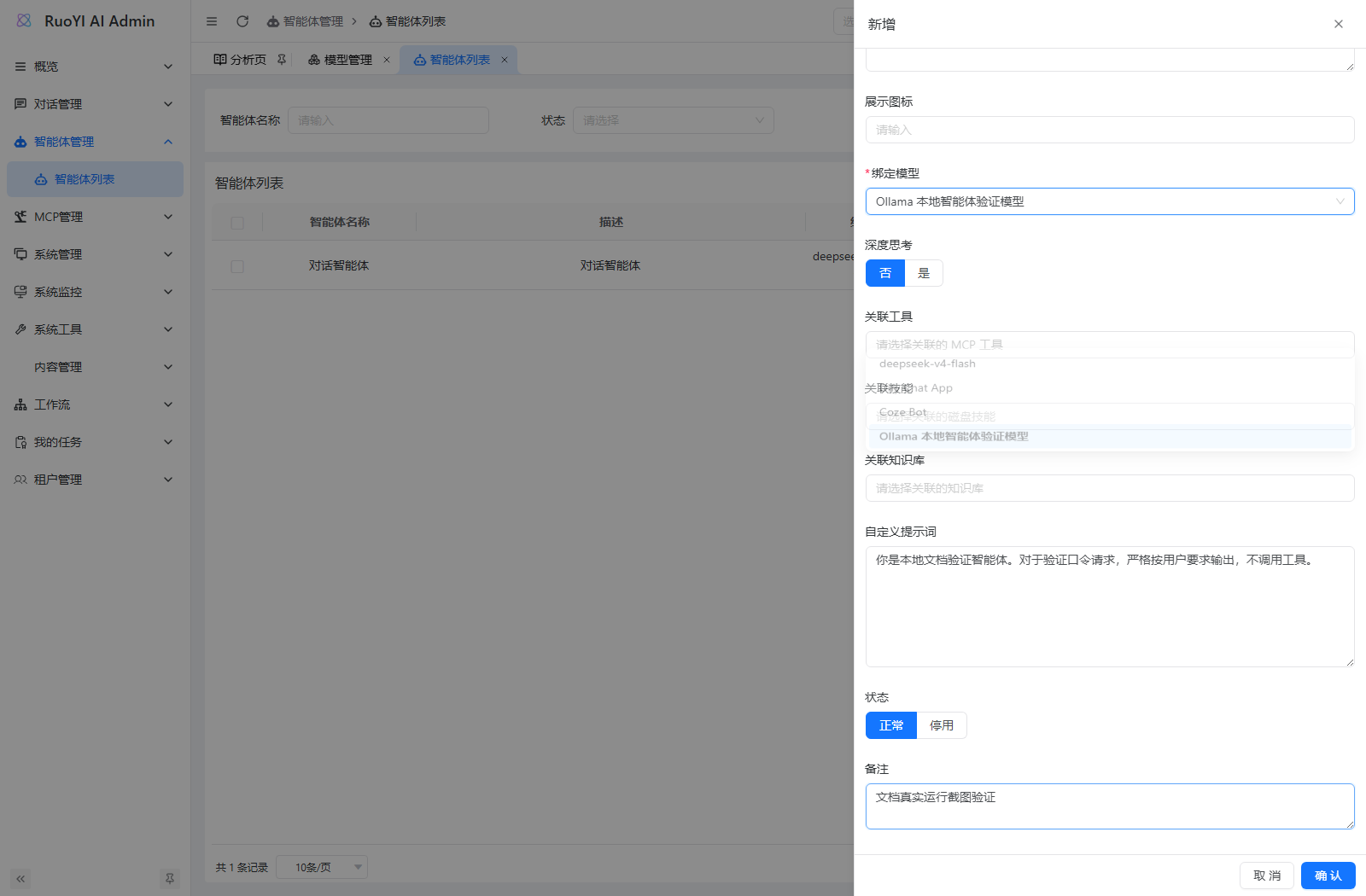
Save, then reopen the record to verify the model and associations. mcpToolIds, skillNames, and knowledgeIds are JSON strings in the database but arrays in API requests and responses. A custom admin client should not serialize these arrays a second time.
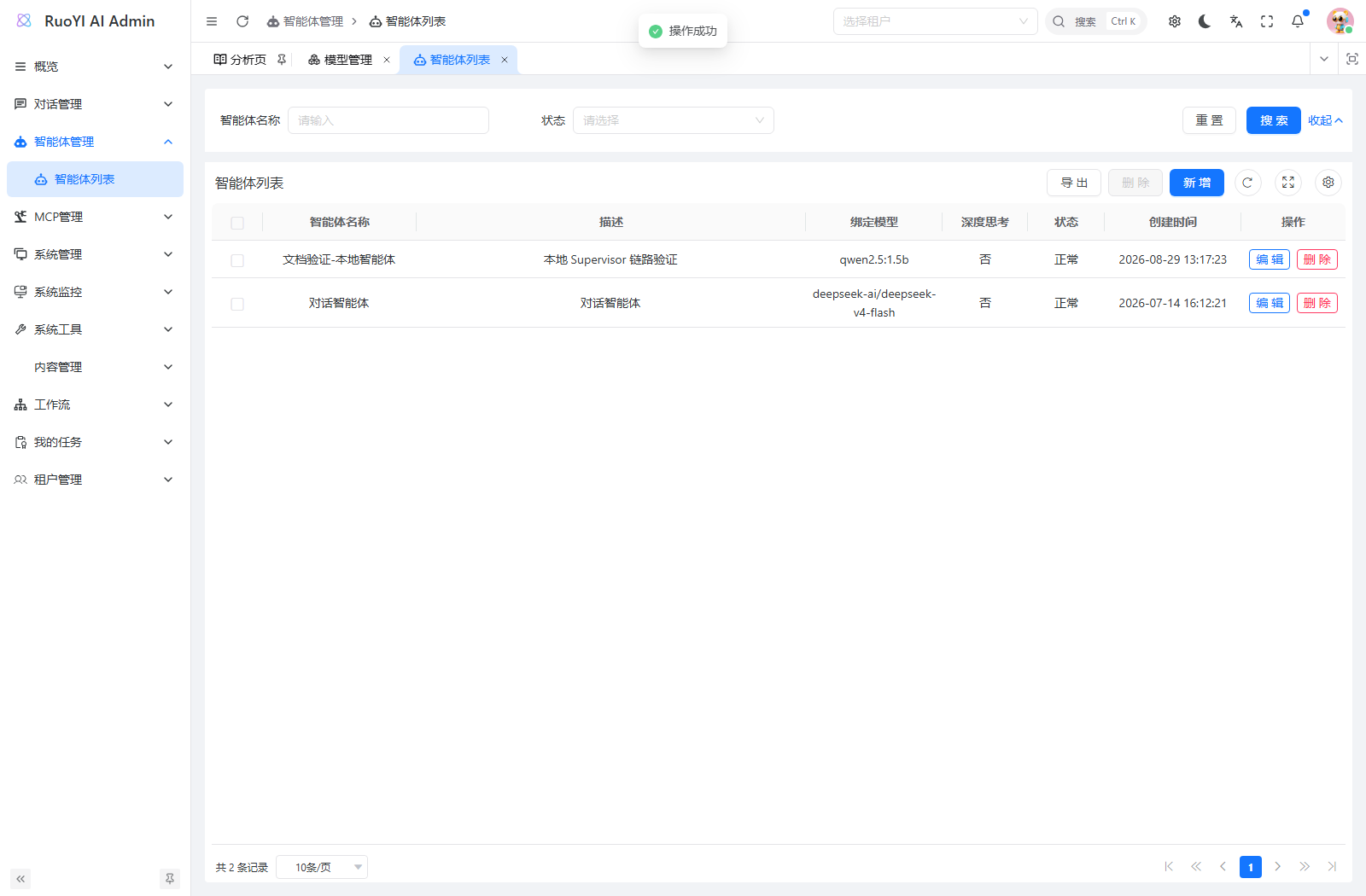
3.2 Select the application in the user app
- Open the actual
ruoyi-webaddress and log in. - Open App Market, find the agent, and click Start Using.
- Check that the intended agent is selected near the chat input.
- Start a new conversation and ask it to introduce itself in one sentence.
- Inspect
/chat/sendin the browser's Network panel. Confirm the correctagentIdand asessionIdowned by the current user. See API integration to obtain these IDs through the API.
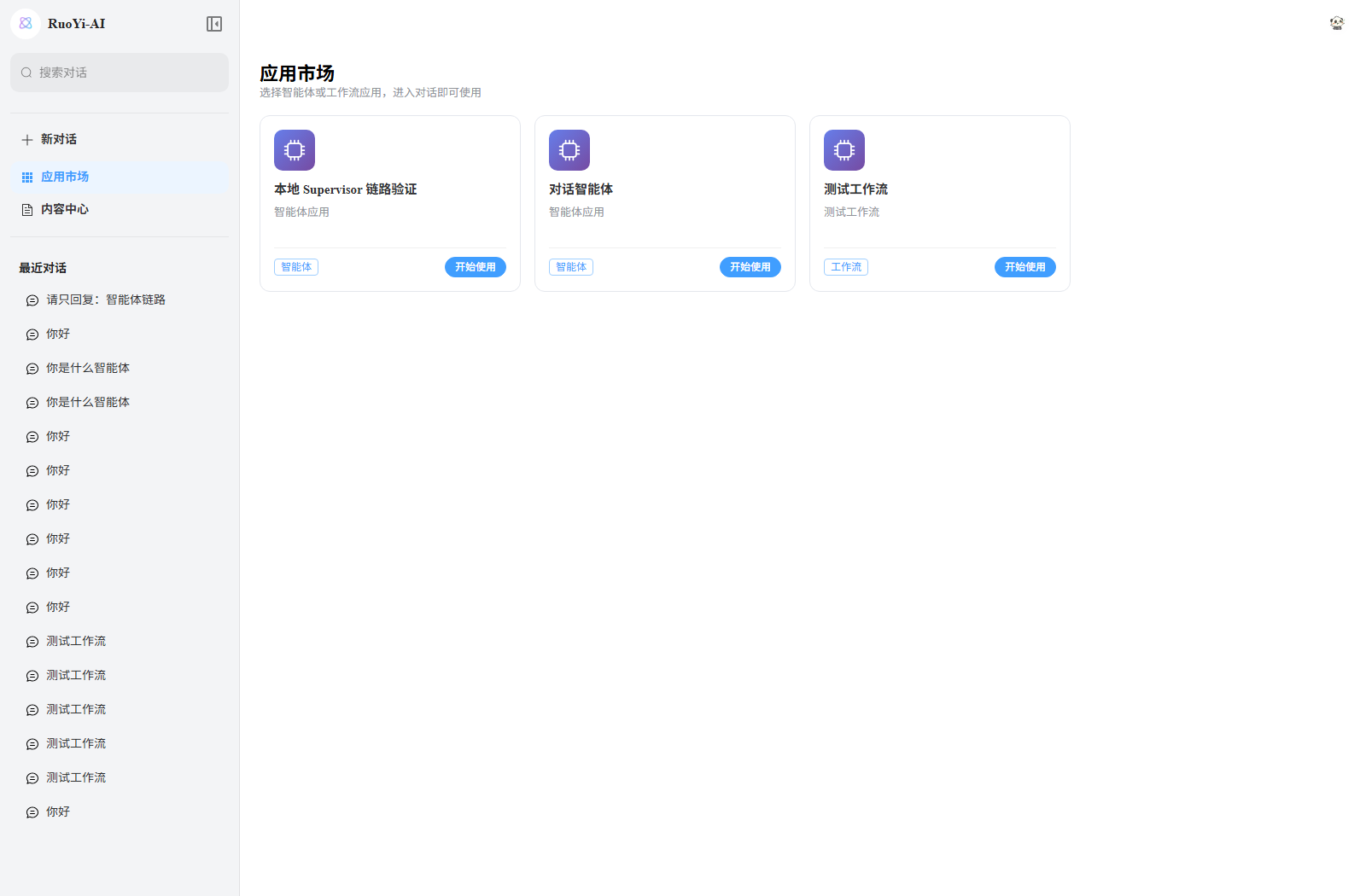
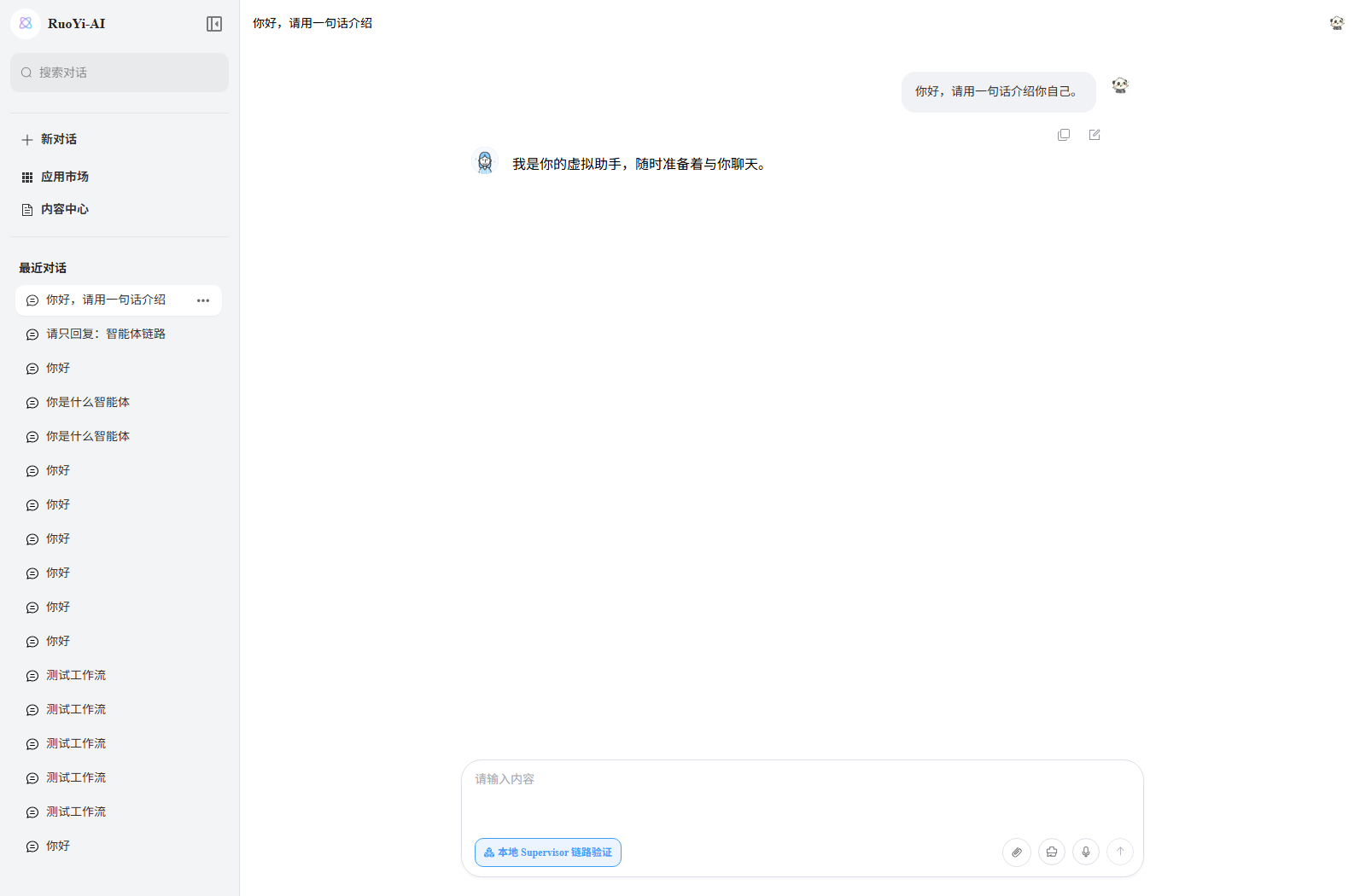
Verify that the request reaches handleAgentChat(), returns a nonempty reply, and remains visible after refreshing the conversation. The model can phrase its introduction differently; an exact sentence is not the success criterion. This screenshot documents basic chat, not SQL or chart acceptance.
3.3 Write maintainable prompts
Use specific business rules: “Include paid orders only, use CNY in yuan, filter by payment time, and exclude cancelled orders.” These are more actionable than a general instruction to act as a professional analyst.
A reusable structure:
职责:你能解决哪类问题,哪些问题应要求用户补充条件。
数据来源:哪些问题必须查数据库,哪些可以使用知识库或用户提供的数据。
业务口径:统计字段、状态、时间范围、单位、时区及排序规则。
执行方式:先确认表和字段,再查询;只根据真实结果回答。
输出约定:需要文字、结果表,还是一个 echarts JSON 代码块。
失败策略:权限不足、工具错误、空结果或结果截断时如何说明。
The admin prompt is concatenated into the Supervisor's input. It does not override each subagent's @SystemMessage. Persistent role conflicts require checking both the routing context and subagent descriptions, rather than continually expanding the admin prompt.
3.4 Edits, disabling, and conversation history
Subsequent requests reread the model, prompt, and resources, normally without a backend restart. A request already running continues with its assembled configuration. Java changes, data sources, and environment variables require rebuilding or restarting the relevant process.
Use a new conversation when testing a revised prompt. The current implementation reads history through MessageWindowChatMemory and PersistentChatMemoryStore, then passes it to the Supervisor as text. The default window is 20 messages, not 20 conversation turns. It does not persist every subagent's tool state across requests. See Context Management and Memory.
After disabling an agent, verify that it disappears from the app market options and that a new request from an old session is rejected. Check dependent agents before deleting or changing a model. Saving configuration does not test connectivity or tool capabilities.
4. Connect knowledge, MCP tools, and skills
4.1 Knowledge bases supply reference material and business definitions
The backend performs retrieval once before invoking the Supervisor:
- Nonempty agent
knowledgeIdstake precedence; otherwise it falls back to the request's singleknowledgeId. - Multiple knowledge bases are searched concurrently. Results are deduplicated by knowledge base, document, and chunk identifiers.
- Merged content is limited to 20 chunks and 24,000 characters.
- Retrieval failures log
chat_rag operation=AUGMENT status=FALLBACKand fall back to the original question. The chat request does not necessarily fail. - The final input combines the custom prompt, conversation history, and augmented current question.
For reports, store definitions of paid orders, region mappings, refunds, and fields in a knowledge base. Fetch live sales figures through SQL or business tools. Uploading an order CSV does not turn the knowledge base into a relational database for exact aggregation.
First verify retrieval independently in Knowledge Base, then test it in the agent. If answers must be grounded in documents, instruct the model to acknowledge missing evidence. A requirement to terminate on retrieval failure needs explicit application logic because the default behavior falls back.
4.2 MCP connects external capabilities
- Add or select a tool under MCP Management → MCP Tools and test it.
- Verify that the backend can connect to the remote service or start the local command.
- Edit the agent, select the required tool records, and save.
- Select the agent and ask a question that explicitly requires that tool.
Only explicitly selected records are assembled, and the provider filters unavailable or disabled configurations. A server record can expose several functions; the agent form does not select individual functions within a server.
Binding a tool does not guarantee a call. The current WebSearchAgent description emphasizes browsing and search. Inventory, file, and business APIs may require broader role descriptions and Supervisor routing; see Business tool routing. A connection test is also separate from a real business invocation; use the MCP verification steps.
4.3 Skills in ordinary agents
The admin app lists on-disk skills and saves selections, but ChatServiceFacade has disabled the legacy shell-backed Skills runtime. It only logs:
Legacy shell-backed skills are disabled; use the coding Harness skill runtimeSelecting Word, PDF, or Excel skills therefore does not make the ordinary Supervisor generate files. Use Coding Harness for coding skills, execution leases, and approvals; see Skills for directories, APIs, and policies. Reporting on this page means data visualization in chat, not automatic Excel generation or a persistent BI dashboard.
5. Configure database access for SQL agents
5.1 SQL tools and the data source
SqlAgent and EchartsAgent have three tools fixed in their Java assembly. You do not need to select SQL MCP tools in the admin form.
| Model function | Java class | Result |
|---|---|---|
queryAllTables | QueryAllTablesTool | Names, types, and comments of allowed tables successfully loaded into the cache |
queryTableSchema | QueryTableSchemaTool | Field definitions from SHOW CREATE TABLE for an allowed table |
executeSql | ExecuteSqlQueryTool | A Markdown table from SELECT, with row counts and truncation information |
Their tool-management names are query_all_tables, query_table_schema, and execute_sql_query. Management names identify records; model function names appear in tool calls.
All three tools now use the dynamic data source named agent. TableSchemaManager uses @DS("agent"); the two direct JDBC tools call push("agent") before acquiring a connection and poll() afterward to restore the caller's routing context. This requires dynamic data source configuration, not merely a Bean named agentDataSource.
Configure the data source explicitly
The development configuration comments out the sample agent data source and enables spring.datasource.dynamic.strict=true. A table allowlist alone is insufficient. Keep strict routing enabled so a missing data source cannot silently send queries to the primary business database.
AgentMysqlConfig.java is also commented out. Setting agent.mysql.enabled=true alone has no effect. Configure spring.datasource.dynamic.datasource.agent as shown below.
5.2 Add a dedicated read-only connection
Add agent alongside master under spring.datasource.dynamic.datasource, preserving the existing primary connection. Alternatively, download agent-report-demo.yml and load it as additional configuration:
spring:
  datasource:
    dynamic:
      strict: true
      datasource:
        agent:
          type: com.zaxxer.hikari.HikariDataSource
          driver-class-name: com.mysql.cj.jdbc.Driver
          url: ${AGENT_DB_URL}
          username: ${AGENT_DB_USERNAME}
          password: ${AGENT_DB_PASSWORD}

AGENT_ALLOWED_TABLES: demo_agent_sales_order
Set AGENT_DB_URL to the reporting database. Give the account only the SELECT permissions it needs. Verify the same read-only account in a database client first:
SELECT DATABASE();
SHOW GRANTS FOR CURRENT_USER;
SHOW CREATE TABLE demo_agent_sales_order;
SELECT region, paid_amount FROM demo_agent_sales_order LIMIT 3;
A database administrator creates the account for the actual source host and network. For the first setup, initialize the demo table, then create a dedicated account and grant access to that table. Replace the password placeholder with a separate password in your database administration tool; do not save the credential in a project SQL file.
-- 由数据库管理员执行;账号已存在时先检查现有权限,不要重复创建。
CREATE USER 'agent_report_reader'@'localhost' IDENTIFIED BY '<替换为独立密码>';
GRANT SELECT ON ruoyi_agent_demo.demo_agent_sales_order
TO 'agent_report_reader'@'localhost';
This grant illustrates an account connecting from the database host. A container or remote backend needs the appropriate account host for its actual connection source.
5.3 Set the table allowlist and start the backend
AGENT_ALLOWED_TABLES is global configuration for the backend process. Use comma-separated, unqualified table names in the reporting database, such as demo_agent_sales_order,demo_agent_product. Wildcards and cross-database qualified names are unsupported. Match the database's actual letter case.
Stop the existing local backend with Ctrl+C, then set these values in the backend repository root, in the same PowerShell terminal that starts Java. This example continues from Local Installation: it retains the dev profile and .dev/application-local.yml, then appends the reporting configuration. With a different startup setup, preserve your existing arguments and append the new configuration location:
$env:AGENT_DB_URL = 'jdbc:mysql://127.0.0.1:3306/ruoyi_agent_demo?useUnicode=true&characterEncoding=UTF-8&serverTimezone=Asia/Shanghai'
$env:AGENT_DB_USERNAME = 'agent_report_reader'
# 本地交互式输入;服务部署时改用已有的密钥注入方式。
$agentDbSecret = Read-Host '请输入报表只读账号密码' -AsSecureString
$env:AGENT_DB_PASSWORD = [System.Net.NetworkCredential]::new('', $agentDbSecret).Password
$agentDbSecret.Dispose()
$env:AGENT_ALLOWED_TABLES = 'demo_agent_sales_order'

java "-Dfile.encoding=UTF-8" -jar .\ruoyi-admin\target\ruoyi-admin.jar `
  --spring.profiles.active=dev `
  "--spring.config.additional-location=file:./.dev/application-local.yml,file:./agent-report-demo.yml"
Replace the jar path with your build output and put the additional YAML file in the startup directory. This password input avoids plaintext shell history, but the password still enters the process environment; do not print it. After Java exits, Remove-Item Env:AGENT_DB_PASSWORD clears the variable in that terminal. For an IDE, set environment variables in the Run Configuration. For Docker, pass them to the backend container. Changing another terminal's variables does not update a running Java process.
The development allowlist is empty by default. Production configuration may contain example values that must be replaced. Restart after changing the connection or allowlist and confirm the active profile and external configuration.
5.4 Execution limits and authorization boundaries
| Constraint | Practical effect |
|---|---|
| An empty allowlist rejects queries | This is expected; a prompt cannot override it |
| One SELECT only; no WITH, comments, or cross-database references | Use ordinary aggregate SELECT statements compatible with the example's MySQL 5.7-style syntax |
| Table references are checked through the syntax tree | Tables in JOINs, comma joins, subqueries, and UNIONs must all be allowed |
| SELECT INTO, locking queries, and some functions with side effects are rejected | The tool reads report data; it does not write files or maintain databases |
| 30-second query timeout | Applies to JDBC execution, not the entire Supervisor request |
| At most 1,000 retained rows, with one extra row probed for truncation | A truncated result reports at least 1,000 rows, not a known full total |
| At most 10 rows and 8 columns displayed to the model | Aggregate in SQL first. A 12-month result cannot be treated as complete annual chart data |
| Long individual values are abbreviated | Extend the structured result protocol before relying on long labels, long text, or high-precision values |
Validation uses the project's JSQLParser dependency; its usage documentation explains syntax trees and table extraction. This is an additional check, not a complete SQL sandbox. Configure database read-only permissions, connection timeouts, permitted functions, and resource limits too.
A table allowlist does not enforce tenant or row permissions
These tools execute directly through JDBC. Do not assume they pass through MyBatis tenant or data-permission interceptors. The allowlist is shared by every agent using these tools, rather than configured separately for each agentId.
For tenant, department, or personal data boundaries, use fixed business query tools that bind the authenticated identity and filters on the server, or isolate connections and database grants by access scope. A prompt cannot enforce those boundaries or hide sensitive columns in an allowed table.
6. Example: generate a sales report
The target request is: “Show paid sales by region for August 2026, sorted by amount descending, as a bar chart in CNY yuan.”
The example uses 12 synthetic orders, including cancelled orders and dates around the month boundary. Verify the query before the chart so that the visualization can be checked against known results. Original Chinese sample labels and prompts are retained for consistency with the SQL file and screenshots.
6.1 Initialize the sample data
Download agent-report-demo.sql and have a database administrator run it in an isolated test MySQL instance. It creates ruoyi_agent_demo.demo_agent_sales_order without dropping an existing table. Inspect an existing table before rerunning the script.
In the MySQL client, using the actual downloaded path:
SOURCE D:/demo/agent-report-demo.sql;Run initialization outside the agent: it contains DDL and INSERT statements, while executeSql accepts restricted SELECT queries only. Then configure the read-only account, the named agent data source, and AGENT_ALLOWED_TABLES=demo_agent_sales_order.
| Field | Meaning |
|---|---|
id | Sample order ID |
paid_at | Business timestamp, interpreted as Asia/Shanghai in this example |
region | 华东 (East), 华南 (South), 华北 (North), 西部 (West) |
paid_amount | DECIMAL(12,2) amount in CNY yuan, not cents |
order_status | PAID or CANCELLED |
The July 31 and September 1 orders, and cancelled orders, must be excluded. Use the half-open interval [2026-08-01, 2026-09-01) to include all of August 31.
6.2 Create the Sales Report Assistant
Create an enabled agent named Sales Report Assistant, describe its sample-data reporting purpose, and bind a chat model with verified tool support. Leave tools, skills, and knowledge bases empty for this test: the database tools are already assembled in code.
Use this custom prompt:
你是销售报表助手。当前只使用允许访问的 demo_agent_sales_order 演示表。
真实数值必须来自 SQL 工具;先列出可用表,再读取所需表结构,再执行 SELECT。
销售额只统计 order_status='PAID';按 paid_at 过滤;paid_amount 单位为人民币元。
时间按 Asia/Shanghai 业务时间解释,月份使用左闭右开区间。
查询时在 SQL 中聚合,保留列别名、单位、筛选条件、排序和结果是否截断的信息。
没有数据、权限不足、调用错误时说明原因;不要造数,不要将未知值填成 0。
用户只要求查数时返回执行 SQL 和结果表,不调用图表智能体。
用户要求先查询再绘图时,先由 SqlAgent 查询,再将完整结果交给 ChartGenerationAgent。
用户明确指定 EchartsAgent 时,由它在内部完成查询和绘图,不强制经过另两个角色。
已有完整数据的绘图请求直接使用 ChartGenerationAgent,不重复查库。
成功绘图时最终输出一个 echarts 代码块,内容必须是合法 JSON,不含函数或脚本。
图表标题/副标题包含统计月份、指标、单位和必要的筛选条件。
Select the saved agent in the user app and start a new conversation. Separate admin records named SqlAgent and ChartGenerationAgent are unnecessary; these are roles inside one Supervisor.
6.3 Query the data first
Send:
请由 SqlAgent 查询 demo_agent_sales_order:统计 2026 年 8 月各地区已支付订单的
销售额 paid_amount 和订单数 order_count,按销售额降序、地区名称升序排列。
金额单位人民币元。先检查允许的表和表结构,再执行 SQL。
只返回实际执行的 SQL、完整汇总结果和统计口径,不要生成图表。
The expected tool order is queryAllTables → queryTableSchema → executeSql. Generated SQL may differ in formatting, but its aggregation semantics should match:
SELECT region, SUM(paid_amount) AS paid_amount, COUNT(*) AS order_count
FROM demo_agent_sales_order
WHERE order_status = 'PAID'
  AND paid_at >= '2026-08-01 00:00:00'
  AND paid_at < '2026-09-01 00:00:00'
GROUP BY region
ORDER BY paid_amount DESC, region ASC
LIMIT 10;
Expected results:
| region | paid_amount | order_count |
|---|---|---|
| 华东 | 4000.00 | 3 |
| 华南 | 2400.00 | 2 |
| 华北 | 2000.00 | 2 |
| 西部 | 1200.00 | 2 |
The total is CNY 9,600.00 across 9 orders. Four aggregate rows fit within the 10-row display limit. The tool returns Markdown similar to the following, not {"data":[...]}:
| region | paid_amount | order_count |
| --- | --- | --- |
| 华东 | 4000.00 | 3 |
| 华南 | 2400.00 | 2 |
| 华北 | 2000.00 | 2 |
| 西部 | 1200.00 | 2 |

Total: 4 rows
6.4 Turn the verified data into a chart
In the same conversation, send:
请由 ChartGenerationAgent 将上一轮实际查询得到的四个地区销售额绘制成柱状图。
沿用上一轮完整数据、筛选条件和排序,不重新查询数据库,不修改或补造数值。
标题为“2026 年 8 月各地区已支付销售额”,纵轴单位为“元”。
最终只输出一个 echarts 代码块,内部是合法 JSON。
若无法从上下文取得完整结果,请明确要求补充,不要猜测。
This checks the path from the SQL result through conversation history to ChartGenerationAgent and the frontend renderer. If the data is missing from history, paste the verified table to isolate chart generation; doing so does not demonstrate a fresh database query.
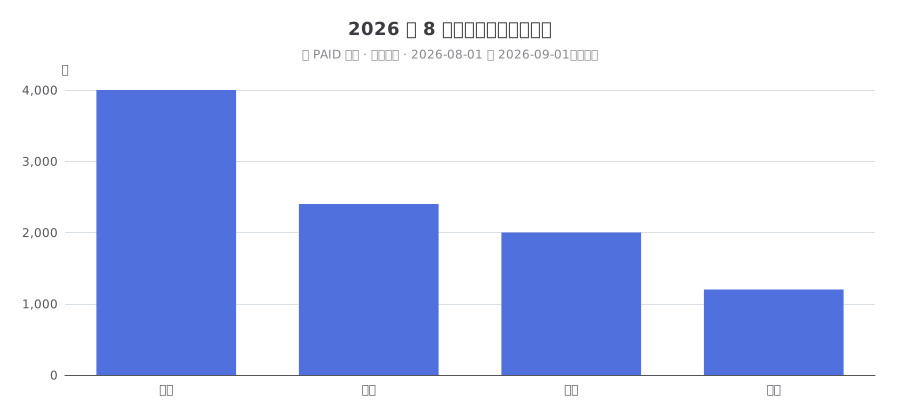
The reply should contain a single echarts code block with valid JSON, for example:
```echarts
{
  "title": {
    "text": "2026 年 8 月各地区已支付销售额",
    "subtext": "仅 PAID 订单 · 人民币元 · 2026-08-01 至 2026-09-01(不含)",
    "left": "center"
  },
  "tooltip": { "trigger": "axis", "renderMode": "richText" },
  "grid": { "top": 90, "left": 65, "right": 25, "bottom": 45 },
  "xAxis": { "type": "category", "data": ["华东", "华南", "华北", "西部"] },
  "yAxis": { "type": "value", "name": "元" },
  "series": [{
    "name": "已支付销售额",
    "type": "bar",
    "data": [4000, 2400, 2000, 1200],
    "label": { "show": true, "position": "top" }
  }]
}
```
Check the region order, values 4000, 2400, 2000, and 1200, and the yuan unit. The following image shows the expected result from fixed data; it is not a captured model response.
6.5 Combine querying and chart generation in one request
Send:
请生成 2026 年 8 月各地区已支付销售额柱状图,数据来自 demo_agent_sales_order,
按 paid_at 筛选整月,仅统计 PAID,金额单位元,按销售额降序。
先由 SqlAgent 检查表和字段并执行聚合 SQL,再把 SQL、统计口径、单位和完整结果行
交给 ChartGenerationAgent 生成图表。查询失败、空结果或截断时停止并说明。
最后保留 echarts JSON 代码块,不再用闲聊改写结果。
Use MyAgentListener evidence to check whether SqlAgent runs before ChartGenerationAgent. The Supervisor chooses a route; this sequence is not hard-coded. Diagnose the actual step that failed. For a mandatory execution order, use a deterministic reporting process.
6.6 Test EchartsAgent directly
Send:
请由 EchartsAgent 查询 demo_agent_sales_order,生成 2026 年 8 月各地区已支付
销售额柱状图。先列出允许表、读取结构,再执行聚合 SELECT;仅统计 PAID,
按 paid_at 使用 [2026-08-01, 2026-09-01) 区间,金额单位元,按销售额降序。
工具返回 Markdown 表格,只用实际返回的完整四行数据,最终返回 echarts JSON。
EchartsAgent can query and draw within one subagent using the same SQL tools. A successful chart on this route does not demonstrate a handoff between SqlAgent and ChartGenerationAgent.
6.7 Acceptance checks and follow-up questions
| Check | Expected evidence |
|---|---|
| Request mode | Correct agentId, owned session, and the agent chat branch |
| Database access | Explicit agent connection, read-only account, and demo table allowlist |
| Data | Four regions, CNY 9,600.00, and 9 paid orders |
| Routing | Logs show the intended subagent or handoff |
| Chart format | One echarts block, valid JSON, aligned categories and numeric series values |
| Display | The chart renders in chat and after refresh, with no chart console errors |
| Empty result | A month without orders produces a no-data explanation, not invented sales |
| Unauthorized table | Rejected before acquiring the query connection |
| Follow-up | “Use a line chart” reuses verified data; “Use September instead” performs a new query |
No records and a result of zero have different meanings. Filling missing months with zero requires explicit time-series rules. Label Top N charts so readers can distinguish a subset from all results.
7. APIs and custom clients
7.1 Management APIs
These are raw backend paths. Your frontend proxy may add /api or /dev-api; follow the local configuration.
| Method | Path | Permission / purpose |
|---|---|---|
| GET | /agent/agent/list | agent:agent:list, paginated list |
| GET | /agent/agent/queryList | agent:agent:list, non-paginated query |
| GET | /agent/agent/{id} | agent:agent:query, detail |
| POST | /agent/agent | agent:agent:add, create |
| PUT | /agent/agent | agent:agent:edit, update with id |
| DELETE | /agent/agent/{ids} | agent:agent:remove, delete |
| POST | /agent/agent/export | agent:agent:export, export management data |
| GET | /agent/agent/agentOptions | Enabled options for authenticated users; no separate management permission annotation on the method |
| GET | /agent/agent/skillOptions | agent:agent:list, on-disk skill options |
Example creation request; replace modelId with a real model record:
{
  "agentName": "销售报表助手",
  "agentDescribe": "查询演示销售数据并生成图表",
  "modelId": 123,
  "enableThinking": "0",
  "systemPrompt": "在此放入报表示例中的完整提示词",
  "mcpToolIds": [],
  "skillNames": [],
  "knowledgeIds": [],
  "status": "0"
}
list returns pagination fields rows and total. Detail and option responses use data inside the R wrapper. Creation returns an operation result, not the new agent ID; query the list afterward. The current admin response handling is in src/api/agent/agent/index.ts.
7.2 Chat requests and SSE
Create a session owned by the authenticated user first. The user app does this when you start a new chat. A custom client can call POST /system/session with {"sessionTitle":"销售报表验证"} and read the ID from data; this requires system:session:add.
POST /chat/send
Content-Type: application/json
Accept: text/event-stream
Authorization: Bearer <当前登录 Token>{
"agentId": "123",
"sessionId": "456",
"content": "请统计演示表中 2026 年 8 月各地区已支付销售额",
"enableWorkFlow": false
}Replace example IDs with real records. Send long integer IDs as strings to avoid JavaScript precision loss. A bound agent model overrides the request's model, so that field can be omitted. The service retains a compatibility fallback for agents without a model, but the admin form and creation API require a model; do not use the fallback as the standard configuration.
Use Copy as cURL in an authenticated browser to preserve the deployment's authentication headers, client headers, and proxy path, then change the question. Remove tokens before sharing commands. A custom client must parse SSE content, completion, and error events rather than decode the entire response as ordinary JSON. HTTP 200 does not prove tool success; a tool can return an error string to the model.
8. Source map
Paths are relative to their repositories. Backend org/ruoyi/ paths are under ruoyi-modules/ruoyi-chat/src/main/java/; browse the backend source directory, or the local source for unreleased fixes.
| Behavior | Repository and file | Start with |
|---|---|---|
| Form fields and defaults | ruoyi-admin/apps/web-antd/src/views/agent/agent/data.tsx | drawerSchema() |
| Save and reload | agent-drawer.vue in the same directory; src/api/agent/agent/index.ts | handleConfirm(), response handling |
| App market selection | ruoyi-web/src/pages/app-market/index.vue | Start Using and the agent type branch |
| Selected state and chat parameters | ruoyi-web/src/stores/modules/agent.ts; src/pages/chat/layouts/chatWithId/index.vue | currentAgentInfo, construction of agentId |
| Management APIs | Backend org/ruoyi/controller/agent/AgentController.java | CRUD, options, permission annotations |
| Configuration and resources | org/ruoyi/service/agent/impl/AgentServiceImpl.java | toVo(), queryEnabledOptions(), JSON array conversion |
| Record and validation | org/ruoyi/domain/entity/agent/Agent.java; domain/bo/agent/AgentBo.java | agent_info, fields, validation |
| Chat entry and mode | org/ruoyi/controller/chat/ChatController.java; service/chat/impl/ChatServiceFacade.java | sseChat(), handleAgentChat() |
| Session ownership | org/ruoyi/service/chat/ChatSessionOwnershipGuard.java | requireOwned() |
| Model adapters | org/ruoyi/factory/ChatServiceFactory.java; service/chat/AbstractChatService.java | getOriginalService(), buildChatModel(), provider implementations |
| Subagent roles and output | Five interfaces in org/ruoyi/agent/ | @SystemMessage, @Agent, @V("query") |
| Metadata and allowlist | org/ruoyi/agent/manager/TableSchemaManager.java | getAllowedTableSchemas(), getAllowedTableNames(), refreshTableSchema() |
| SQL execution and limits | org/ruoyi/agent/tool/ | The three tools and AgentSqlValidator.validate() |
| MCP assembly | org/ruoyi/mcp/service/core/LangChain4jMcpToolProviderService.java | getToolProvider() |
| Knowledge and history input | ChatServiceFacade.java | augmentAgentInput(), buildMultiKnowledgeAugmentor(), formatHistoryMessages() |
| Subagent logs | org/ruoyi/observability/MyAgentListener.java | Start, completion, and failure events |
| Chart block detection | ruoyi-web/src/utils/markdownRenderers.ts | codeXRender, echarts / json branches |
| Chart display | ruoyi-web/src/components/EchartsRenderer/index.vue | Parsing, container size, echarts.init(), setOption() |
| Chart data validation | ruoyi-web/src/utils/echartsOption.ts | parseEChartsOption(), block extraction, pure JSON, series validation |
Follow one request: frontend parameters → sseChat() → handleAgentChat() → chosen subagent → tool → final reply → chart rendering. This provides a practical entry into the implementation.
9. Troubleshooting
9.1 Establish a minimal reproduction
Record the time, agent ID, session ID, model, resource associations, and a short question without sensitive data. Use the demo table for reporting issues. Change one variable at a time.
Check request parameters → application configuration → model connectivity and capabilities → routing → tools → returned data → chart rendering.
| Symptom | First check | Where or how |
|---|---|---|
| Missing admin menu or button | Role menus and permissions | agent:agent:list/add/edit/query |
| Agent missing from app market | Status, tenant, options response | Check GET /agent/agent/agentOptions and reload options |
| Selected agent behaves like ordinary chat | Request contains agentId | Network /chat/send, then handleAgentChat() |
| Agent missing or disabled error | ID, status, current tenant | Refresh options; check for a stale record or cache |
| Bound model missing error | Model record and name lookup | Check modelId and the subsequent lookup, especially with duplicate model names |
| Unavailable session | Ownership and authentication | requireOwned(); use a real owned sessionId |
| Model rejects tools | Model and adapter tool protocol | Verify Function Calling independently |
| Selected MCP tool is never called | Assembly and role matching | getToolProvider(), WebSearchAgent description, Supervisor route |
| No queryable database tables | Allowlist, data source, schema cache | Actual process variables, profile, agent connection, table existence |
Missing agent data source | Named dynamic connection | YAML indentation and external configuration; keep strict mode enabled |
Database schema query failed | Schema permissions, routing, table name | Run SHOW CREATE TABLE with the same account; inspect the backend exception type |
Database query failed | SQL, permissions, timeout, connectivity | Inspect SQL in a development breakpoint and reproduce with the same read-only account |
| Only 10 categories displayed | Tool display limit | Check displayed / Result truncated; aggregate, use explicit Top N, or extend the protocol |
| Chart differs from query | Lost intermediate data, a new query, or units | Compare SQL output, chart-agent input, and final series |
| JSON text without a chart | Fence language and data shape | Use echarts with valid JSON; check codeXRender |
| Blank chart or parsing error | JSON, series, container size | EchartsRenderer, console errors, nonzero width and height |
| Months missing in an annual report | More than 10 rows or absent records | Define missing-month rules and adjust the tool; do not invent values |
| Selecting Skills produces no files | Runtime boundary | Use Coding Harness; ordinary agents store selections but do not load legacy Skills |
9.2 Logs and breakpoints
Search your backend log using these terms, replacing the file path. Remove tokens and business results before sharing logs publicly.
Select-String -LiteralPath .\logs\ruoyi-ai.log `
-Pattern '处理智能体对话|agent_invocation|sql_tool|chat_operation|chat_rag'| Log or breakpoint | Evidence to inspect |
|---|---|
After agent resolution in sseChat() | Agent record, status, bound model, session ownership |
agent_invocation ... status=STARTED/COMPLETED | Whether SqlAgent, ChartGenerationAgent, or EchartsAgent ran |
QueryAllTablesTool.queryAllTables() | Tables visible to the model; distinguish an empty allowlist from failed loading |
QueryTableSchemaTool.queryTableSchema() | Correct allowed table and returned DDL |
ExecuteSqlQueryTool.executeSql() | Actual SQL, routing context, timeout, tool result |
sql_tool ... status=FAILED errorType=... | Exception type behind the simplified tool error |
chat_operation operation=SUPERVISOR status=FAILED | Overall Supervisor failure |
chat_rag ... status=FALLBACK | Retrieval fell back to the original input |
After supervisor.invoke() returns | Expected table or chart, and whether a later role replaced it |
MyAgentListener mainly records lifecycle events and counts, not complete tool arguments and results. An agent can complete even when a tool returns an Error: string. COMPLETED does not prove a successful business query. Use breakpoints or redacted tool events, plus real result status and row counts.
9.3 Empty table lists or stale schemas
TableSchemaManager initializes an in-memory cache lazily. There is no admin refresh button or scheduled schema refresh, and each question does not rescan the database.
Check the actual process allowlist, registration of agent, connection to the correct database with that account, table existence, and initialization errors. During development, call refreshTableSchema(tableName) from controlled code or restart the service. It is not a public HTTP endpoint.
An initial loading failure, or a table created afterward, can leave the cache empty. Restart after fixing the database to verify recovery. Listing a table in the allowlist neither grants access nor proves that its schema loaded.
9.4 Long waits, proxy disconnects, or missing messages after refresh
Test the model directly, then determine whether execution has reached asynchronous supervisor.invoke() or is waiting on MCP, SQL, or a model request. Account for multi-step model execution, reverse-proxy read timeouts, and SSE timeouts; this branch does not stream tokens.
The SQL timeout limits one query, not repeated planning. Disconnecting chat does not automatically cancel model or SQL work. Production execution needs an overall budget, total timeout, and cancellation propagation. Assistant messages are saved after the final result; if a refresh immediately after completion loses a message, inspect save ordering and database write failures.
10. Extend agent capabilities
10.1 Add business tools using existing services
For existing Java business logic, add an @Tool method that invokes the Service layer, validates parameters, and reads the authenticated identity on the server. Return status, necessary data, and a useful failure reason without exposing stack traces or credentials.
There are two assembly paths:
- Admin association: implement and register
BuiltinToolProvider, expose the tool in MCP tool management, and select it throughmcpToolIds. See Develop a Java tool. - Fixed subagent tool: explicitly supply it through
AgenticServices.agentBuilder(...).tools(...), as the SQL agents do. The admin MCP list does not control this path; the tool must enforce its own authorization.
For current-user orders, a fixed queryMyOrderSummary(startDate, endDate) tool is usually more suitable than arbitrary SQL. Let the model provide dates while the server binds user and tenant identity and controls the query.
10.2 Add a subagent to the Supervisor
Create a role interface under backend org/ruoyi/agent/. For example, review the reporting definitions of data already retrieved:
package org.ruoyi.agent;

import dev.langchain4j.agentic.Agent;
import dev.langchain4j.service.SystemMessage;
import dev.langchain4j.service.UserMessage;
import dev.langchain4j.service.V;

public interface ReportReviewAgent {
    @SystemMessage("""
        你负责核对已提供报表的统计口径。
        检查时间范围、单位、筛选条件与合计是否一致。
        没有原始依据时说明无法核对,不查询数据库,不补造数值。
        """)
    @UserMessage("请核对以下报表材料:{{query}}")
    @Agent("Review supplied report data, filters, units and totals. Does not fetch data or generate charts.")
    String review(@V("query") String query);
}
Assemble it with the existing model in ChatServiceFacade.handleAgentChat():
ReportReviewAgent reportReviewAgent = AgenticServices.agentBuilder(ReportReviewAgent.class)
    .chatModel(plannerModel)
    .listener(new MyAgentListener())
    .build();
Append reportReviewAgent to .subAgents(...) and explain its use in .supervisorContext(...). Add the imports and rebuild. An interface, @Agent annotation, or same-named admin record alone does not register a role with the Supervisor.
Account for LAST: a reviewer running after the chart can replace the final chart with review text. Review before drawing, or combine results in an explicit business process.
10.3 Use a deterministic reporting process
For consistent business definitions, traceability, or exports, explicitly execute the reporting steps in the backend:
用户问题
  → 模型抽取指标、时间范围、维度(不接受模型决定用户/租户权限)
  → 服务端校验范围、身份和业务口径
  → 执行固定的参数化查询或受限查询计划
  → 产生结构化 ReportData,并校验是否为空或被截断
  → 服务端模板或 ChartGenerationAgent 生成图表
  → 校验 JSON 和数值,再返回图表、来源与摘要
This is a proposed extension, not an existing admin toggle. Implement it in a dedicated reporting service or organize supported nodes with Workflow Orchestration. Workflow requests must remain mutually exclusive with agentId.
ReportData should contain at least columns, rows, units, filters, data timestamp, row counts, and truncated. The current SqlAgent → ChartGenerationAgent handoff uses text. Strict data consistency needs more than a model restating a table.
10.4 Extend query results and chart types
For 12 months, multiple dimensions, or more than 10 rows, change the SQL result protocol and its agent prompts and consumers together. Increasing SQL LIMIT alone is insufficient. Prefer structured JSON, configurable row and byte limits, and explicit truncation metadata.
Pie and line charts can retain the echarts plus strict JSON contract, using the appropriate series.type and data shape. Install and register an ECharts extension only when the frontend does not already bundle it. Supply formatters through trusted frontend templates or field mappings, rather than executing model-generated JavaScript.
The parser accepts JSON data with valid series structures, in echarts or json fences. Old messages containing functions, single-quoted objects, or unquoted keys need valid JSON regenerated; do not restore execution through eval or new Function.
When changing database routing, check metadata loading, schema queries, and data queries together. Different connections can produce missing-table errors or accidental queries against the primary database.
10.5 Establish regression checks before release
Cover greetings, one tool call, empty allowlists, unauthorized tables, known reports, empty results, display truncation, month boundaries, chart follow-ups, and models without tool support. Assert values and routing evidence for fixed reports, not merely a nonempty reply.
The SQL regression tests are under backend src/test/java/org/ruoyi/agent/tool/. Run from ruoyi-ai:
mvn -pl ruoyi-modules/ruoyi-chat -am test `
  '-Dtest=AgentAvailabilityTest,AgentSqlValidatorTest,AgentDatabaseToolsTest,DatabaseToolLoggingBoundaryTest' `
  '-Dsurefire.failIfNoSpecifiedTests=false' '-DskipTests=false' '-Dgroups=dev'
These checks cover disabled agents, SQL structures and rejection paths, data source context, result formatting, and error-log boundaries.
In this documentation repository, python scripts/verify-agent-report.py checks the 12 sample orders, aggregate SQL, and chart values. It uses in-memory SQLite for INSERT/SELECT semantics, not MySQL DDL or grants. In the user app repository, node --test tests/agent-chart.test.mjs requires Node.js 22.18+ or 24 and checks pure JSON chart parsing. With Vite running, /tests/fixtures/agent-chart.html supports manual checks of bar charts, line charts, and error recovery.
The Chinese source guide records 34 backend tests, 7 chart-parser tests, user-app type checking and builds, a documentation build, and browser checks of fixed-data rendering and error recovery. A full run with a real read-only MySQL account, a real model, and the Supervisor has not yet been completed. Before release, follow the report acceptance checks and retain actual invocation evidence.
11. Companion fixes and release considerations
The implementation accompanying the Chinese guide includes these corrections:
| Previous issue | Corrected behavior |
|---|---|
Schema queries used agent but SQL execution did not switch | SQL consistently uses agent, then poll() restores the caller's context |
| Schema tools skipped the allowlist | Validate AGENT_ALLOWED_TABLES before retrieving DDL |
| FROM/JOIN regexes missed references such as comma joins | Inspect the syntax tree; reject multiple statements and unsupported write or locking forms |
| Original column names could lose aliases | JDBC getColumnLabel() preserves SQL aliases |
| A row limit could look like a complete count | Explicit truncation, query timeout, and JDBC row limits |
| Chart agents assumed JSON SQL results | Describe the actual Markdown protocol and handle definitions, empty results, and truncation |
| Query and chart roles overlapped | Clarify SqlAgent, ChartGenerationAgent, and EchartsAgent responsibilities and handoffs |
| Disabling affected only the options list | The chat entry also rejects disabled agent IDs |
| Chart fence matching missed content and attempted to construct generated functions | Extract fences correctly and parse pure JSON; ordinary title JSON is not mistaken for a chart |
| Merging chart options could retain old series | notMerge replaces the previous options |
Rebuild the backend before enabling the read-only agent connection. Older installations relying on primary-data-source fallback need explicit configuration and an updated jar.
Before production use, review table and column permissions, whether data may be sent to the selected model provider, tenant isolation, multi-step model budgets, timeouts and cancellation, observable errors, and regressions after prompt or code changes. Auditable reports and fixed business definitions should use controlled queries and structured results.