
MCP management
RuoYi AI connects local and remote tool services, tests connections, and associates tools with agents. The connected service determines capabilities such as web fetching, search, file access, and business queries.
MCP (Model Context Protocol) standardizes how AI applications discover and use external capabilities. Their provider is an MCP Server. RuoYi AI currently mainly consumes Tools; Resources and Prompts are explained below.
This guide introduces concepts, local-file and ModelScope examples, verification, and extensions. See Tools, Models, and Agents for related settings.
| Task | Start here |
|---|---|
| Understand MCP, models, and APIs | Concepts |
| Connect a first service | LOCAL walkthrough |
| Use ModelScope services | ModelScope |
| Connection passes but chat does not call tools | Verification, Troubleshooting |
| Read code or connect business services | Source path, Extensions |
Implementation scope
Checked against current ruoyi-ai/ruoyi-modules/ruoyi-chat and ruoyi-admin/apps/web-antd. The backend uses LangChain4j 1.17.2 and MCP 1.17.2-beta27. Third-party pages were checked on 2026-09-08; provider details, authentication, and expiry should be checked when connecting.
The guide distinguishes configurable behavior from backend development work. Existing screenshots locate UI controls; record counts, names, and configuration visibility are not guarantees for your environment.
1. Understand MCP before configuring it
1.1 Model, Host, Client, and Server
For “Read this file's first line,” the model chooses an action; a tool actually opens the file.
| Concept | Responsibility | In this project |
|---|---|---|
| Model | Choose functions/arguments and compose answers | Agent chat model with tool-call support. |
| Host | Manage sessions, models, and tool usage | RuoYi AI backend agent chat. |
| Client | Connect, discover, and call | DefaultMcpClient. |
| Server | Describe capabilities and execute operations | Filesystem process, ModelScope Hosted service, business service. |
| Transport | Carry protocol messages | StdioMcpTransport / StreamableHttpMcpTransport. |
| ToolProvider | Supply definitions and executors to LangChain4j | McpToolProvider and the combined provider. |
The browser starts chat and renders results; Java connects to MCP. LOCAL means the backend host/container. A Hosted service's files and dependencies belong to its remote environment.
See MCP architecture. ToolProvider is a LangChain4j integration concept, not an additional MCP protocol role.
1.2 Tools, Resources, and Prompts
| Capability | Meaning | Example | Current integration |
|---|---|---|---|
| Tools | Executable functions | fetch(url), order lookup | Main supported path for agents. |
| Resources | Readable context | Documents, configuration, resource URIs | SDK/listener support exists; no separate management/consumption flow. |
| Prompts | Reusable server templates | Code review or report prompts | No separate selection, fetching, and injection flow. |
A server can expose one or several capabilities. MCP prompts and the agent system prompt are separate sources; adding a server does not overwrite agent instructions.
1.3 MCP, Function Calling, and HTTP APIs
- Function/Tool Calling: the model chooses a function and arguments.
- MCP: the application discovers, connects, invokes, and receives tool results.
- Business HTTP API: a tool may call it internally, such as an inventory API.
These can form one chain. An ordinary REST URL entered as baseUrl does not become MCP automatically.
A tool typically declares a name, description, and JSON Schema. This is illustrative, not management configuration:
{
  "name": "get_inventory",
  "description": "按商品编码查询可用库存,不能下单或扣减库存",
  "inputSchema": {
    "type": "object",
    "properties": {
      "sku": { "type": "string", "description": "商品编码,例如 DEMO-001" }
    },
    "required": ["sku"]
  }
}
The description helps the model choose a function; the schema defines arguments. External model-facing definitions come from the server. Editing the management description does not rewrite its schema.
1.4 One record can expose several functions
A LOCAL/REMOTE row in mcp_tool represents one server connection. A filesystem server may expose reading, listing, and writing.
Agent mcpToolIds stores record IDs, not function names. Current assembly has no per-server function allowlist. For query-only access, use a query-only server or implement filtering in the server/provider.
2. Choose a method and prepare
2.1 Three tool types
| Type | Use | Runtime | Configuration |
|---|---|---|---|
BUILTIN | Existing/new Java functions | JVM @Tool calls without MCP transport | Registry/initializer; cannot be created as BUILTIN in admin. |
LOCAL | Node.js/Python packages or custom programs | Backend subprocess over stdin/stdout | command, args. |
REMOTE | Hosted or self-hosted compatible services | Streamable HTTP | baseUrl. |
Legacy HTTP+SSE cannot be selected just by changing JSON in the current REMOTE branch. Streamable HTTP can itself return SSE, so text/event-stream does not identify the legacy transport. See MCP transports.
2.2 Four prerequisites
- Run the backend and both frontends using Local installation.
- Verify ordinary chat with a tool-capable model; basic connection tests are insufficient.
- Give the admin account tool create/query/test and agent-edit permissions; see APIs.
- Prepare commands or networking in the backend service environment: interpreters, dependencies, and directories for LOCAL; DNS, TLS, and reachability for REMOTE.
2.3 Configuration rules
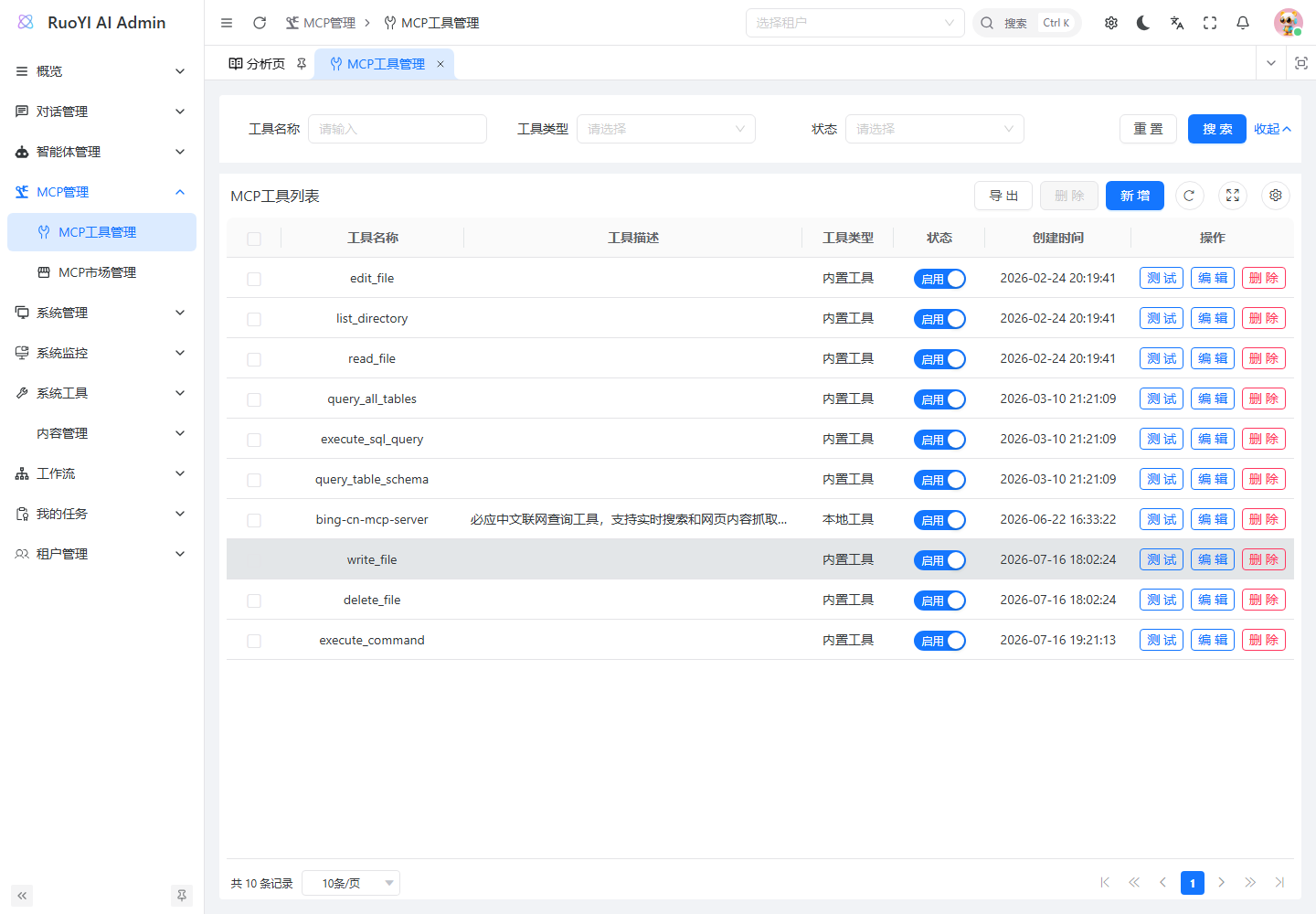
Open MCP Management → MCP Tool Management → Add:
| Field | Rule |
|---|---|
| Name | Recognizable connection name, such as filesystem-demo or modelscope-fetch; need not match a function. |
| Description | Purpose, environment, and maintainer. |
| Type | LOCAL or REMOTE. |
| Status | Enabled (ENABLED) for initial testing; disabled is DISABLED. |
| Configuration | One valid JSON object, without comments, trailing commas, or an outer mcpServers wrapper. |
An empty edit box is expected
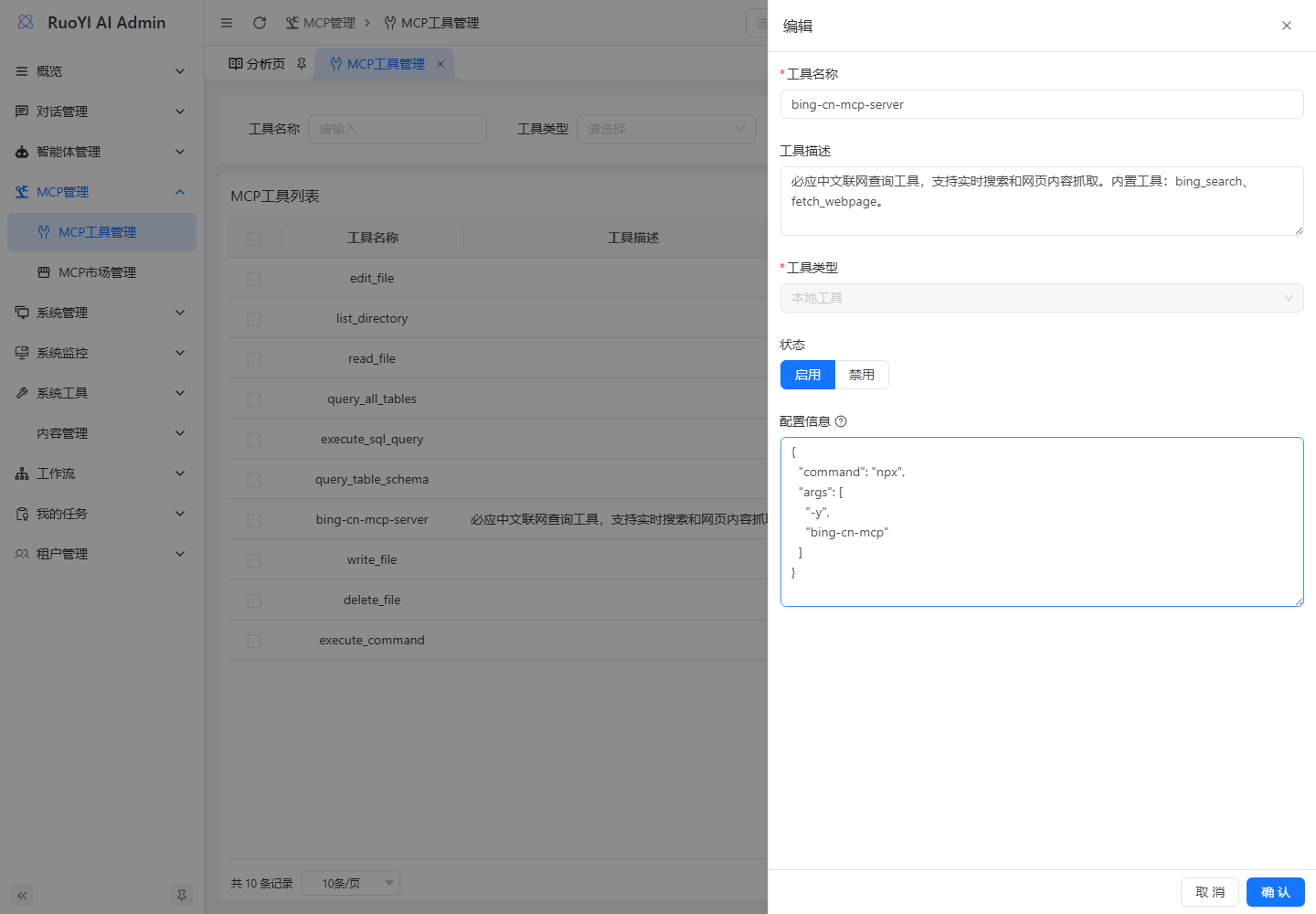
Configuration is write-only. Lists, details, exports, and options omit raw configJson. Empty edits retain it; new JSON replaces it. {} replaces with an empty object rather than retaining the old value. The edit form also cannot switch type; create a new connection for another transport type.
3. LOCAL walkthrough: read a sample file
The filesystem server exposes several file operations, so give it a dedicated demo directory. Verify reading your marker, not merely a successful connection.
3.1 Prepare the backend directory and runtime
Windows PowerShell example; replace the backend path consistently:
node --version
npx --version
New-Item -ItemType Directory -Force D:/Project/github/ruoyi-ai/workspace/mcp-demo
Set-Content -LiteralPath D:/Project/github/ruoyi-ai/workspace/mcp-demo/hello.txt -Value 'RUOYI_MCP_DEMO_20260908' -Encoding utf8
First-time npx downloads require npm-registry access. Use the server's supported Node.js version and pin a verified package version for deployment. Linux/container paths must be internal absolute paths, such as /app/workspace/mcp-demo, rather than host Windows paths.
3.2 Add a LOCAL record
Use name filesystem-demo, local type, enabled status, and:
{
  "command": "npx",
  "args": [
    "-y",
    "@modelcontextprotocol/server-filesystem",
    "D:/Project/github/ruoyi-ai/workspace/mcp-demo"
  ]
}
The directory argument defines the server's allowed directory. See the filesystem server for its arguments.
| Field | Backend use | Common mistake |
|---|---|---|
command | Executable, first checked with --version | Putting npx -y package into one command string. |
args | Separate process arguments | One combined string or extra shell quotes. |
| Paths | Interpreted by the server | Browser-machine, relative, or outside-container paths. |
A JSON array element is one argument, including paths with spaces; do not add nested quotes. Use / or escaped \\ in Windows JSON paths.
3.3 Test connection, then read the file
Save and click Test on the row.
If it fails, run the same server command on the backend host:
powershellnpx -y @modelcontextprotocol/server-filesystem D:/Project/github/ruoyi-ai/workspace/mcp-demoWaiting for protocol input is normal for STDIO. Stop the manual instance with
Ctrl+Cafter inspection; Java launches its own instance.Associate
filesystem-demowith an agent and select that agent in the user app.Ask it to read
D:/Project/github/ruoyi-ai/workspace/mcp-demo/hello.txtusing the filesystem tool and return only the first line, reporting failure rather than guessing. The original sample prompt is:text请使用文件系统工具,读取 D:/Project/github/ruoyi-ai/workspace/mcp-demo/hello.txt, 只返回第一行。如果读取失败,请说明失败,不要猜测内容。Check actual execution evidence as in section 5.
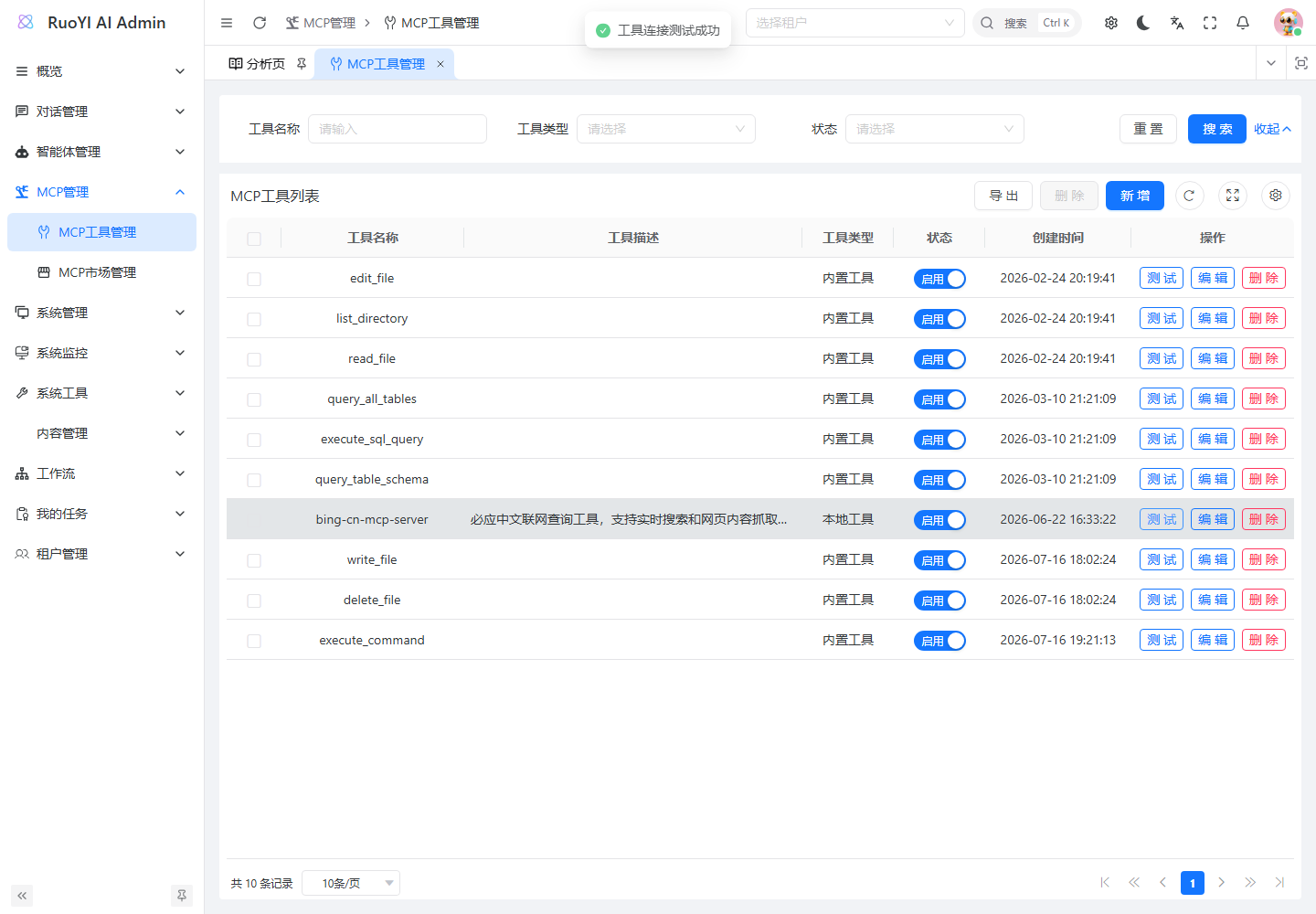
The screenshot's bing-cn-mcp-server is a different LOCAL record illustrating the Test control, not the filesystem walkthrough's result.
3.4 Windows, variables, and process output
resolveCommand() appends .cmd to bare npx/npm/node/pnpm/yarn/uv/uvx. This does not guarantee those programs are installed with that extension. For node.exe or uv.exe, use the actual absolute executable path and check backend-account access.
createStdioClient() does not read JSON env. Prepare the backend launch environment or implement explicit variable passing. ChildProcessSecretSanitizer also masks inherited DEEPSEEK_API_KEY; do not depend on passing model credentials through to MCP.
STDIO stdout carries protocol messages. Write logs, progress, and diagnostics to stderr.
4. ModelScope walkthrough
4.1 Three different ModelScope entry points
Open the ModelScope homepage and MCP plaza:
| Entry | Purpose | RuoYi AI integration |
|---|---|---|
| Models / inference | Model APIs | Model Management. |
| MCP plaza | Tool services, parameters, connection details | MCP Tool Management. |
| MCP playground | Test platform models and MCP together | Independent checks; not automatically synced to RuoYi agents. |
ModelScope MCP does not require a ModelScope model. Any configured tool-capable model can use a compatible service.
4.2 Choose an easily verified service
This example uses Fetch, whose main fetch tool extracts a webpage into model-readable text.
Check the service's maintainer/source, intended use, Hosted/Local type, available transport, authentication/expiry, and required arguments. For direct REMOTE integration choose Streamable HTTP.
At the recorded check, Fetch offered Remote/Stdio, with Remote defaulting to Streamable HTTP and showing no authentication, 24-hour validity, and a Connect button. This does not mean every service is permanently unauthenticated or has the same expiry.
Hosted versus LOCAL
Hosted reduces backend dependency installation for search/fetch tools. Private backend files, internal systems, and controlled runtimes need LOCAL or a reachable self-hosted REMOTE service. Remote Fetch does not gain access to your local files.
4.3 Sign in and obtain your configuration
- Sign in to your ModelScope account and open the service.
- Select Service configuration → Remote → Streamable HTTP.
- Supply service-specific settings. ModelScope account tokens, model keys, and upstream service keys are distinct credentials.
- Click Connect and complete any activation/deployment requirements to obtain your URL or client configuration.
- Record expiry and store the full configuration securely. Examples below contain placeholders only.
ModelScope may return:
{
  "mcpServers": {
    "fetch": {
      "type": "streamable_http",
      "url": "https://mcp.api-inference.modelscope.net/YOUR_CONNECTION_ID/streamable_http"
    }
  }
}
Its type describes a client transport. In RuoYi AI, choose REMOTE and convert the inner url to baseUrl:
{
  "baseUrl": "https://mcp.api-inference.modelscope.net/YOUR_CONNECTION_ID/streamable_http"
}
Copy the full actual URL. Do not invent IDs or rename /sse to /streamable_http. The platform must expose that transport. See ModelScope MCP API source.
A private connection URL can itself be a credential
ModelScope describes Hosted URLs as private sensitive addresses. “No authentication” does not make them public. Keep real URLs out of Git, screenshots, issue reports, and model prompts; store them only in controlled backend configuration.
4.4 Save in RuoYi AI and fetch a page
| Field | Value |
|---|---|
| Name | modelscope-fetch |
| Description | Fetch public webpages through ModelScope |
| Type | REMOTE |
| Status | Enabled |
| Configuration | The converted baseUrl JSON |
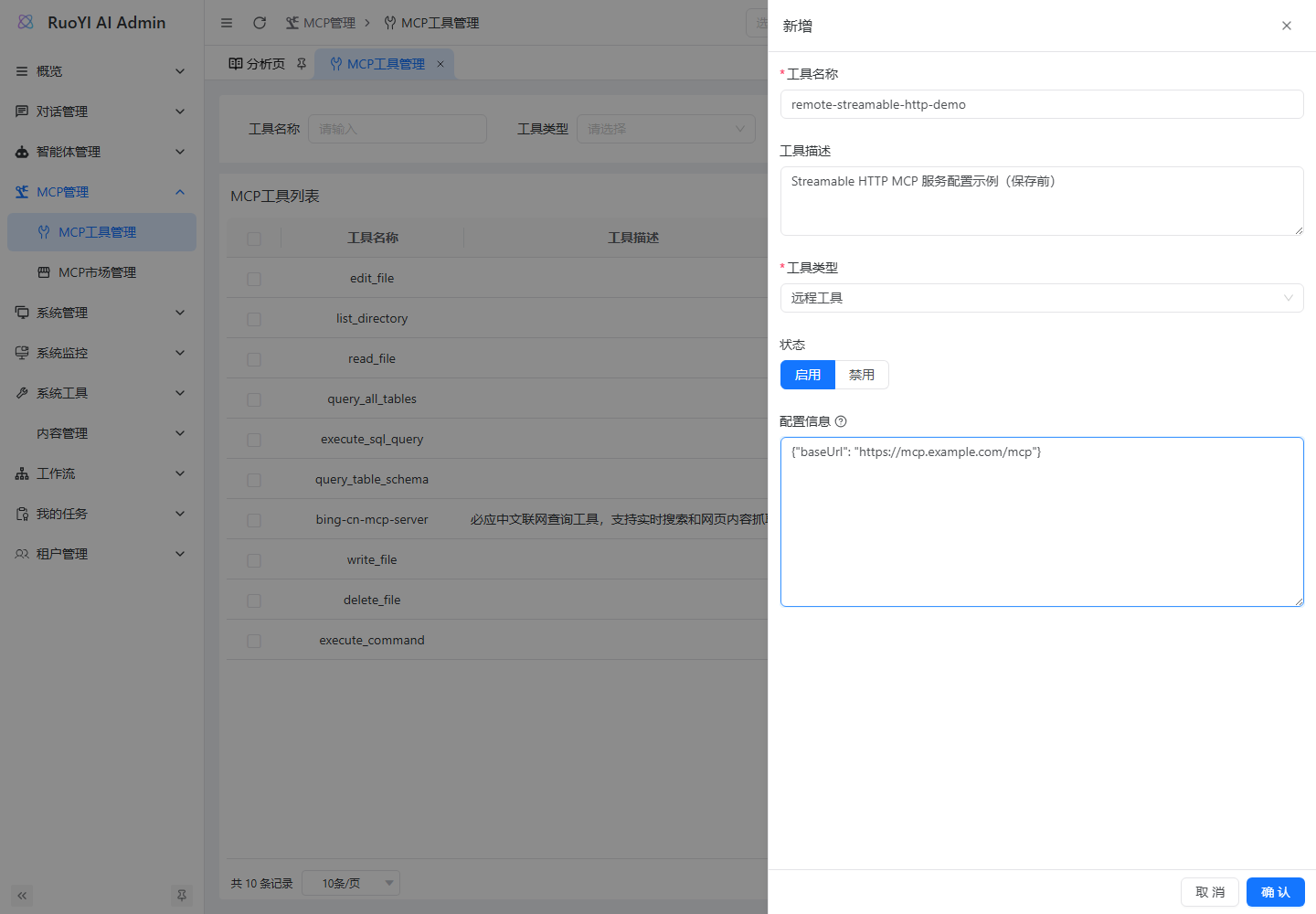
Save, test, bind to an agent, and send:
请使用 Fetch 工具抓取 https://example.com/ 的内容,
告诉我页面标题并摘取一句原文。若工具失败,直接报告失败,不要凭已有知识作答。
The page normally says “Example Domain,” which is useful for a basic fetch but is also known to models. Verify execution logs; for stronger evidence, use a controlled public page with a new marker.
Use the same URL in ModelScope's Tool test:
{
  "url": "https://example.com/",
  "max_length": 1000,
  "start_index": 0,
  "raw": false
}
Testing on the platform first separates server problems from integration problems. The MCP playground uses its own session/model/network, not Java's environment.
4.5 Convert third-party configuration
| Source configuration | RuoYi AI handling |
|---|---|
Multiple mcpServers | Create one record per server. |
Streamable HTTP url | REMOTE baseUrl. |
STDIO command / args | LOCAL; install dependencies in the backend environment. |
| Legacy SSE only | Find Streamable HTTP or implement another transport. |
headers / Bearer token | Ignored by current REMOTE construction; needs a trusted gateway or backend changes. |
env | Ignored by current LOCAL construction; use controlled launch variables or extend it. |
timeout, cwd, etc. | Not currently parsed. |
For a Local-only Fetch configuration, its published python -m mcp_server_fetch command can use an absolute Python command and separate -m, mcp_server_fetch arguments after dependency installation. Follow the service's version and option requirements.
4.6 Expiry and common mistakes
- For a previously working connection, check expiry, service status, and quota; replace the complete
baseUrlwhen needed. - Paste complete new JSON into the empty edit box; leaving it empty retains the old URL.
- Model-inference, homepage, and service-detail URLs are not MCP endpoints.
- ModelScope homepage or
/mcpis not a compatible MCP Market URL. Current markets parse a particular JSON catalog, not the webpage; see market integration.
The source guide checked public pages and configuration code without generating a private-account connection or claiming a complete ModelScope-backed conversation in that environment.
5. Bind an agent and verify each layer
5.1 Select the correct agent after binding
- Add/edit under Agent Management → Agent List.
- Choose a usable chat model and the new connection under Associated tools.
- Save, select that agent in user chat, and send a concrete tool task.
- Bind only the tools needed for the first check to simplify routing.
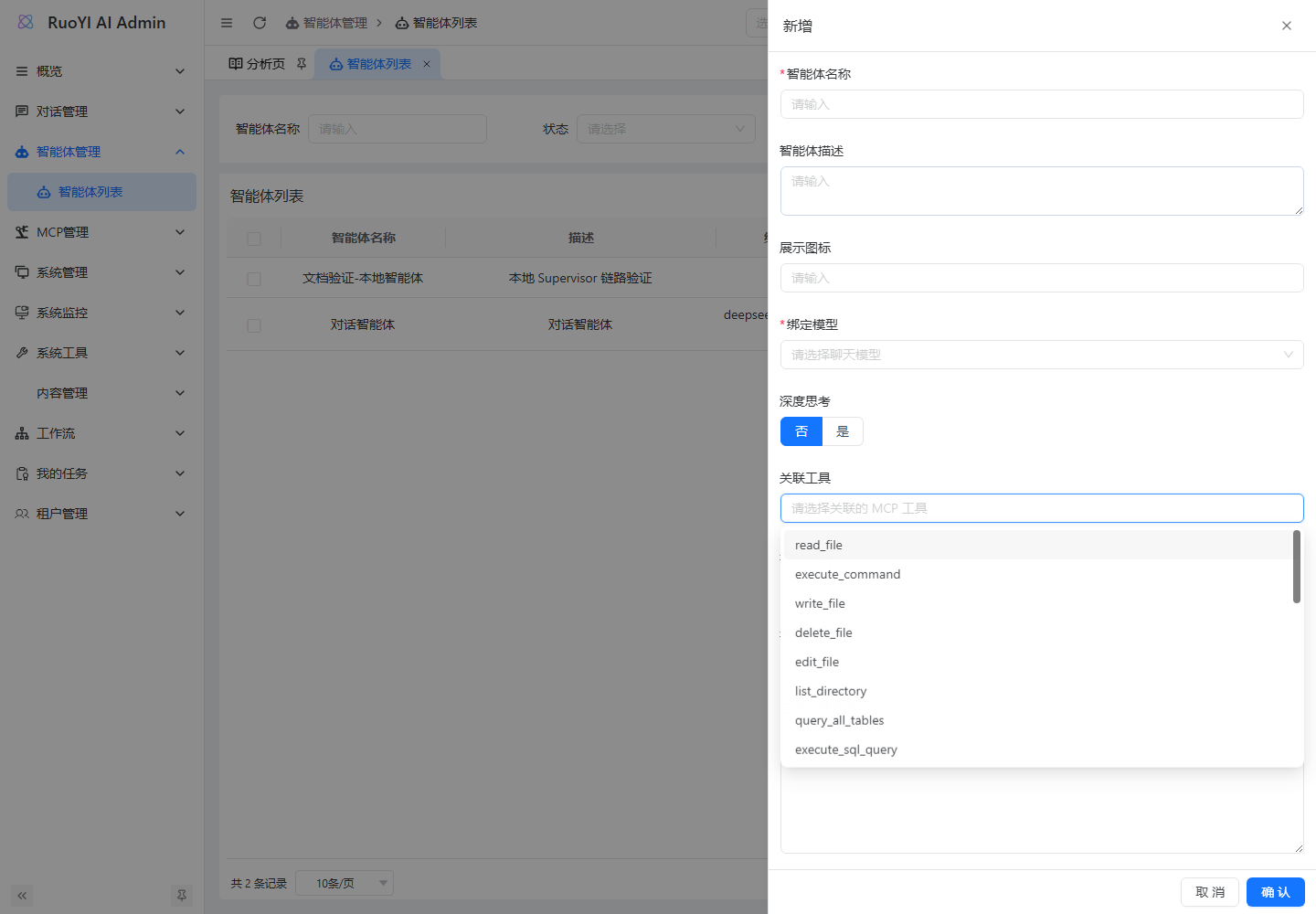
GET /mcp/tool/options returns enabled public metadata for agent forms. It differs from management GET /mcp/tool/all and uses different permissions. Check status, tenant, and form permissions for missing options.
5.2 Saving, connecting, and executing are separate
| Layer | Check | What it proves |
|---|---|---|
| Saved configuration | Row appears | Persistence only. |
| Connection test | data.success | Client construction and initialization path. |
| Discovery/execution | Platform test, protocol client, or server logs | Function exists, arguments work, business result returns. |
| Agent end-to-end | Selected agent, task, actual call, answer | Model, binding, routing, execution, and result feedback work together. |
testMcpTool() constructs toolCount=1 and tools=[record name]; these are not real tools/list results. It does not execute a business tools/call.
5.3 Exclude model guessing
Use your own file marker, sample business data, or controlled webpage, and compare function name, status, timestamp, and result with server/platform execution records.
Do not require frontend event=mcp as acceptance evidence. MyMcpClientListener has conversion logic but is not explicitly registered by current client builders, and its default bean lacks a session ID. Missing SSE alone does not prove no call occurred; see observability.
Agent routing also determines calls
Explicitly associated tools go to WebSearchAgent under Supervisor. Binding does not force every conversation to use them. Business tasks outside the search role may need role/routing changes. Ordinary model chat does not assemble agent mcpToolIds.
See business-tool routing for file/inventory tasks, or start with the webpage example for the existing search-oriented role.
5.4 Verify this conversation with IDE breakpoints
Client breakpoints apply to LOCAL/REMOTE. For BUILTIN, break in its @Tool method; it bypasses DefaultMcpClient.executeTool().
- Debug Java and break where
handleAgentChat()requestsgetToolProvider(). Check targetmcpToolIds. - Break after the tool-service query and in assembly to confirm an enabled record and added client.
- In external dependencies, open
DefaultMcpClient.executeTool(ToolExecutionRequest, InvocationContext)and break inside that overload.listTools()alone is not execution. - Inspect actual function, arguments, and stack, such as the test path or
get_inventorywithsku. - Step to the returned
ToolExecutionResult, compare with source data, then inspect the final answer. Follow exceptions through transport/server layers.
Long breakpoint pauses may time out requests; use a development instance. This proves execution in this RuoYi conversation; another client's success proves only server behavior.
6. Trace the backend source
Paths are relative to ruoyi-ai/ruoyi-modules/ruoyi-chat/src/main/java/org/ruoyi/. Excerpts explain existing code; do not add duplicate copies.
6.1 From management record to model tool
| Order | Class/method | Action |
|---|---|---|
| 1 | controller/mcp/McpToolController | Management requests. |
| 2 | service/mcp/impl/McpToolServiceImpl | Records, built-in protection, write-only settings, refresh. |
| 3 | ChatServiceFacade.handleAgentChat() | Read associated IDs and request a provider. |
| 4 | LangChain4jMcpToolProviderService.getToolProvider() | Deduplicate IDs, query enabled records, retain requested order. |
| 5 | buildToolProvider() | Java tools or created/reused MCP clients. |
| 6 | combineToolProviders() | Combine built-ins and discovered external tools. |
| 7 | WebSearchAgent and LangChain4j | Expose definitions, execute selections, return results. |
ToolProviderFactory has all-enabled wrappers, but current agent chat directly calls the service; it does not automatically inject all tools through that factory.
6.2 How bindings take effect
Core Facade logic:
ToolProvider toolProvider = null;
if (agentVo != null && agentVo.getMcpToolIds() != null
        && !agentVo.getMcpToolIds().isEmpty()) {
    toolProvider = langChain4jMcpToolProviderService
        .getToolProvider(agentVo.getMcpToolIds());
}

var searchAgentBuilder = AgenticServices.agentBuilder(WebSearchAgent.class)
    .chatModel(plannerModel)
    .listener(new MyAgentListener());
if (toolProvider != null) {
    searchAgentBuilder.toolProvider(toolProvider);
}
Adding a tool does not grant it to every agent. Disabled associated records are filtered. This only describes the mcpToolIds path, not other subagents' independently attached Java tools.
6.3 LOCAL and REMOTE construction
createStdioClient() parses command/arguments, handles Windows names, performs a five-second --version precheck, then builds:
McpTransport transport = StdioMcpTransport.builder()
    .command(fullCommand)
    .environment(ChildProcessSecretSanitizer.emptyProviderSecretOverride())
    .logEvents(TRAFFIC_LOGGING_ENABLED)
    .build();
Five seconds applies only to executable availability, not all calls. The check requires startup and timely exit, not a zero exit code.
createRemoteClient() extracts only baseUrl:
String baseUrl = configNode.get("baseUrl").asText();
McpTransport transport = StreamableHttpMcpTransport.builder()
    .url(baseUrl)
    .logRequests(TRAFFIC_LOGGING_ENABLED)
    .build();
Both construct clients as:
return new DefaultMcpClient.Builder()
    .transport(transport)
    .logHandler(SAFE_NO_OP_LOG_HANDLER)
    .build();
Valid JSON alone cannot activate headers, env, transport selectors, or timeouts; parsing and builder wiring are required.
6.4 Cache, failure count, and refresh
| Event | Current behavior |
|---|---|
| First assembly | Create and cache by tool ID in JVM activeClients. |
| Later assembly | Reuse healthy clients outside the pause period. |
| Creation/manual health-check failure | Count failures; three trigger a five-minute pause. |
| Business-function failure | Not uniformly wired into this count. |
| Edit/toggle/delete | refreshClient() removes the cached reference. |
| Test button | checkToolHealth() creates a fresh client, bypassing cache/pause and not adding it to activeClients. |
| Shutdown | cleanup() removes cached references. |
Two limits matter:
- Refresh does not clear failures or
toolDisabledUntil. A successful manual test also leaves an existing pause deadline, so chat may still skip it. Wait or restart the corrected instance. closeClient()currently removes Map references without explicitly calling SDK close. It does not establish subprocess termination or remote-session release. Repeated tests/edits can consume resources; production extensions need proper closing.
State is process-local; changes do not invalidate other replicas automatically.
6.5 Code by concern
| Concern | File |
|---|---|
| Fields and responses | domain/bo/mcp/McpToolBo.java, domain/vo/mcp/McpToolVo.java, domain/dto/mcp/. |
| Management and tests | controller/mcp/McpToolController.java, service/mcp/impl/McpToolServiceImpl.java. |
| Connections/cache/combination | mcp/service/core/LangChain4jMcpToolProviderService.java. |
| Agent routing | service/chat/impl/ChatServiceFacade.java. |
| Built-ins | BuiltinToolRegistry.java, config/mcp/SystemToolInitializer.java. |
| Market | service/mcp/impl/McpMarketServiceImpl.java. |
| Events | observability/MyMcpClientListener.java, LangChain4jObservabilityConfig.java. |
| Child variables | common/process/ChildProcessSecretSanitizer.java. |
See the backend source directory, allowing for local uncommitted changes. Admin forms are under apps/web-antd/src/views/mcp/tool/, APIs under src/api/mcp/tool/ and src/api/agent/agent/.
7. Management APIs and the MCP market
7.1 Tool APIs
These Controller paths may have a deployment/proxy prefix such as /api. Application login/permissions are separate from remote MCP authentication.
| Method and path | Purpose | Permission |
|---|---|---|
GET /mcp/tool/list | Paged management list | mcp:tool:list |
GET /mcp/tool/all | Unpaged, with keyword, type, status | mcp:tool:list |
GET /mcp/tool/options | Enabled agent options | Any agent:agent:list/add/edit |
GET /mcp/tool/{id} | Public details without raw config | mcp:tool:query |
POST /mcp/tool | Add LOCAL/REMOTE | mcp:tool:add |
PUT /mcp/tool | Edit; include id | mcp:tool:edit |
PUT /mcp/tool/{id}/status?status=DISABLED | Toggle external record | mcp:tool:edit |
POST /mcp/tool/{id}/test | Registration/connection check | mcp:tool:test |
DELETE /mcp/tool/{ids} | Delete external records, comma-separated | mcp:tool:remove |
REMOTE creation body:
{
  "name": "company-inventory",
  "description": "公司库存只读 MCP 服务",
  "type": "REMOTE",
  "status": "ENABLED",
  "configJson": "{\"baseUrl\":\"http://127.0.0.1:8001/mcp\"}"
}
API configJson is a string, so inner quotes are escaped. In the UI textbox paste the inner object directly. Creation returns R<Void>; get the ID from the list.
Example test response; outer success differs from data.success:
{
  "code": 200,
  "msg": "操作成功",
  "data": {
    "success": true,
    "message": "MCP工具 [company-inventory] 连接测试成功",
    "toolCount": 1,
    "tools": ["company-inventory"]
  }
}
7.2 The market imports catalogs, not arbitrary webpages
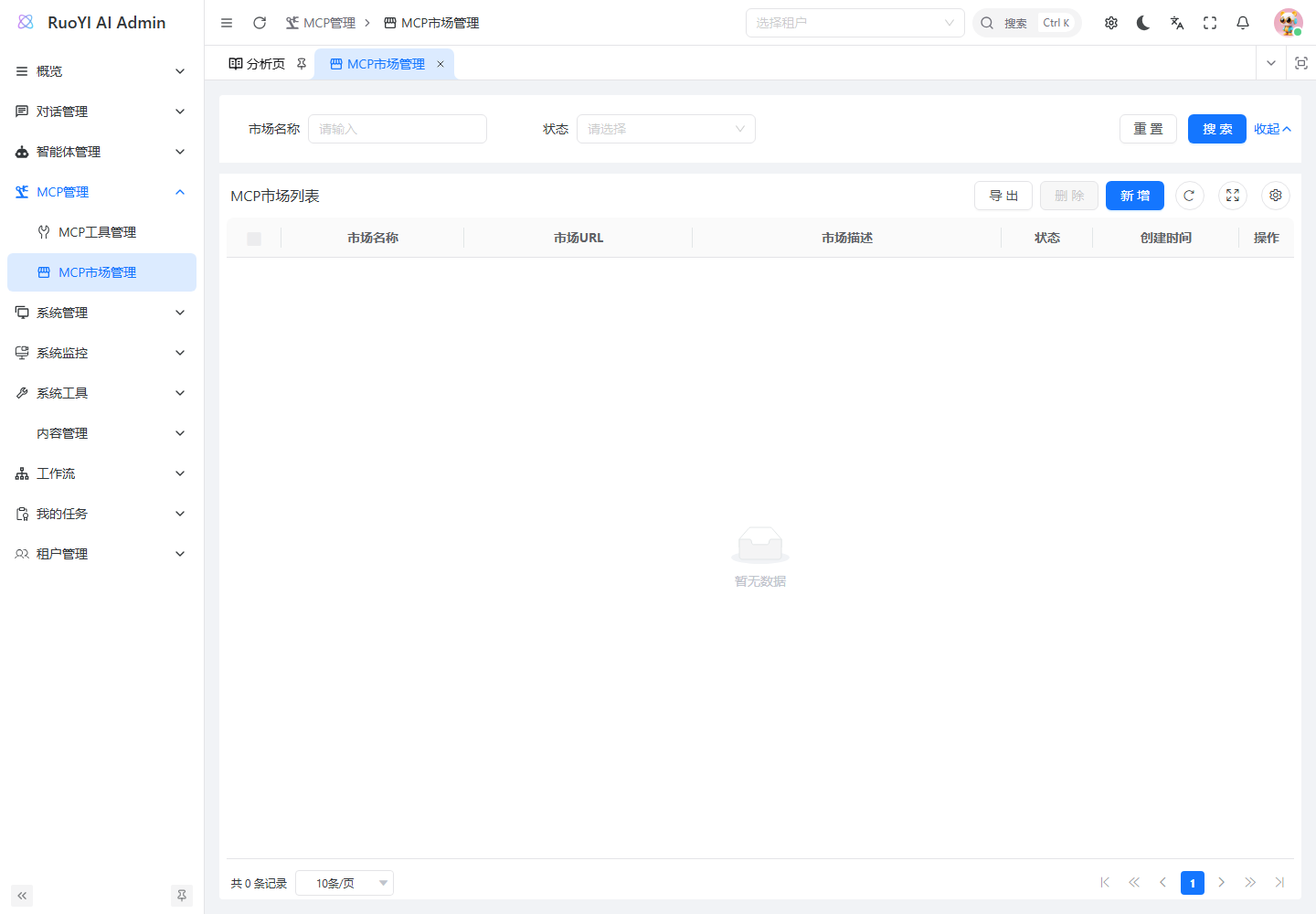
MCP Market Management loads catalog services into mcp_tool. “Load locally” means into this system's management list, not necessarily type LOCAL. It neither deploys the server nor binds an agent.
| Action | Path |
|---|---|
| List/add/edit sources | GET /mcp/market/list, POST /mcp/market, PUT /mcp/market |
| Cached catalog | GET /mcp/market/{marketId}/tools?page=1&size=10 |
| Refresh | POST /mcp/market/{marketId}/refresh |
| Load one | POST /mcp/market/tools/{toolId}/load |
| Batch load | POST /mcp/market/tools/batch-load, array of market-tool IDs |
Distinguish market ID, market-tool ID, and the resulting mcp_tool.id. Agents select the last one.
7.3 Supported catalog JSON
refreshMarketTools() performs an HTTP GET with a 30-second timeout, accepting a top-level array or {"data":[...]}. Example self-hosted catalog:
{
  "data": [
    {
      "name": "company-inventory",
      "description": "库存只读工具",
      "version": "1.0.0",
      "baseUrl": "https://mcp.example.com/mcp"
    },
    {
      "name": "filesystem-demo",
      "description": "演示目录的文件工具",
      "command": "npx",
      "args": ["-y", "@modelcontextprotocol/server-filesystem", "/app/workspace/mcp-demo"]
    }
  ]
}
Replace placeholder remote endpoints with real Streamable HTTP services. The catalog URL must return JSON reachable by Java.
baseUrlorurlcreates REMOTE, normalized tobaseUrl;type=ssedoes not select legacy transport.- Otherwise LOCAL extracts
command,args, andenv, though runtime still ignoresenv. packageornpmPackagereplaces earlier command/arguments withnpx -y package; avoid it when extra directory arguments are needed.
Stored market authConfig is not converted into request headers. Refresh adds/updates by name, without deleting vanished source entries or updating already-loaded tool records. Even a non-array object may report success with zero items; inspect actual counts and content.
7.4 Extend ModelScope catalog synchronization
Use individual connections first. For bulk integration, add a platform adapter or controlled catalog converter outside McpMarketServiceImpl:
- Fetch through official API/SDK with authentication and pagination.
- Extract real connections, distinguishing SSE, Streamable HTTP, and STDIO.
- Convert supported records; obtain user-private URLs/upstream keys at load time where required.
- Retain source IDs, versions, and expiry; define renewal and loaded-record synchronization.
- Apply tenant checks and verify refresh → load → test → bind → call.
This requires development. Do not publish private connection URLs in public catalogs.
8. Develop business tools and MCP servers
8.1 Choose the extension layer
| Goal | Area |
|---|---|
| Simple Java capability | BuiltinToolProvider and @Tool. |
| Share with other MCP clients | Separate LOCAL/REMOTE server. |
| Headers, env, legacy SSE, timeouts | Service parsing and transport builders. |
| Function permissions, tracing, cleanup | Providers, invocation context, client lifecycle. |
8.2 A read-only inventory server
This standalone Python example uses the MCP Python SDK v1 API and fictional in-memory data, without a real database. The SDK is pinned for reproducibility.
Prepare Python 3.10+ in D:/mcp/inventory-demo on the backend host:
New-Item -ItemType Directory -Force D:/mcp/inventory-demo
Set-Location D:/mcp/inventory-demo
python -m venv .venv
.\.venv\Scripts\python.exe -m pip install "mcp==1.30.0"
Create server.py:
import argparse
import logging
import sys

from mcp.server.fastmcp import FastMCP

logging.basicConfig(stream=sys.stderr, level=logging.INFO)
logger = logging.getLogger("inventory-demo")

mcp = FastMCP("inventory-demo", host="127.0.0.1", port=8001)
INVENTORY = {"DEMO-001": 12, "DEMO-002": 0}


@mcp.tool()
def get_inventory(sku: str) -> dict:
    """按商品编码查询演示库存,例如 DEMO-001;只读,不下单、不扣库存。"""
    normalized_sku = sku.strip().upper()
    if not normalized_sku:
        raise ValueError("sku 不能为空")

    found = normalized_sku in INVENTORY
    logger.info("inventory_lookup completed found=%s", found)
    return {
        "sku": normalized_sku,
        "found": found,
        "available": INVENTORY.get(normalized_sku),
        "source": "demo-data",
    }


if __name__ == "__main__":
    parser = argparse.ArgumentParser()
    parser.add_argument(
        "--transport", choices=["stdio", "streamable-http"], default="stdio"
    )
    args = parser.parse_args()
    mcp.run(transport=args.transport)
@mcp.tool() exposes functions, type hints define parameters, and docstrings describe use. Results return to the client; logs use stderr.
The source example was verified with SDK 1.30.0 clients over STDIO and Streamable HTTP for initialization, discovery, normal/zero inventory, unknown products, and empty/missing/wrong-type arguments. Your model account and agent routing still need verification.
8.3 Connect the server with LOCAL
Add LOCAL inventory-demo:
{
  "command": "D:/mcp/inventory-demo/.venv/Scripts/python.exe",
  "args": ["D:/mcp/inventory-demo/server.py"]
}
The virtual-environment Python path ensures the correct SDK installation. Java launches the server; no manual instance is needed.
Save, test, bind, and ask get_inventory for DEMO-001, including its source. Expect found=true, available=12, source=demo-data. DEMO-002 has zero stock; unknown codes return found=false, available=null, which is different from zero.
If Supervisor routes this to SQL instead, apply routing changes, rebuild, and retest. This is not a standalone management-page option.
8.4 Verify through REMOTE
Start the same code as an HTTP service:
Set-Location D:/mcp/inventory-demo
.\.venv\Scripts\python.exe server.py --transport streamable-http
Leave it running and create a separate REMOTE record:
{
  "baseUrl": "http://127.0.0.1:8001/mcp"
}
Bind it and repeat the inventory check. Avoid binding both versions simultaneously because they expose the same function names.
The example listens on 127.0.0.1 and assumes Java shares its network environment. For containers or other hosts, deploy a controlled reachable endpoint with authentication and TLS.
For real business use, replace the in-memory lookup while retaining validation and error semantics. Resolve tenant/user identity from trusted context, not model-provided IDs. Writes also need idempotency and explicit execution authorization.
8.5 Add a Java built-in
For an in-process capability, add mcp/tools/InventoryDemoTool.java:
package org.ruoyi.mcp.tools;

import dev.langchain4j.agent.tool.P;
import dev.langchain4j.agent.tool.Tool;
import org.ruoyi.mcp.service.core.BuiltinToolProvider;
import org.springframework.stereotype.Component;

@Component
public class InventoryDemoTool implements BuiltinToolProvider {
    @Override
    public String getToolName() {
        return "inventory_demo";
    }

    @Override
    public String getDisplayName() {
        return "演示库存查询";
    }

    @Override
    public String getDescription() {
        return "查询虚构的演示商品库存";
    }

    @Tool(name = "inventory_demo", value = "按商品编码查询演示库存;只读,不下单")
    public String query(@P("商品编码,例如 DEMO-001") String sku) {
        if (sku == null || sku.isBlank()) {
            return "错误:sku 不能为空";
        }
        if ("DEMO-001".equalsIgnoreCase(sku.trim())) {
            return "演示商品 DEMO-001 的可用库存为 12,数据来源 demo-data";
        }
        return "未找到该演示商品,不代表库存为 0";
    }
}
Rebuild/restart for registry discovery and initializer synchronization, then test registration and actual agent execution. Do not fabricate BUILTIN rows through management APIs, which reject them.
The registry stores classes and creates objects with getDeclaredConstructor().newInstance(). Keep a no-argument constructor; injected fields or constructors are not automatically available on runtime objects. Adjust instance provisioning or use the existing dependency-access approach and verify proxies, transactions, and context.
getToolName() is the registry name; @Tool(name=...) is the model function name. This example aligns them. Generated database descriptions are currently empty, so model-facing detail belongs in @Tool / @P.
8.6 Route file and inventory tasks to the right subagent
WebSearchAgent currently describes browser/search duties, with prompts referring to Bing, crawling, and Playwright. An assembled inventory function may never be dispatched to it.
For a minimal development-only file/inventory check, adjust the shared role as follows. Products needing distinct duties should add a dedicated business agent instead.
Retain
WebSearchAgent's interface, method, and parameters. Update its system prompt to require using provided tools for explicit webpage, file, and demo-inventory requests; use actual names and schemas, get results before answering, report missing/failed tools, and avoid writes for read-only tasks. Update its@Agentdescription to include file reads andget_inventory/inventory_demo, keeping@UserMessage("")andsearch(@V("query") String query).java@SystemMessage(""" 你负责使用当前提供的工具完成用户明确要求的网页、文件和演示库存查询。 只使用本次提供的真实函数名和参数,不假设固定存在某个工具。 文件任务使用文件工具;演示库存使用 get_inventory 或 inventory_demo。 必须先取得工具返回结果再回答;工具缺失或失败时说明情况,不编造结果。 只读请求不能执行写入、删除或命令操作。 """) // 保留原来的 @UserMessage("{{query}}")。 @Agent("工具助手:处理网页查询、文件读取和使用 get_inventory 或 inventory_demo 的演示库存查询") // 保留原来的 String search(@V("query") String query)。Extend
handleAgentChat()'s.supervisorContext(...)so greetings usechitChatAgent, while webpage/file/explicit demo-inventory requests go toWebSearchAgent. State that demo inventory uses MCP/built-ins rather than SQL.java.supervisorContext( "仅问候或简单闲聊时使用 chitChatAgent;其他请求使用对应专业 Agent。" + "网页查询、文件读取,以及明确调用 get_inventory 或 inventory_demo 的请求," + "交给工具助手 WebSearchAgent。演示库存由 MCP/内置工具查询,不转为 SQL 查询。")Retain ID-based assembly, rebuild, bind only the target connection, and verify the execution breakpoint with an explicit function request.
These changes control dispatch and tool selection, not permissions or installation. A production business agent should use a filtered provider and be added to .subAgents(...), rather than sharing every connection with every role.
8.7 Extend headers, environment, transport, and timeouts
These require code changes:
| Need | Location | Implementation |
|---|---|---|
| Bearer/custom headers | createRemoteClient() | Define fields, resolve secrets from controlled sources, pass supported SDK headers, retain write-only/log-redaction behavior. |
| LOCAL variables | createStdioClient() | Validate/merge allowed env, then retain sensitive-variable filtering. |
| Legacy SSE | createMcpClient() / remote builder | Explicit transport selection, not URL suffix changes. |
| Timeouts | Transport/client builders | Separate connection/read/execution limits using actual pinned-SDK APIs. |
| Function allowlists | Provider combination/discovery | Filter by server/function and handle name conflicts. |
| Refresh/recovery | Refresh/health checks | Close clients and tests, clear failure state appropriately, handle replicas. |
Cover valid connections, auth failures, updates, disabled status, timeouts, and resource cleanup. Per-user credentials also require redesigned cache keys and isolation. Check the pinned SDK and LangChain4j MCP guide.
8.8 Observability, Resources, and Prompts
MyMcpClientListener callbacks construct event="mcp" with name, status, and result, but currently send status only with result=null. Protocol/server log forwarding is disabled.
Register the listener explicitly and route events using correct invocation context. Do not bind one user's session ID permanently to a shared tool-ID-cached client. Trace names, status, duration, and IDs; redact arguments/results as appropriate.
Resources/Prompts also need selection, reading, parameter entry, model injection, permissions, and audit flows. Listener callbacks alone do not implement them.
9. Troubleshooting
Check configuration → backend process/network → MCP connection → execution → agent routing.
| Symptom | Check and action |
|---|---|
| Save succeeds, test fails | Valid JSON may lack command / baseUrl; use the full configuration. |
| Empty edit box | Write-only: empty retains, complete JSON replaces. |
| Command unavailable | Backend account/PATH and five-second --version exit. |
Missing node.cmd / uv.cmd | Use the actual .exe absolute path. |
| LOCAL exits immediately | Package, arguments, path, variables; run manually and inspect stderr. |
| JSON-RPC parse error | Move stdout diagnostics to stderr; use a standard SDK. |
| REMOTE 404 / 405 | Wrong endpoint, REST URL, or legacy transport; copy the actual protocol URL. |
| REMOTE 401 / 403 | Expiry, auth headers, permissions; current JSON headers are not passed. |
| Browser works, Java cannot connect | Backend DNS, TLS trust, proxy, and container networking. |
| ModelScope stops working later | Connection expiry, service state, quota; replace the full URL. |
| JSON env but missing key | Runtime ignores it or sanitizer masks it; use controlled launch settings/extension. |
| HTTP 200 but test fails | Inspect data.success / data.message. |
| One reported tool but many functions | Test count is fixed; use real discovery. |
| Test passes, chat skips | Binding, status, tenant, request instance, five-minute pause. |
| Answers without tools | Agent selection, model support, and subagent routing. |
| No MCP SSE | Listener not attached; inspect server execution evidence. |
| Old address after editing | Pause state or replica caches; update the serving instance. |
| More subprocesses after repeated tests | Missing explicit client cleanup; implement lifecycle release. |
| Market refresh empty/fails | Supply compatible top-level/data-array JSON, not a webpage. |
| Market changes do not update tools | Refresh only updates catalog metadata; edit loaded records or implement sync. |
Retain a reproducible template with pinned dependencies, test input, and expected results, using credential placeholders. Reuse these checks for subsequent services.